

- Introduction
- What We Will Cover
- vSAN Component Hardening
- vSAN Compliance & Regulatory Frameworks
- vSAN Configuration Deployment & Enforcement
- Operationalizing vSAN Security: Monitoring & Audit Event Management
- VCF 9.0 Security Resources Compliance Journey
- Conclusion
Introduction
For Security Architects/Platform Engineer,, vSAN provides the software-defined storage layer critical to VMware Cloud Foundation (VCF) 9.0. Securing your vSAN environment is essential for protecting data confidentiality, integrity, and availability within your Software-Defined Data Center (SDDC). This guide details specific technical hardening controls for vSAN within VCF 9.0, their alignment with key regulatory frameworks, and operational security practices.
What We Will Cover
- Part 1: VCF 9.0 Management Plane Security: Hardening & Regulatory Compliance: We will explore securing the hypervisor (ESXi), central management (vCenter Server), the SDDC Manager, and the underlying virtual machines that host these critical management components. This section will include detailed technical controls, how they contribute to viewing and configuring compliance, monitoring security operations, and viewing and configuring audit events, all mapped to compliance frameworks like FISMA/NIST, PCI DSS,DISA STIG and HIPAA.
https://puneetsharma.blog/2025/11/04/part-1-vcf-9-0-management-plane-security-hardening-regulatory-compliance/ - Part 2: NSX Security Hardening & Regulatory Compliance: This section will focus on leveraging NSX Data Center for network virtualization and security, covering NSX Manager, logical routing, and micro-segmentation controls crucial for regulatory adherence.
https://puneetsharma.blog/2025/11/27/part-2-vcf-9-0-nsx-security-hardening-regulatory-compliance/ - Part 3: vSAN Security Hardening & Regulatory Compliance: We will delve into protecting your software-defined storage, detailing vSAN data-at-rest and in-transit encryption, access controls, and how these features contribute to data integrity and confidentiality requirements. https://puneetsharma.blog/2025/12/27/part-3-vsan-security-hardening-regulatory-compliance/
vSAN Component Hardening
Effective vSAN hardening focuses on data protection and storage management controls.
- Data-at-Rest Protection
| vsan-9.encryption-rest (vSAN Data-at-Rest Encryption – D@RE): | Enable vSAN D@RE for all workload domains. This encrypts all data stored on vSAN disk groups or storage pools. |
| Integrate vSAN with an external Key Management System (KMS) that supports KMIP 1.1 or 1.2 to securely manage and store encryption keys. This ensures separation of keys from data. |
- Data-in-Transit Protection
| vsan-9.encryption-transit-osa / vsan-9.encryption-transit-esa (vSAN Data-in-Transit Encryption) | Enable data-in-transit encryption for vSAN storage traffic. For vSAN Original Storage Architecture (OSA), this is configurable. For vSAN Express Storage Architecture (ESA), this is enabled by default when D@RE is active. This protects data as it moves between ESXi hosts in the vSAN cluster. |
| esx-9.nfs-encryption (NFS Encryption) | If using NFS datastores with ESX, enable data-in-transit encryption using Kerberos (krb5p) mount options for NFS v4.1, especially when hosts are joined to Active Directory. |
| esx-9.iscsi-mutual-chap (iSCSI Mutual CHAP) | If ESXi hosts utilize iSCSI storage, enable bidirectional/mutual CHAP authentication for iSCSI traffic. |
| vsan-9.iscsi-mutual-chap (vSAN iSCSI Target Mutual CHAP) | If utilizing the vSAN iSCSI Target service, enable bidirectional/mutual CHAP authentication. |
- Storage Access and Management
| vsan-9.file-services-access-control-nfs (vSAN File Services NFS Access Control | If vSAN File Services are deployed, configure NFS file shares with restrictive “Customize net access” options, allowing access only from authorized IP ranges. |
| vsan-9.file-services-authentication-smb (vSAN File Services SMB Authentication): | If vSAN File Services are deployed for SMB, ensure the “Protocol Encryption” option is enabled for SMB file shares. |
| vsan-9.managed-disk-claim (Managed Disk Claim) | Disable automatic disk claiming by vSAN. Disks should be claimed manually or with temporary enablement of the feature to ensure intentional disk assignment. |
| vsan-9.force-provisioning (Force Provisioning) | Disable “Force Provisioning” in vSAN storage policies. Objects should only be provisioned if storage policy requirements (e.g., FTT, disk stripes) can be met, preventing policy violations. |
| vsan-9.operations-reserve (Operations Reserve) | Enable vSAN Operations Reserve capacity to ensure sufficient free space for internal maintenance, preventing availability issues. |
| vsan-9.network-isolation-vsan-iscsi-target / vsan-9.network-isolation-vsan-max (vSAN Network Isolation) | Isolate vSAN iSCSI Target and vSAN Max storage network traffic onto dedicated VMkernel network interfaces and network segments (VLANs), employing separate perimeter controls if data-in-transit encryption is not fully utilized or to provide defense-in-depth. |
| vsan-9.object-checksum (Object Checksum) | Ensure object checksums are enabled (default for vSAN ESA, configurable for OSA) to protect data integrity. |
vSAN Compliance & Regulatory Frameworks
vSAN’s data protection features are directly relevant for various compliance mandates.
- Data Encryption (D@RE, In-Transit): vSAN D@RE and data-in-transit encryption are crucial for:
- PCI DSS Requirement 3.4 (Render account data unreadable wherever it is stored on electronic media): By encrypting cardholder data at rest on vSAN datastores.
- HIPAA Section 164.312(a)(2)(iv) (Encryption and Decryption – Implementation Specification): By providing a technical mechanism to encrypt electronic Protected Health Information (ePHI) at rest and in transit.
- GDPR Article 32 (Security of processing): By contributing to the pseudonymisation and encryption of personal data to ensure an appropriate level of security against unauthorized access or disclosure.
- NIST SP 800-53 SC-8 (Transmission Confidentiality and Integrity): Protecting data moving across the network.
- Data Integrity (Object Checksum):
- NIST SP 800-53 SI-1 (System and Information Integrity Policy and Procedures): By verifying data integrity at the storage layer.
- Access Controls (File Services, iSCSI CHAP): Controls like restricted NFS/SMB access and iSCSI mutual CHAP support:
- NIST SP 800-53 AC-3 (Access Enforcement): Ensuring only authorized entities can access storage resources.
- ISO 27001 A.9.2.1 (User Access Management): Securing access to shared storage.
Note: VCF provides the technical means for compliance; actual compliance depends on proper implementation, operational adherence to policies, and comprehensive documentation tailored to your organization’s specific requirements.
vSAN Configuration Deployment & Enforcement
In a VCF 9.0 environment, the implementation and ongoing management of vSAN security baselines are systematically conducted through the use of automated policy engines and lifecycle management tools. Hardened configurations, developed in accordance with the VMware vSAN Configuration Guide (VVCG) and the best practices established for VCF, are applied through various mechanisms associated with VCF and vSAN.
Capture 1: –
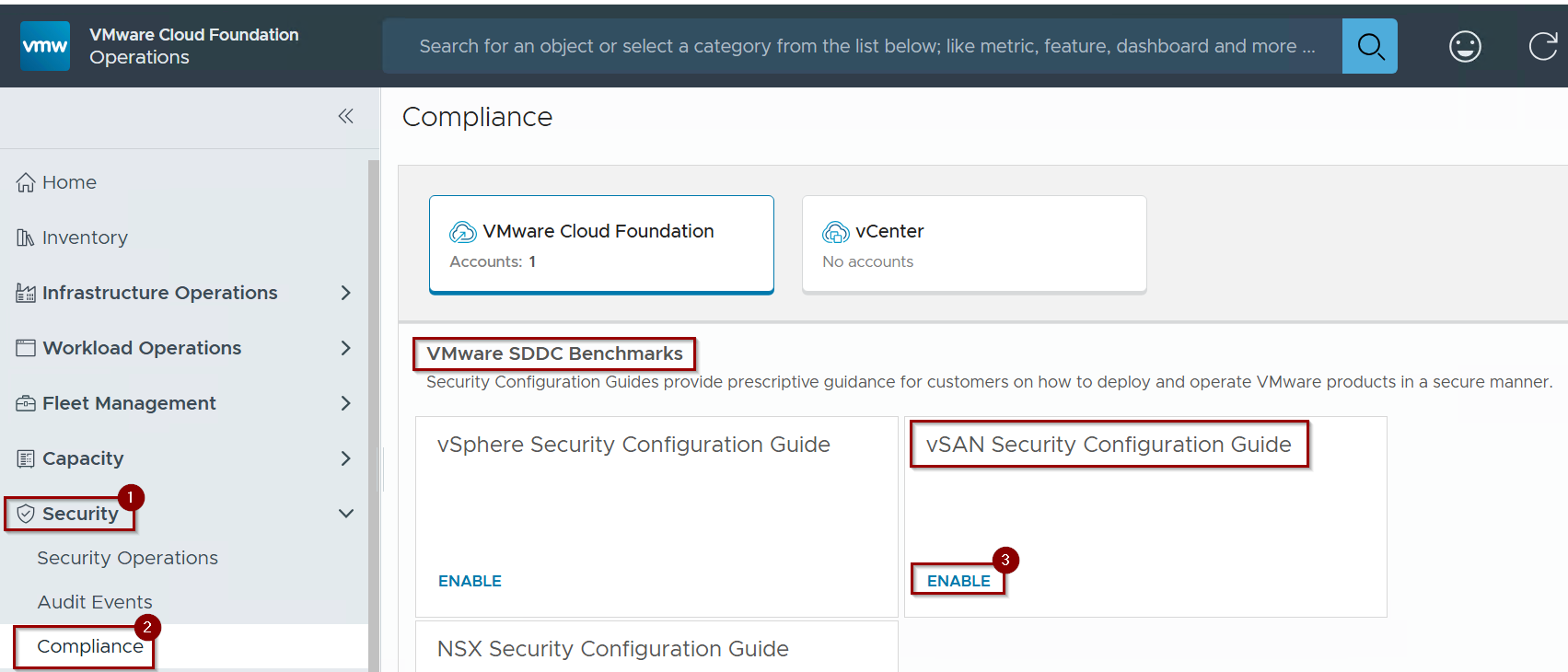
Step 1: – Click on Security.
Step 2: – Click on Compliance.
Step 3: – Click on Enable under NSX Security Configuration Guide.
Capture 2: –
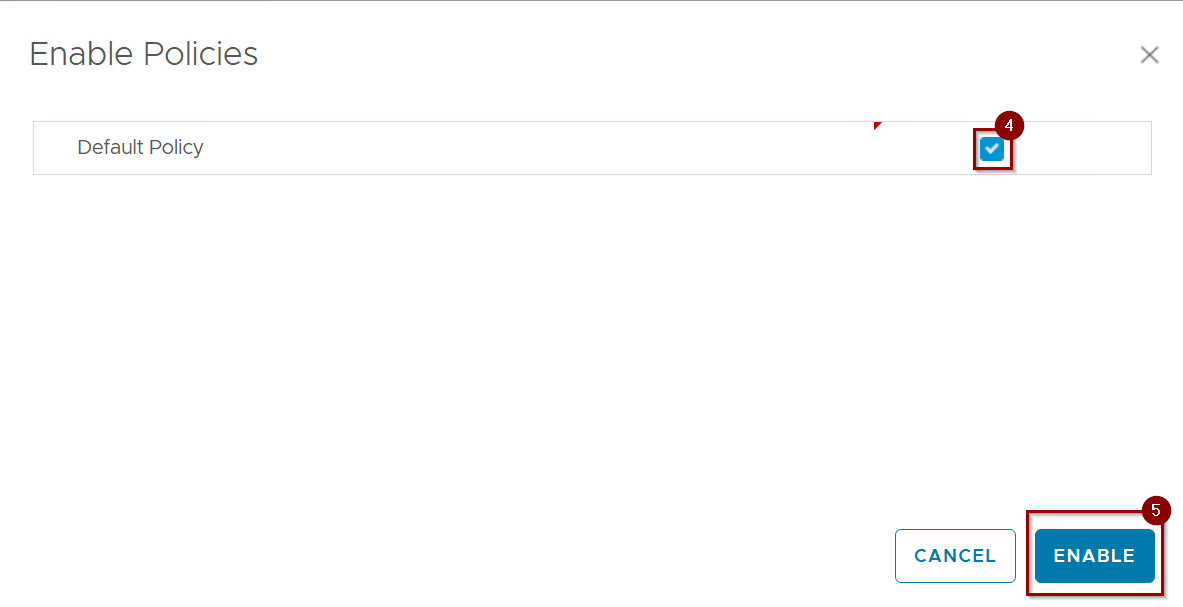
Step 4: – Select the default Policy.
Note: – We can make our own policy instead of default policy go to Infrastructure Operations –> Configurations –> Policy definition.
Step 5: – Click on Enable.
Capture 3: –
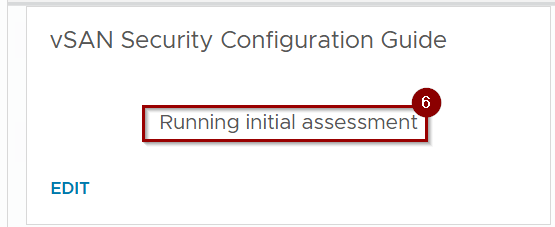
Step 6: – It will start running the initial assessment.
Note: – This process will take the 8 mins in my lab environment and it is dependent on the environment inventory.
Capture 4: –
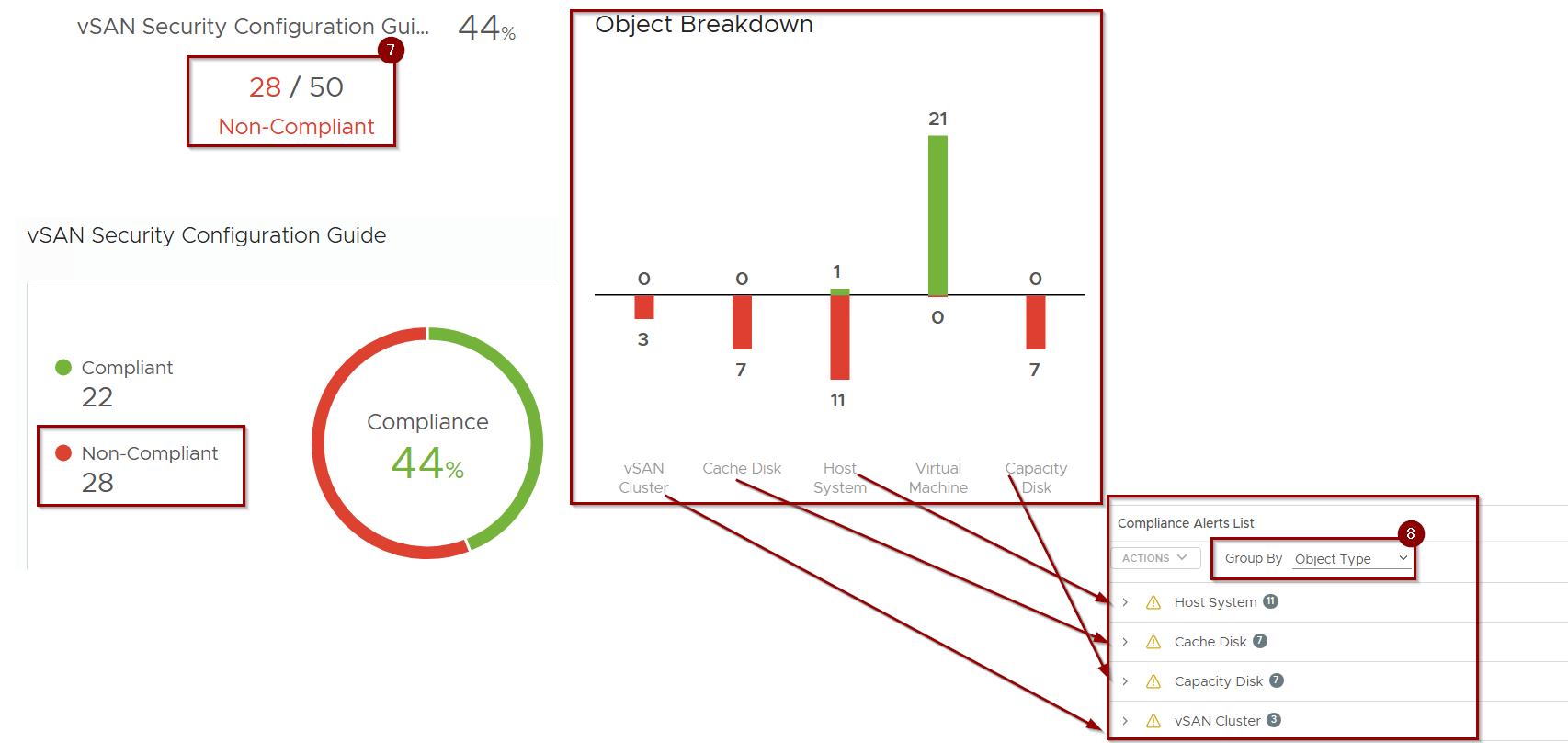
Step 7:- There are 28 Non Compliant Checks.
Note: – These compliance/Non Compliance alerts vary on each environment and i make my lab non complaint just to show the alerts and recommendations.
Step 8: – Group by i selected Object Type.
Capture 5: –
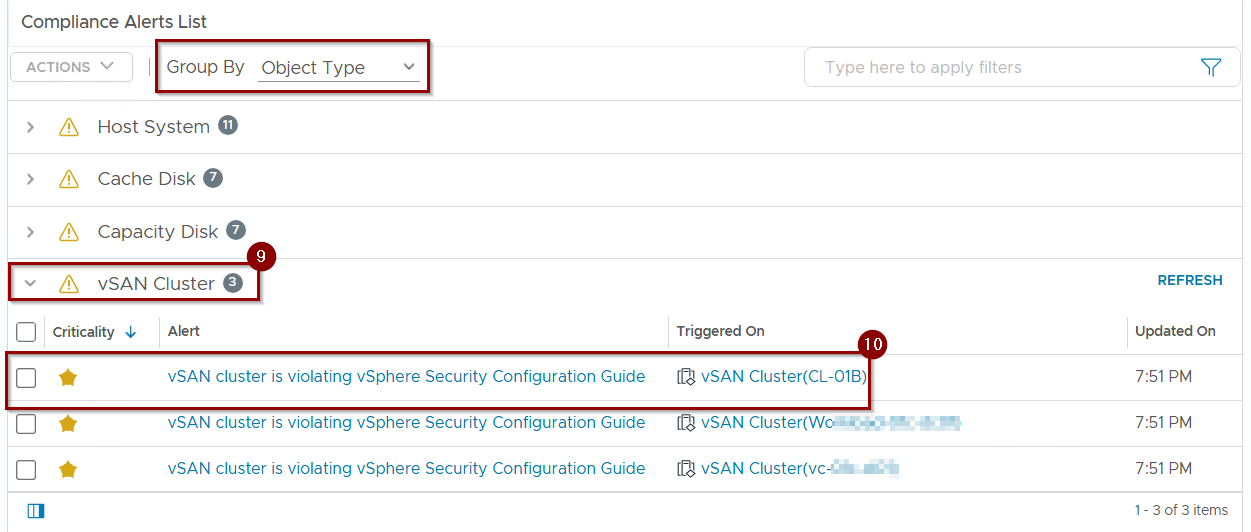
Let’s go with a vSAN Cluster example and try to find out why vSAN Cluster is in violation state and what best practices are missing .
9. Expand the vSAN Cluster .
10. Select the vSAN Cluster is violating vSphere Security Configuration Guide.
Note: – This is just an example to see the vSAN Cluster non complaint alerts.
Capture 6: –
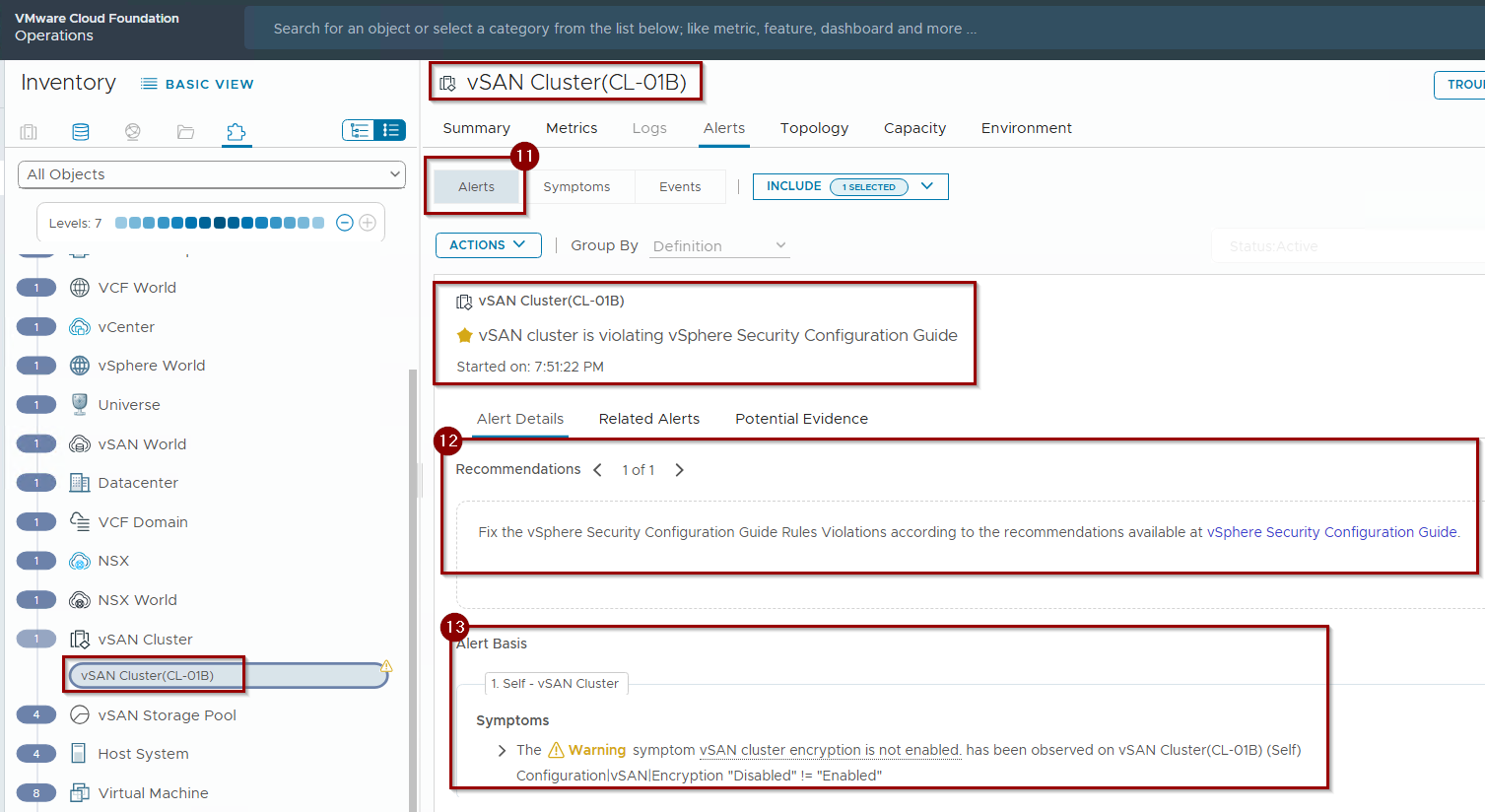
11. click on Alerts.
12. We can see the recommendations mentioned to fix the vsphere security configuration guide rule violation.
13. In the alert basis we can see the vSAN cluster encryption is not enabled.(Configuration|vSAN|Encryption “Disabled” != “Enabled”).
The vSphere Security Configuration Guide is a comprehensive document provided by VMware by Broadcom that offers guidance and best practices for securing VSAN vSphere 8 Security Configuration Guide and vSAN Security Configuration Guide
Operationalizing vSAN Security: Monitoring & Audit Event Management
Continuous monitoring and robust audit event management are crucial for maintaining vSAN security and compliance.
Monitoring Security Operations
| vSAN Health Checks | Regularly monitor vSAN Health checks within vCenter Server. While primarily for availability, issues detected can indicate underlying problems that might impact data integrity or availability, which are security concerns. |
| Performance Monitoring | Monitor vSAN performance metrics (latency, IOPS, throughput) for anomalies that could indicate malicious activity, resource exhaustion, or storage attacks. |
| vCenter Server Events | Monitor vCenter events related to vSAN (e.g., changes to vSAN configuration, disk group operations, policy modifications) for unauthorized activity. |
Viewing & Configuring Audit Events
| Centralized Syslog and SIEM | vSAN-related events from vCenter Server and ESXi hosts must be sent to an external, tamper-proof SIEM. |
| Audit Event Analysis | Utilize SIEM dashboards and queries to correlate vSAN events. Track changes to vSAN encryption status, storage policies, or disk group configurations. Monitor for vsan-9.force-provisioning events indicating policy bypass. |
VCF 9.0 Security Resources Compliance Journey
To support your ongoing compliance journey, this series includes a Summary Index for easy navigation and a Checklist for Auditors to assist in technical validation and evidence collection.
Summary Index: VCF 9.0 Hardening & Compliance Series
| Part | Topic | Key Focus Areas |
| Part 1 | Management Plane Security | Securing the “brain” of VCF (SDDC Manager, vCenter, ESXi, and Management VMs). Focuses on Identity (IAM), FIPS mode, and UEFI Secure Boot. |
| Part 2 | Network Security (NSX) | Implementing Zero Trust via Micro-segmentation. Focuses on Distributed Firewall (DFW), uRPF strict mode, and API security. |
| Part 3 | Storage Security (vSAN) | Protecting data at rest and in transit. Focuses on vSAN D@RE, KMS/Key Provider management, and Object Checksum integrity. |
| Series Core | Operationalized Security | Moving from static hardening to continuous monitoring using VCF Operations (Aria) for drift detection and audit logging. |
Checklist for Auditors: VCF 9.0 Compliance
This checklist is designed to help auditors verify that the VCF 9.0 environment meets common regulatory standards like FISMA, DISA STIG, and PCI DSS.
| Domain | Control ID / Requirement | Technical Verification Step |
| Management | Account Lockout Policy | Verify Security.AccountUnlockTime=900 and Security.AccountLockFailures=5 on all ESXi hosts and vCenter SSO. |
| Management | Hardware Root of Trust | Confirm TPM 2.0 is installed and UEFI Secure Boot is enabled in host firmware. |
| Management | FIPS Cryptography | Validate that FIPS-validated cryptography is enabled via Invoke-SetSystemGlobalFips. |
| Management | Shell/SSH Access | Confirm TSM (ESXi Shell) and TSM-SSH services are set to Off. |
| Network | Micro-segmentation | Review NSX Distributed Firewall (DFW) for “Least Privilege” (Zero Trust) traffic rules. |
| Network | IP Spoofing Mitigation | Verify uRPF is set to Strict mode on all Tier-0 and Tier-1 Gateways. |
| Network | Management Isolation | Confirm SDDC Manager and vCenter are isolated on dedicated, restricted logical segments. |
| Storage | Data-at-Rest (D@RE) | Verify vsan-9.encryption-rest is enabled on all production workload domains. |
| Storage | Data-in-Transit | Confirm vMotion Encryption and vSAN Transit Encryption are set to Required. |
| Storage | Storage Integrity | Verify Object Checksum is enabled in the assigned Storage Policy (SPBM). |
| Operations | Audit Trail Integrity | Confirm all logs are forwarded to a central, tamper-proof SIEM. |
| Operations | Patching & LCM | Verify all components align with the VCF-validated Bill of Materials (BOM) via SDDC Manager. |
Conclusion
Securing the vSAN layer in VCF 9.0 is paramount for protecting sensitive data. By rigorously applying technical hardening controls for data encryption, access management, and integrity, and by integrating comprehensive monitoring and audit practices, Security Architects/Platform Engineer, can establish a robust software-defined storage security posture. This ensures data confidentiality, integrity, and continuous alignment with regulatory compliance mandates.
 Puneet Sharma
Leave a comment