

- Introduction
- Series Agenda: Why a 5-Part Deep Dive?
- The Architecture of Placement Orchestration
- DRS vs. VCF Workload Placement
- Enabling Workload Placement in VCF 9.0
- Operational Boundaries and Prerequisites
- Conclusion
Introduction
In a modern Software-Defined Data Center (SDDC), efficient workload distribution is critical to maintaining both application performance and infrastructure health. VMware Cloud Foundation (VCF) Workload Placement provides an intelligent orchestration layer that works alongside core vSphere features to automate rebalancing compute and storage resources across the environment. This first part explores the architectural foundations and the underlying logic that allow VCF Operations to optimize resource delivery.
Series Agenda: Why a 5-Part Deep Dive?
Workload Placement is one of the most powerful yet misunderstood features within VMware Cloud Foundation. While many administrators are familiar with host-level balancing, VCF introduces a macro-optimization layer that fundamentally changes how resources are managed across the entire data center.
We have broken this topic into five parts to move from the conceptual architecture to specific intent configurations, and finally to operational automation and lifecycle rightsizing. This ensures that administrators can build a foundational understanding before diving into the complex logic that drives a self-driving private cloud.
Series Summary
- Part 1 (Current): Understanding the integration between VCF Operations and vSphere DRS.
https://puneetsharma.blog/2026/01/03/part-1-architecture-and-logic-of-vcf-9-0-workload-placement/ - Part 2: Defining VCF 9.0 Operational Intent for Capacity Management
Mastering Operational Intents to prioritize performance balancing versus hardware consolidation.
https://puneetsharma.blog/2026/01/15/part-2-defining-vcf-9-0-operational-intent-for-capacity-management/ - Part 3: Enforcing VCF 9.0 Governance through Business Intents
Utilizing Business Intents and Tagging for automated license enforcement and compliance.
https://puneetsharma.blog/2026/02/20/part-3-enforcing-vcf-9-0-governance-through-business-intents/ - Part 4: The VCF 9.0 Execution Cycle: Analyzing and Implementing Optimization
Managing the Action-Recommendation Loop via manual, scheduled, and automated execution modes.
https://puneetsharma.blog/2026/03/03/part-4-the-vcf-9-0-execution-cycle-analyzing-and-implementing-optimization/ - Part 5: VCF 9.0 VM Lifecycle Optimization: Rightsizing Strategies
Precision resource management through Rightsizing oversized and undersized VMs.
https://puneetsharma.blog/2026/03/16/part-5-vcf-9-0-vm-lifecycle-optimization-rightsizing-strategies/
The Architecture of Placement Orchestration
Integrated Engine Logic
The architecture relies on a collaborative relationship between VCF Operations and the vSphere hypervisor:
- Cluster-Level Balancing: VCF Operations monitors and manages workload distribution across different clusters within a data center.
- Host-Level Balancing: Within individual clusters, vSphere DRS continues to handle the placement of VMs across physical hosts.
- Predictive Optimization: The logic utilizes real-time predictive analytics to look two hours ahead, ensuring that workload moves are stable and won’t require immediate re-migration.
DRS vs. VCF Workload Placement
While both features aim to optimize resources, they operate at different architectural layers and solve distinct problems:
| Feature | vSphere Distributed Resource Scheduler (DRS) | VCF Workload Placement |
| Optimization Scope | Micro-optimization: Operates strictly WITHIN a single cluster. | Macro-optimization: Operates BETWEEN multiple clusters across the data center. |
| Primary Goal | Balancing host utilization within a cluster to prevent hotspots. | Orchestrating multi-cluster distribution based on operational and business intent. |
| Logic Basis | Host load deviation or individual VM “Happiness”. | Predictive analytics (2-hour look-ahead) and data-center-wide utilization. |
| Constraint Action | DRS becomes “stuck” if the entire cluster is over-utilized. | Moves VMs from a “hot” cluster to a “cool” cluster to resolve cluster-wide over-utilization. |
Enabling Workload Placement in VCF 9.0
Successful activation of the multi-cluster optimization layer requires a systematic configuration of the underlying vSphere infrastructure and the VCF Operations orchestration plane.
Infrastructure-Level Prerequisites
The placement engine operates as an abstraction over cluster-level services. For the engine to execute migrations, the following must be true at the vCenter layer:
- Automation Level: All participating vSphere clusters must have Distributed Resource Scheduler (DRS) enabled and the automation level set to Fully Automated.
- vMotion Compatibility: Hosts across the target clusters must reside within a consistent vMotion TCP/IP stack and have access to shared L2 segments to support cross-cluster virtual machine migration.
- Storage Automation: If the intent includes storage rebalancing, vSphere Storage DRS must be configured on Datastore Clusters with automation set to Fully Automated.
VCF Operations Orchestration Configuration
Once the infrastructure layer is verified, the management plane must be configured to begin data ingestion and analysis:
- Integration and Discovery: Register the vCenter Server instances as integrated accounts within VCF Operations to populate the inventory tree with Data Center, Cluster, and Host objects.
- Policy Assignment: * Navigate to Administration > Policies to identify the active policy applied to the target workload clusters.
- Verify the Demand Model is enabled for capacity calculations, as Workload Placement logic is primarily driven by current resource requirements rather than static allocations.
- Initialization: Access Home > Optimize Performance > Workload Placement to trigger the initial environment assessment.
Operational Execution Path
To identified “Not Optimized” state, the administrator must follow the below captures:
Capture 1: –
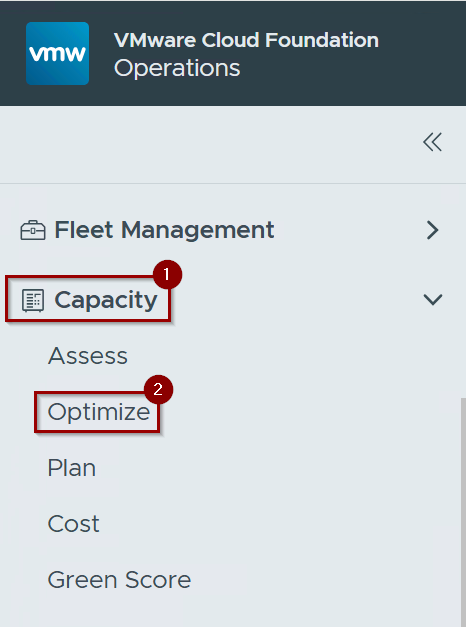
Step 1: – Click on Capacity.
Step 2: – Click on Optimize.
Capture 2: –
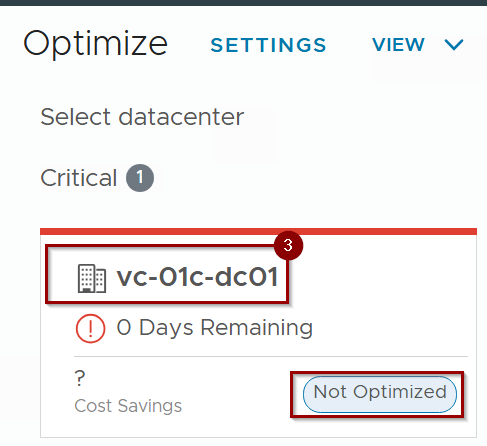
Step 3: – Select the datacenter , which is not optimized. As per capture 3 we are selecting the Datacenter VC-01c-dc01.
Capture 3: –
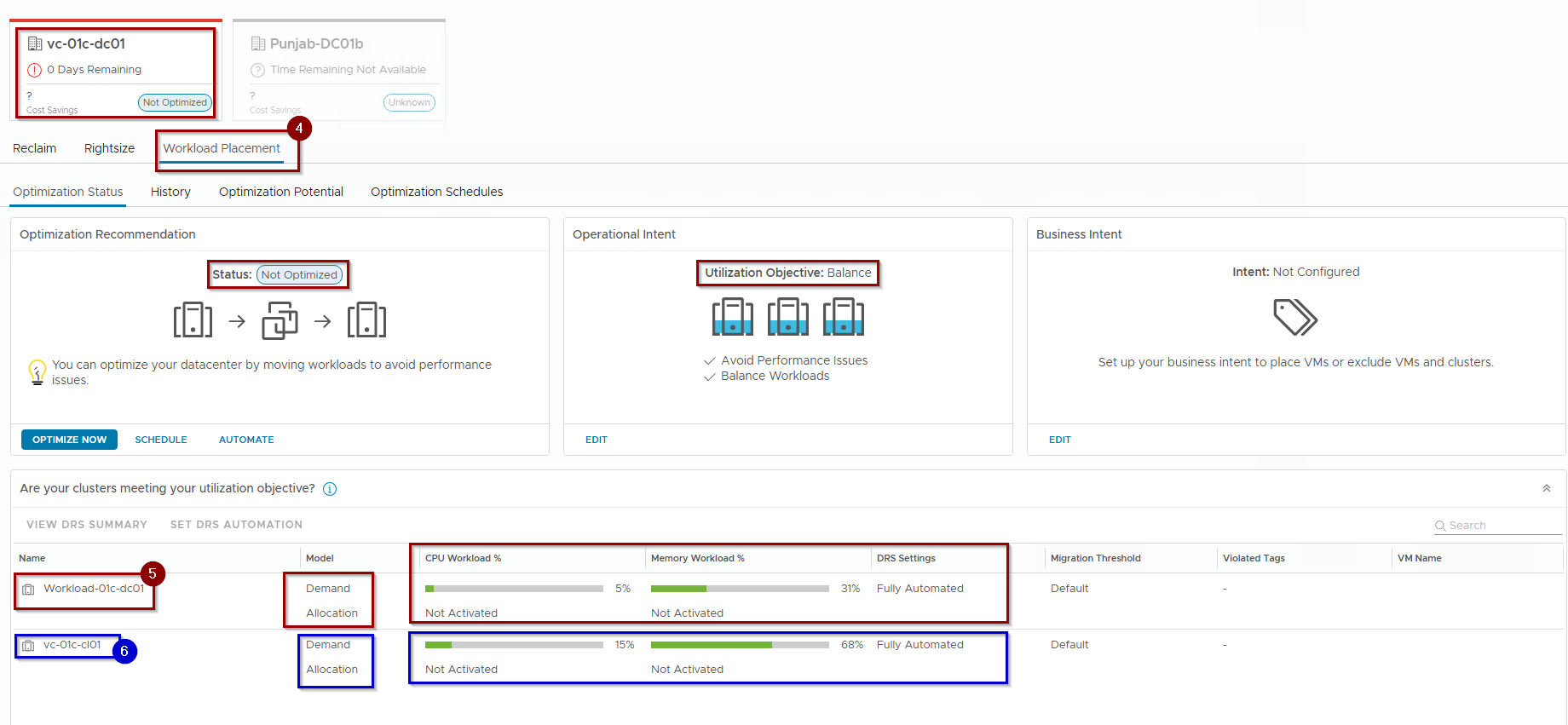
Step 4:- Click on Workload Placement.
Step 5: – Cluster 1-Workload-01c-dc01 as below:
CPU Workload% = Less utilized
Memory Workload% = Moderate Utilized.
DRS Setting = Fully Automated.
Step 6: -Cluster 2-vc-01c-cl01 as below:
CPU Workload% = Less utilized
Memory Workload% = highly Utilized.
DRS Setting = Fully Automated.
Note:- The operational intent is clearly defined as a balanced mode. In Part 02, we will confidently evaluate all options concerning operational intent , ensuring that we implement best practices for optimizing the clusters effectively.
Operational Boundaries and Prerequisites
To function effectively, the architecture requires specific configurations:
- Scope of Movement: Movement of compute and storage resources is limited to the boundaries of a single data center or custom data center object.
- Compute Requirements: Compute moves are only supported across clusters where vSphere DRS is fully enabled.
- Storage Requirements: Storage moves require data store clusters with vSphere Storage DRS set to “fully automated”.
Conclusion
VCF Workload Placement represents a shift from reactive host-management to proactive, data-center-wide orchestration. By integrating with vSphere DRS and utilizing predictive analytics, VCF ensures that workloads land on the most efficient hardware without administrative bottlenecks. Understanding this foundational logic is the first step toward building a self-optimizing private cloud.
In Part 2(Defining Operational Intent for Capacity Management), we will examine how to configure Operational Intents to prioritize performance balancing versus hardware consolidation.
 Puneet Sharma
Leave a comment