

NSX Virtual Private Cloud in Multi-Tenancy-Part 1
- Introduction
- NSX Multi-Tenancy Policy Model with VPC Framework
- Affiliation between the Project & VPC
- Project & VPC Dependability
- VPC Security
- Conclusion
Introduction
VMware has recently introduced in NSX 4.1.1 a new feature, VPC, which offers numerous benefits in the context of multi-tenancy. VPC provides a secondary level of tenancy within a project, allowing for the establishment of a hierarchical tenancy model. This enables the assignment of various projects to different vertical lines, such as sales, HR, Presales, and Finance. Within each project, multiple applications can be deployed and assigned to different VPCs, thereby enabling application owners to access infrastructure in a self-service manner.
VPC is particularly advantageous for those who possess familiarity with the networking structure. The consumption model that accompanies VPC is tailored for diverse personas and provides a convenient way to adopt that model in NSX. While projects can imitator the NSX structure, they have the same T1 segments, nomenclature, and hierarchical structure of the API. Therefore, VPC and projects together constitute a powerful solution for managing multi-tenancy and facilitating self-service access to infrastructure.
NSX Multi-Tenancy Policy Model with VPC Framework
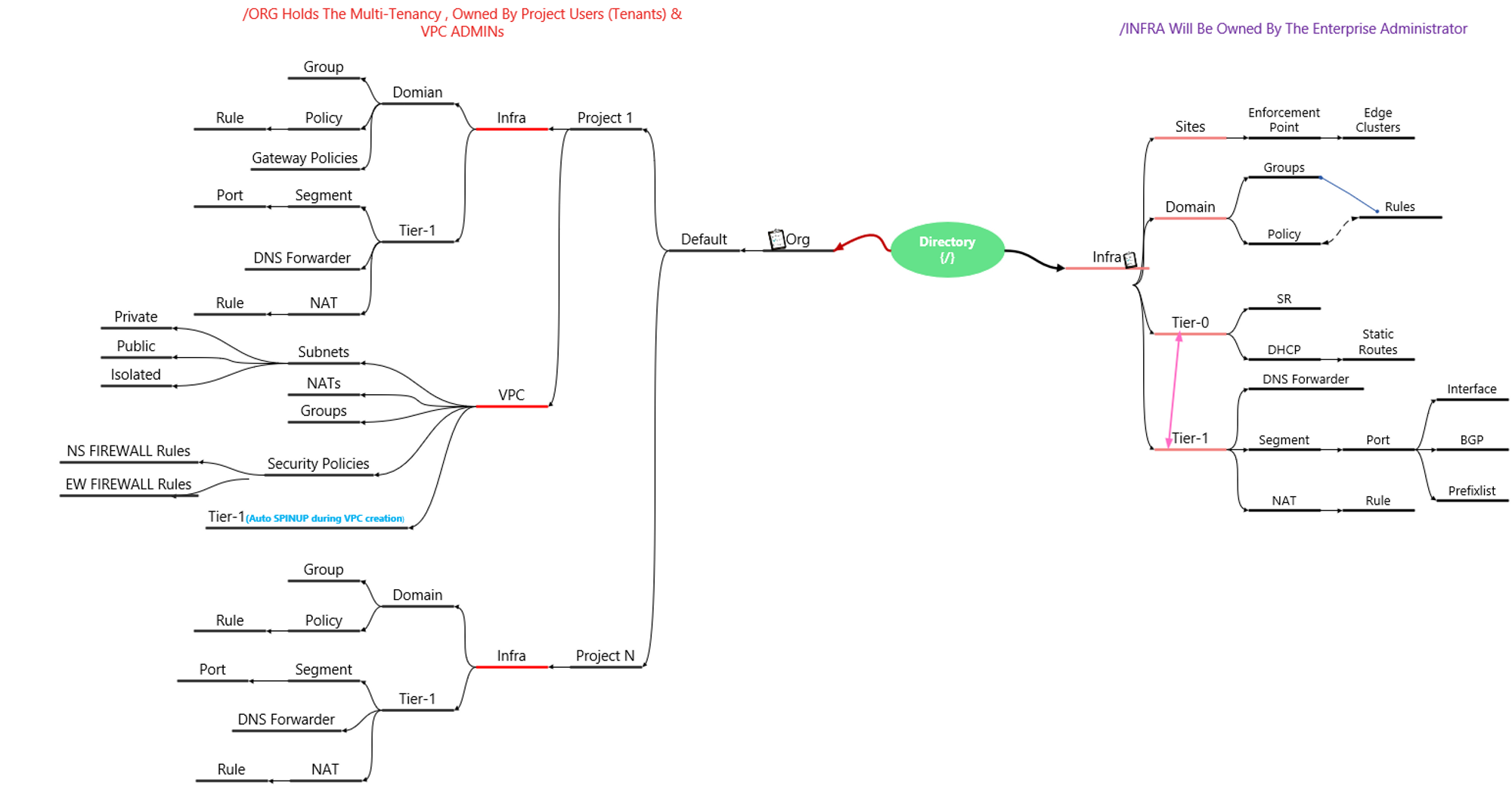
The NSX policy model follows a clear hierarchical structure that comprises two system-created branches: Infra and /org/default.
Infra: -Is under the management of the enterprise administrator and all infra objects can be viewed under the default UI.
On the other hand, /org/default: -Serves as a space for multi-tenancy objects. Org objects are isolated and identified by the system, but not visible in the UI.
Projects : – which are comparable to tenants, can be created to isolate security and networking objects across tenants in a single NSX deployment. The Large NSX Manager can create up to 500 projects, while the medium size can create up to 200 projects. Project A-Users, Project N-Users, and Enterprise admins can log into NSX and have their customized view. It is important to note that Project A-Users and Project N-Users cannot view each other’s configurations and are not allowed to view the configuration of the default Infra owned by the Enterprise Administrator. Configuration limits we can check Here.
VPC: – In the process of establishing a self-contained configuration boundary for networking and security, the VPC administrator need not concern themselves with the creation of release segments, as is required in NSX. Rather, the platform automatically allocates a subnet for the purpose. This automation eliminates the need for the VPC administrator to possess an understanding of which subnet to assign to the segments. Implicit routing for the subnets is also taken care of, unless they are defined as isolated. The only parameter that the VPC administrator needs to define for these subnets is the type, which may be private, public, or isolated. This is made possible through an obscured T1 gateway, which is automatically generated upon the creation of a VPC. Configuration limits we can check Here.
Capture 1:
This Diagram will provide the general view of flow & interactions between the Org, Infra, Objects & Projects & VPCs.
Affiliation between the Project & VPC
The relationship between a Project and a VPC is that a Project is like a container for resources and services, while a VPC (Virtual Private Cloud) is a virtual network environment that provides a secure and isolated space for resources to run within. In other words, a Project can contain one or more VPCs, and resources within a Project can be connected to a VPC to communicate with other resources within the same VPC or across multiple VPCs.
Virtual Private Clouds (VPCs) are hierarchical object models that consist of child objects of projects. However, it’s important to note that VPCs do not alter the traditional NSX consumption model and can be deployed in parallel to the classic NSX Policy constructs, sharing the same physical infrastructure.
VPCs are logically integrated into projects and offer a more streamlined approach to accessing common network and security features, such as subnets, security policies, and NAT. As such, VPCs are an essential tool for managing a complex network infrastructure. The Enterprise administrator has the responsibility to manage the user management lifecycle, which includes creating local users, activating them with desired credentials, and assigning the appropriate role for the VPC. This ensures that the VPCs are secure and compliant with company policies. Additionally, the project or Enterprise administrator has the full right to assign the quota to the VPC as per the requirements of the project.
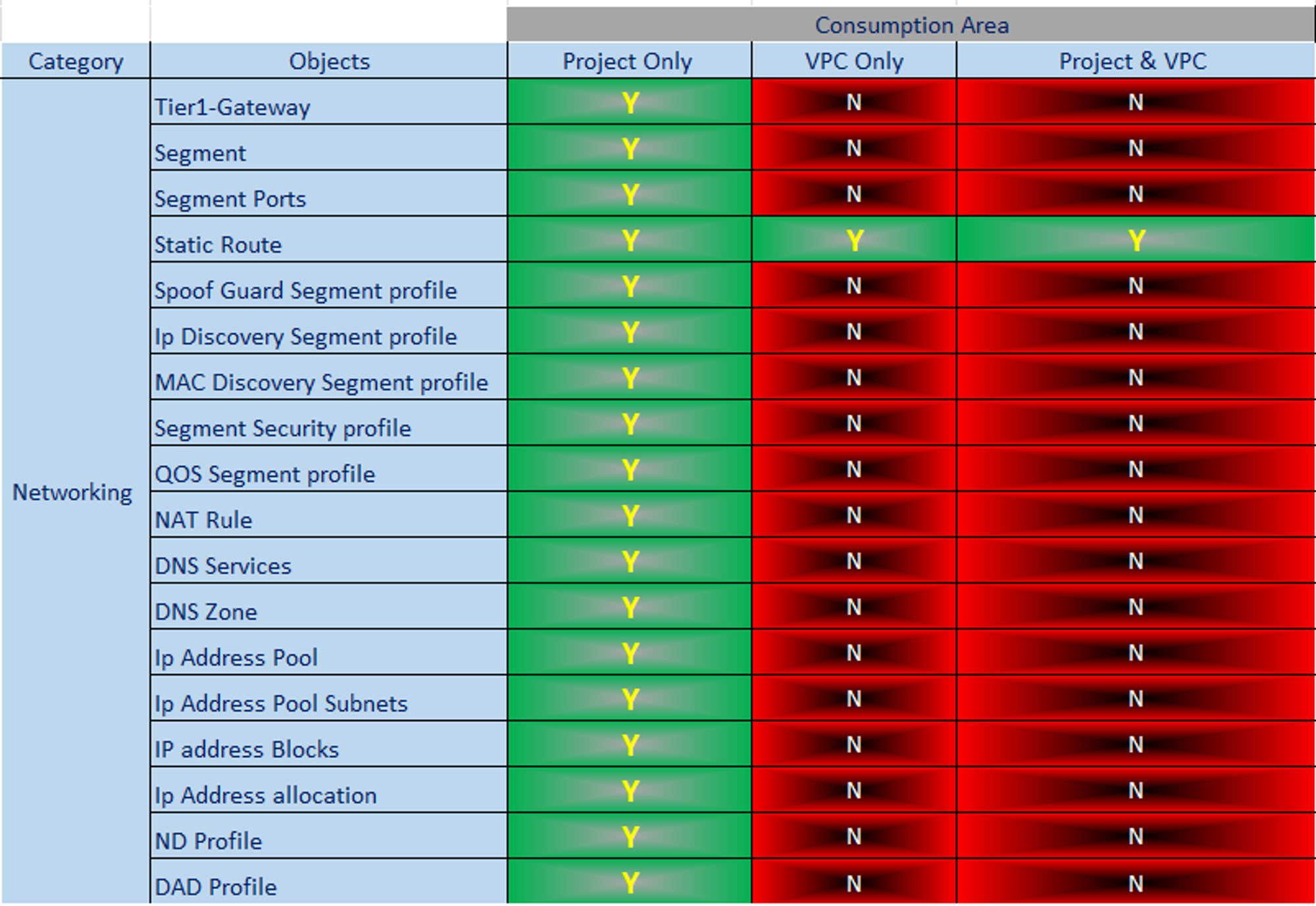
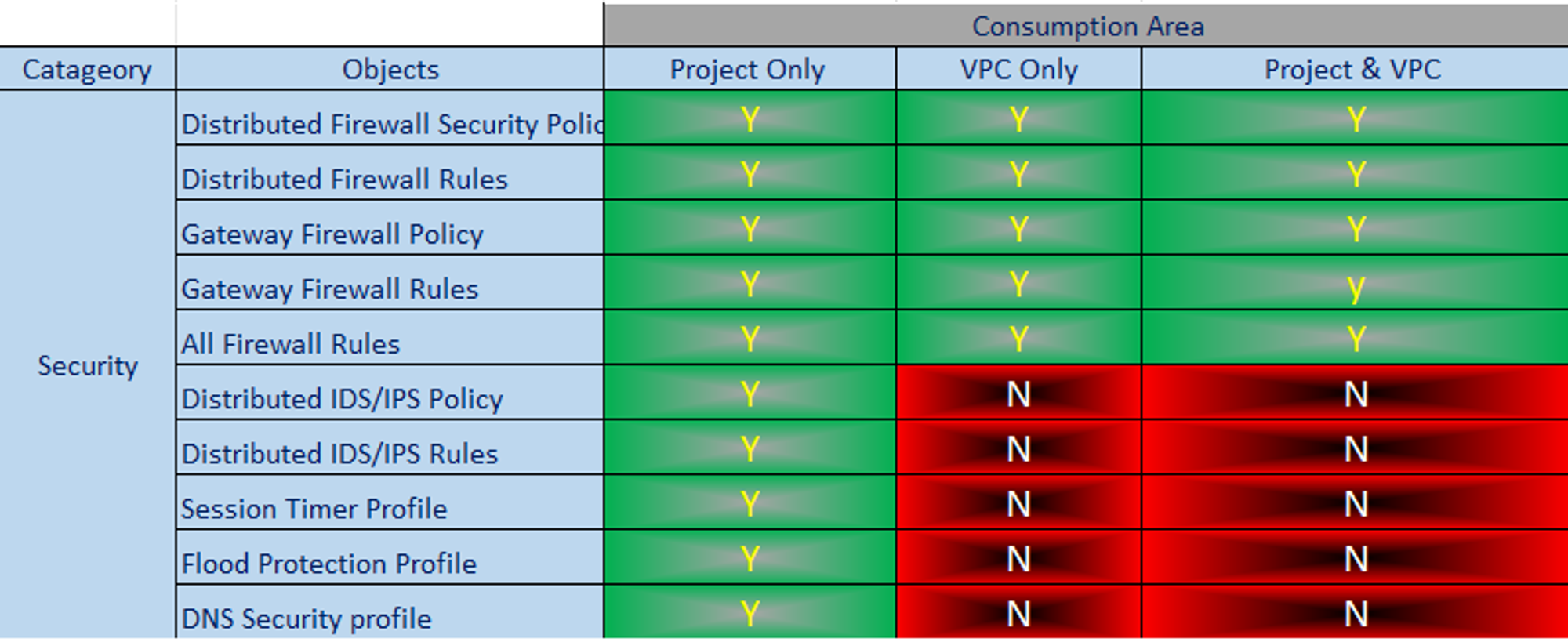
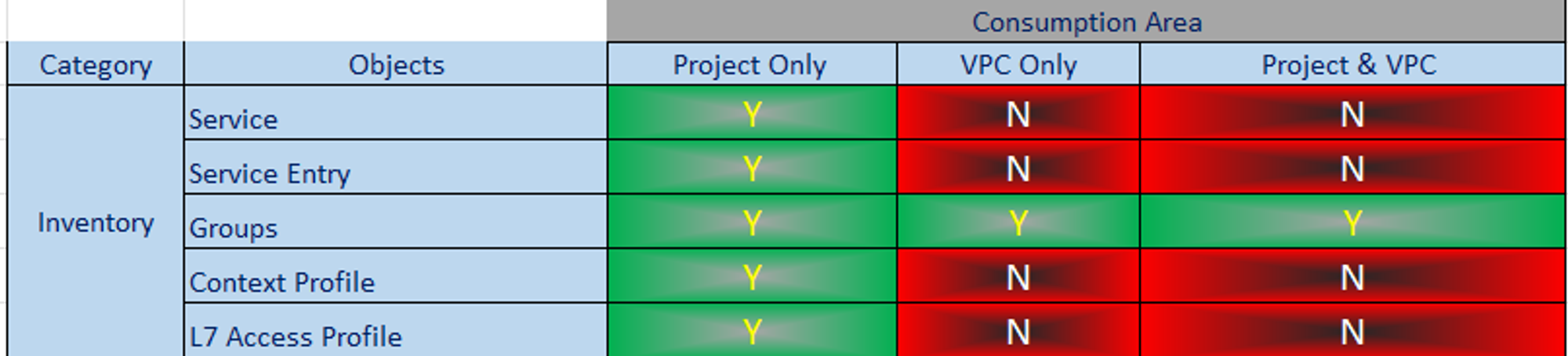
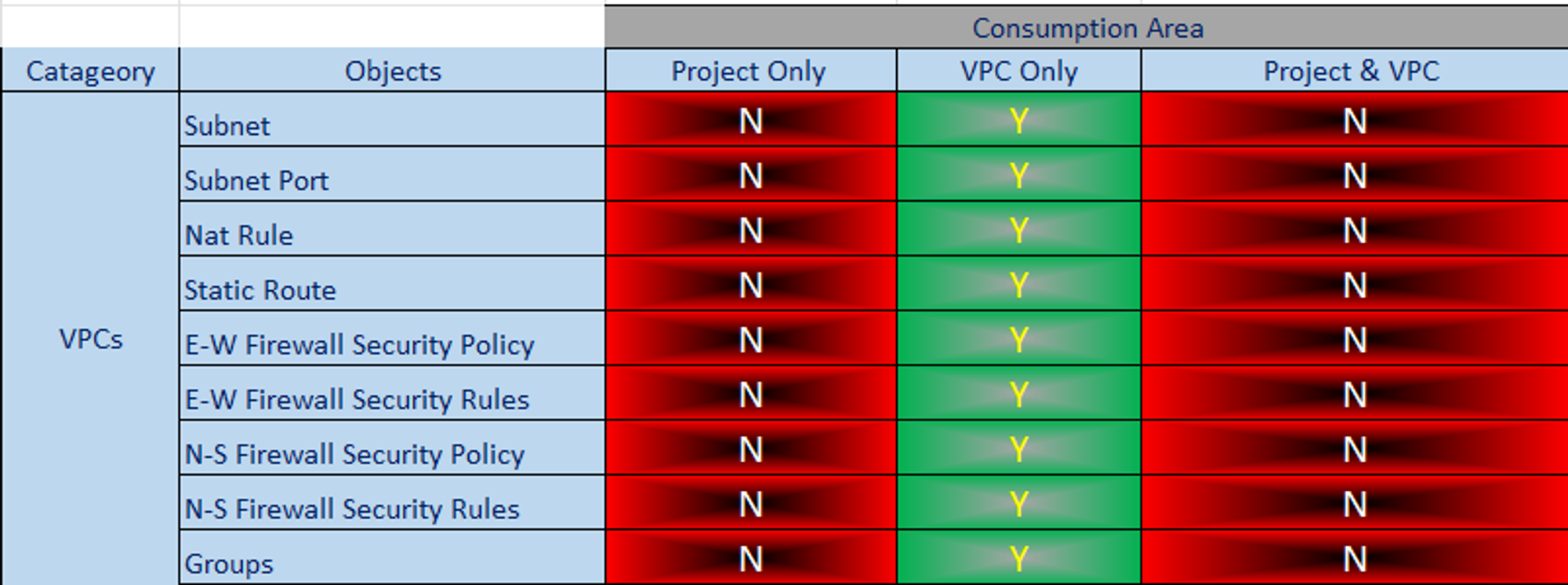
Therefore, VPCs are an important aspect of modern network infrastructure, and their streamlined approach to network management is essential for maintaining a secure and efficient network. Below is a differentiation table for your reference: –
Capture 2:
Note :- Green Color indicates Yes and Red color indicates No.
Project & VPC Dependability
Capture 3: –
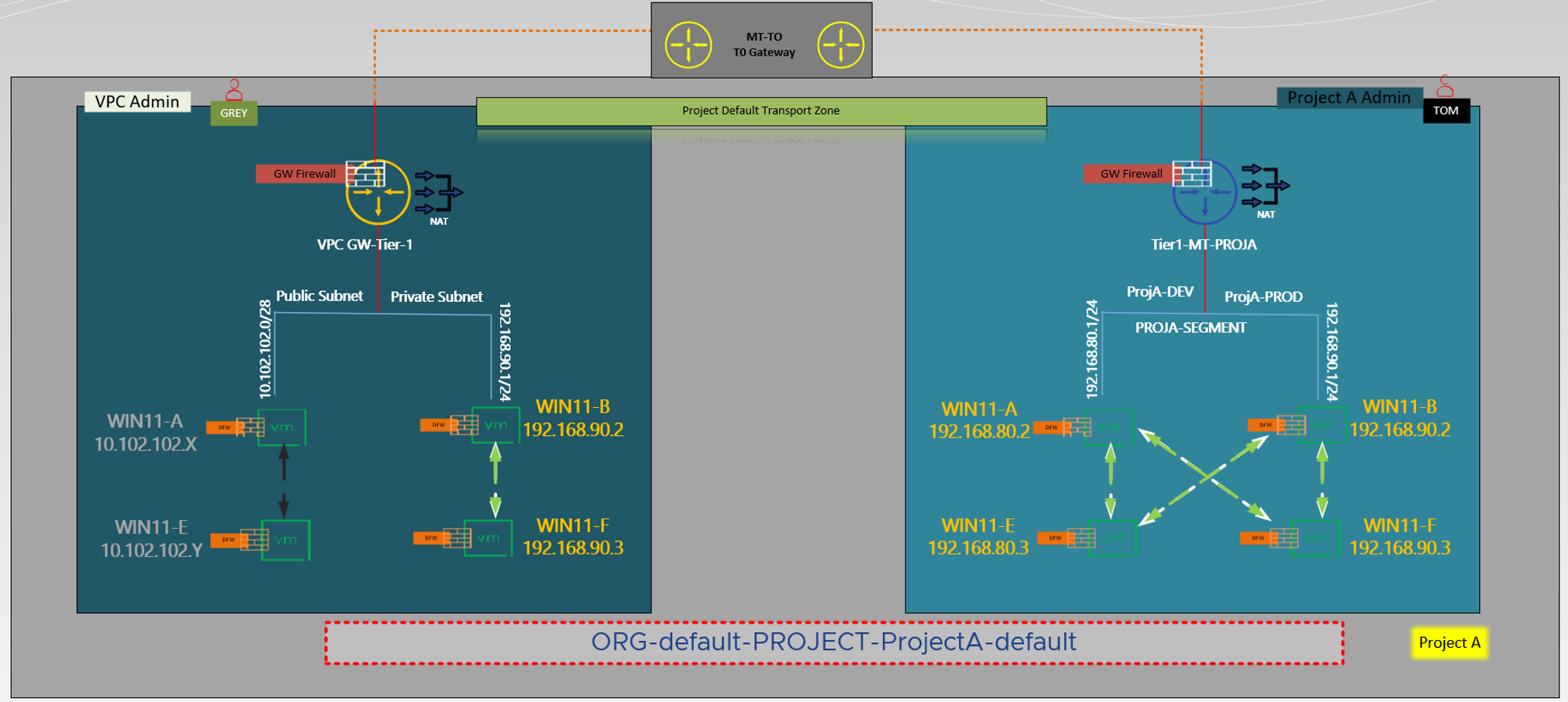
To provide an overview of the NSX VPC workflow, there are fundamental steps involved that one should be aware of.
- First and foremost, the project administrator as per capture 2 user “TOM” initiates an NSX VPC within the project and configures its basic setup, including assigning IPs, configuring DHCP, setting up edge clusters, and other pertinent details.
- The administrator also assigns roles to the users who will be operating within the NSX VPC and establishes limits or quotas for object creation within it.
- Following the input provided by user “GREY,” the VPC administrator proceeded to augment subnets within the NSX VPC, establishing connections for workloads in accordance with the requirements posed by the business. It is worth noting that, based on the information captured, a combination of Public and Private subnets have been implemented within the same VPC.
- Finally, the VPC administrator as per capture 2 user “GREY” integrates security policies to the NSX VPC to ensure that the workloads connected to the subnets are secure and meet the necessary security standards.
VPC Security
Capture 4: –
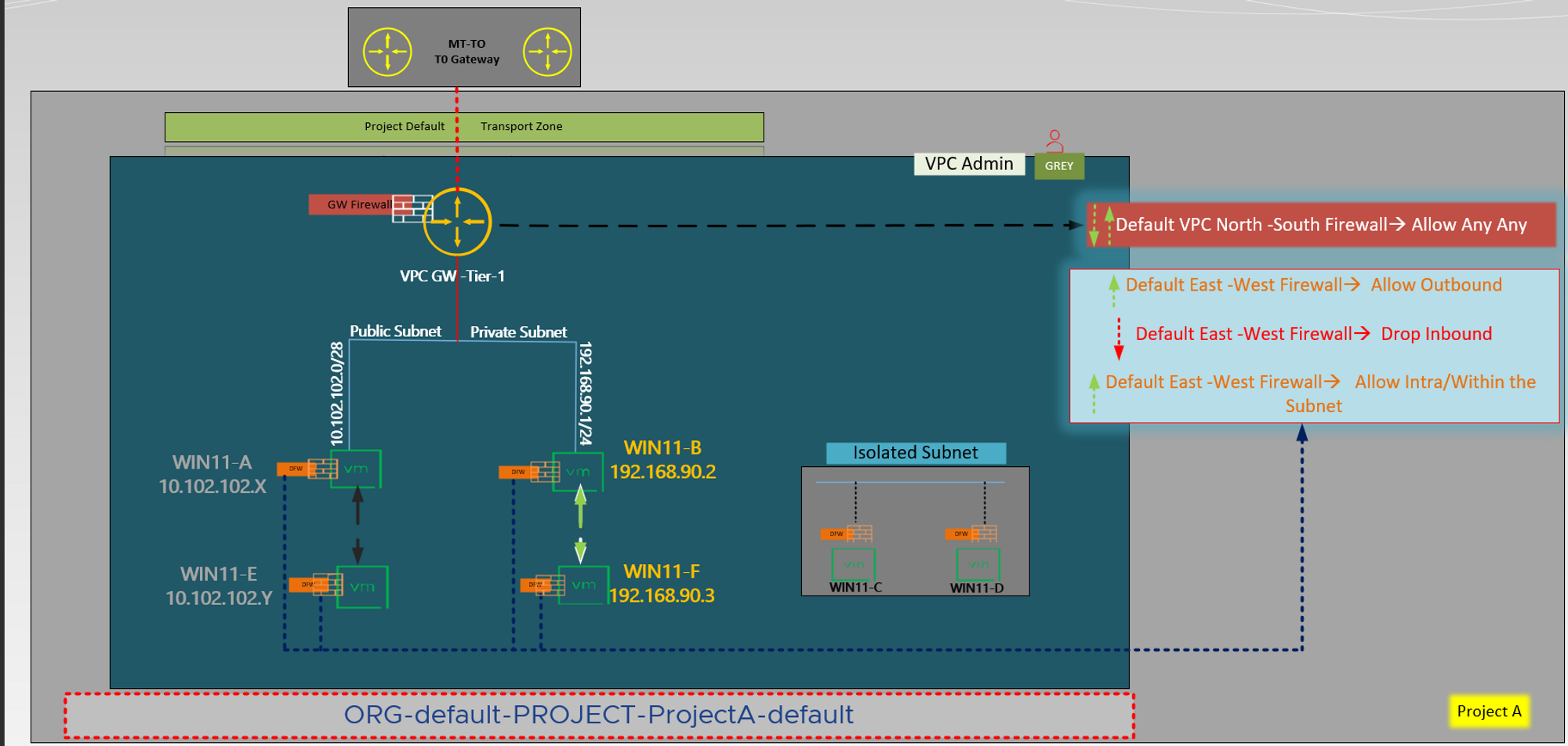
Upon successful realization of an NSX VPC, default firewall rules are automatically established to manage the default firewall behavior for workloads within the NSX VPC. These rules comprise two types: N-S firewall rules and E-W firewall rules. N-S firewall rules are centralized and regulate traffic entering and exiting the NSX VPC. On the other hand, E-W firewall rules are distributed and apply to workloads running within the NSX VPC.
All workloads that are connected to a VPC subnet are considered part of the default VPC group. Default E-W rules permit all outbound traffic from VPC workloads, including traffic to other VPC workloads, while blocking any inbound traffic. Additionally, default N-S rules allow all traffic. However, in order to permit traffic from external clients, E-W rules must be created.
It is important to note that the VPC administrator is unable to create custom services or context profiles, although custom services may be shared by the Project-A administrator with the VPCs. DFW rules are always applied to the VPC default group, regardless of the “DFW in the apply-to field” status. While as per capture 3 Project-A Admin or Enterprise Admin cannot create gateway Firewall rules on the VPC Gateway, they are able to create DFW rules that displace the VPC E-W rules.
Conclusion
Thank you for taking the time to peruse this literature. I eagerly await the release of part 2, as it promises to provide valuable insights into the creation of virtual private clouds under projects and users, including topology diagrams, VPC networking, resource sharing configurations, and quota settings. Armed with this guide, I am confident in my ability to optimize efficiency and organization in project management, thereby enhancing my performance and contributing to the success of my organization.

 Puneet Sharma
Leave a reply to NSX VPC in Multi-Tenancy-Part 3-Intra VPC EAST WEST TRAFFIC FLOW – Puneet Sharma Cancel reply