

- Introduction to Memory Tiering with vSAN
- Architectural Implications and NVMe Device Dedication
- Deployment Strategies in vSAN Environments
- Operational Considerations and Performance Isolation
- Conclusion
Introduction to Memory Tiering with vSAN
Parts 1 and 2 of this series addressed the foundational activation of vSphere Memory Tiering on individual hosts and its integration within a standard vSphere cluster. This final segment extends the discussion to environments leveraging VMware vSAN. Integrating Memory Tiering over NVMe in a vSAN-enabled cluster introduces specific architectural and deployment considerations, primarily due to vSAN’s inherent reliance on local NVMe devices for its own storage layers (cache and capacity tiers). Understanding these interdependencies is critical to ensure optimal performance, resource isolation, and operational stability.
This blog will be structured in Three distinct sections:
Part 1: Deploying vSphere 9.0 Memory Tiering Over NVMe: Host-Level Activation.
Part 2: Deploying vSphere 9.0 Memory Tiering: Cluster Integration and Management.
Part 3: Deploying vSphere 9.0 Memory Tiering: Considerations with vSAN Environments
Architectural Implications and NVMe Device Dedication
A fundamental principle for Memory Tiering in vSAN environments is strict NVMe device dedication. vSAN utilizes local NVMe for its storage tiers (cache/capacity). Memory Tiering also requires a dedicated PCIe-based NVMe device for its Tier 1. These NVMe devices cannot be shared; a single physical NVMe device cannot serve both vSAN and Memory Tiering. Sharing would cause severe I/O contention, unpredictable latency, and operational instability. This necessitates hosts supporting both features to be provisioned with additional, dedicated NVMe hardware for Memory Tiering, separate from vSAN’s disk groups, ensuring adequate PCIe slots and lanes.
Deployment Strategies in vSAN Environments
Integrating Memory Tiering into vSAN clusters follows two primary architectural approaches:
- Approach 1: Existing Host Augmentation. For existing vSAN hosts, this involves adding a new, dedicated PCIe-based NVMe device per host. This requires assessing available physical slots/PCIe lanes and typically necessitates host downtime for hardware installation. Post-installation, the new NVMe device is identified, confirmed as unallocated by vSAN, and then configured for Memory Tiering (referencing Part 2’s methodology).
- Approach 2: New Host Provisioning. For new cluster deployments or expansions, hosts are provisioned from the outset with sufficient NVMe devices to satisfy both vSAN’s storage tiers and the additional dedicated NVMe for Memory Tiering. This approach ensures optimal hardware sizing, PCIe lane allocation, and allows for initial configuration during host provisioning.
This Discussion will proceed with an exclusive focus on Approach 1: Existing Host Augmentation.Approach 2: New Host Provisioning, characterized by initial hardware provisioning, typically involves fewer post-deployment integration complexities and is thus excluded from this detailed examination. Both approaches, however, mandate strict separation: the NVMe device designated for memory riering must never be a part of a vSAN disk group.
Approach 1: Existing Host Augmentation
Capture 1: –
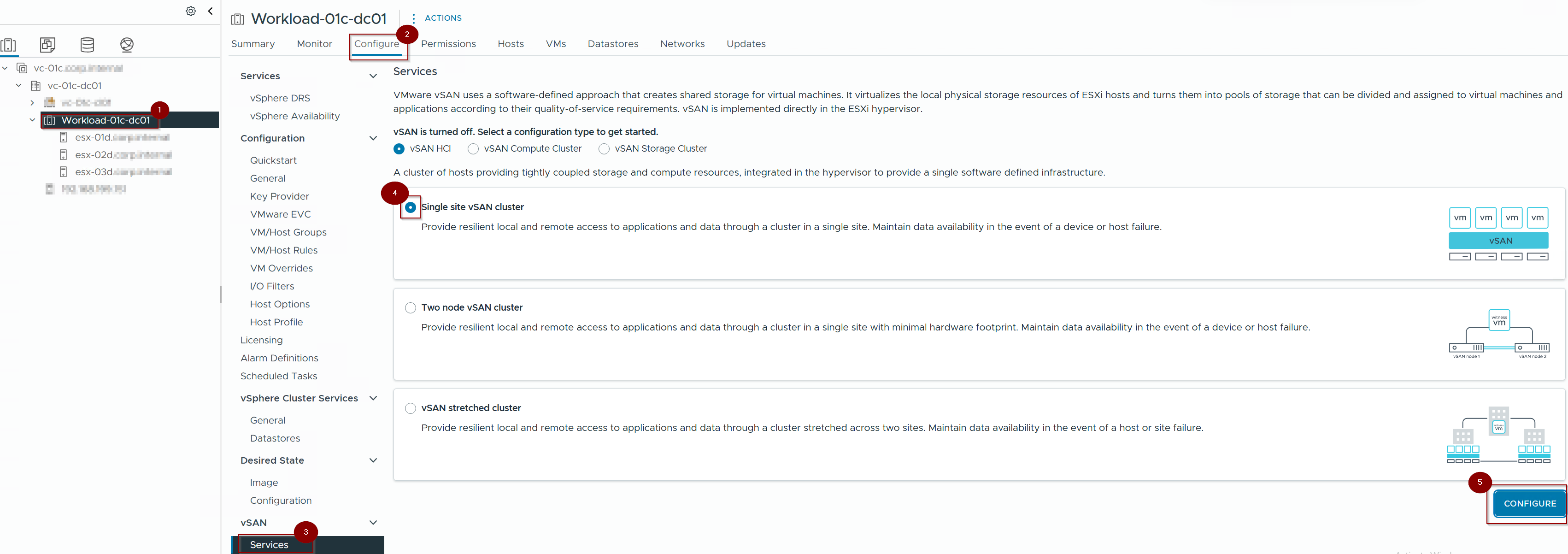
- Click on Cluster.
- Click on Configure.
- Click on Services under VSAN.
- Click on Single Site VSAN Cluster.(select as per your design requirement).
- Click on Configure.
Capture 2: –
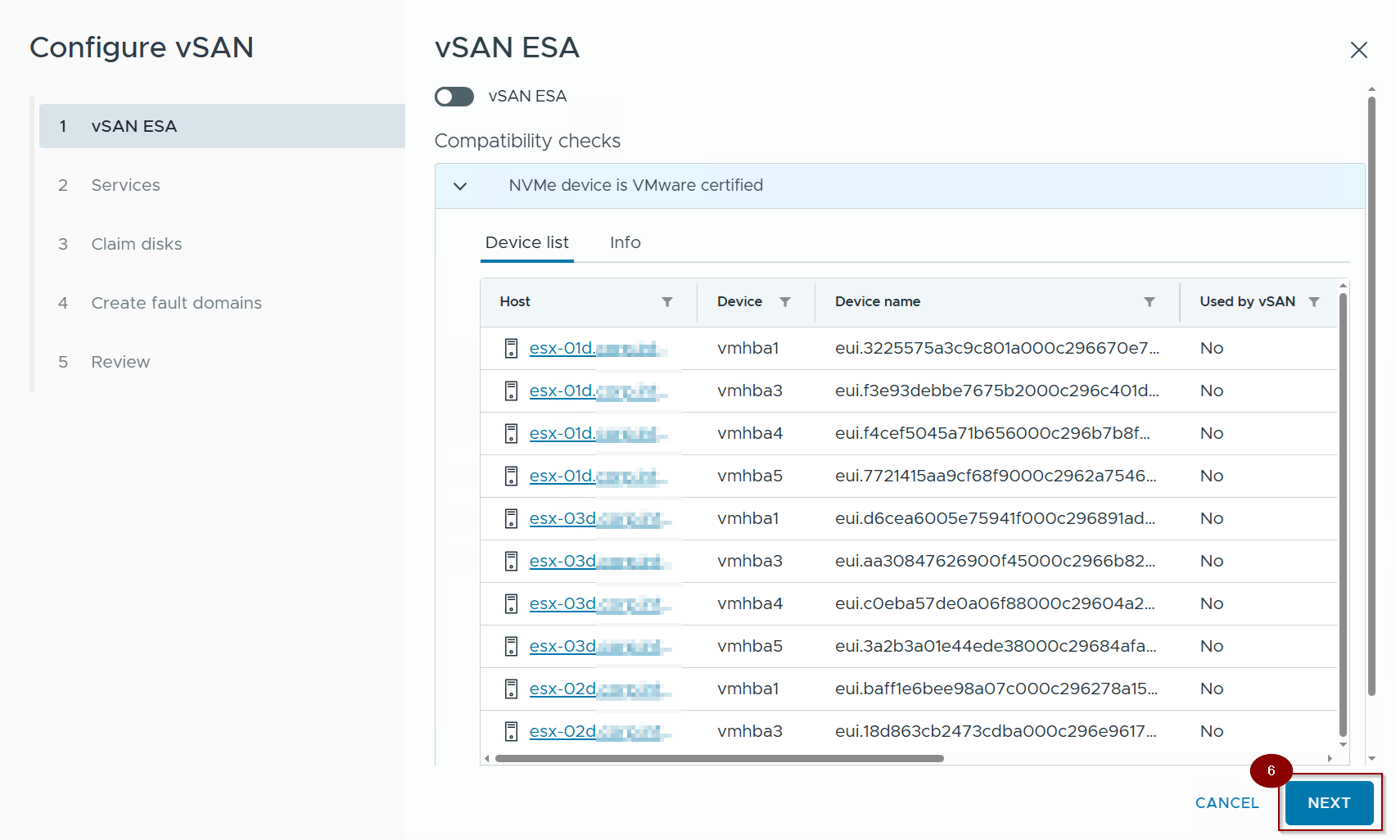
6. Click on Next.
Capture 3: –
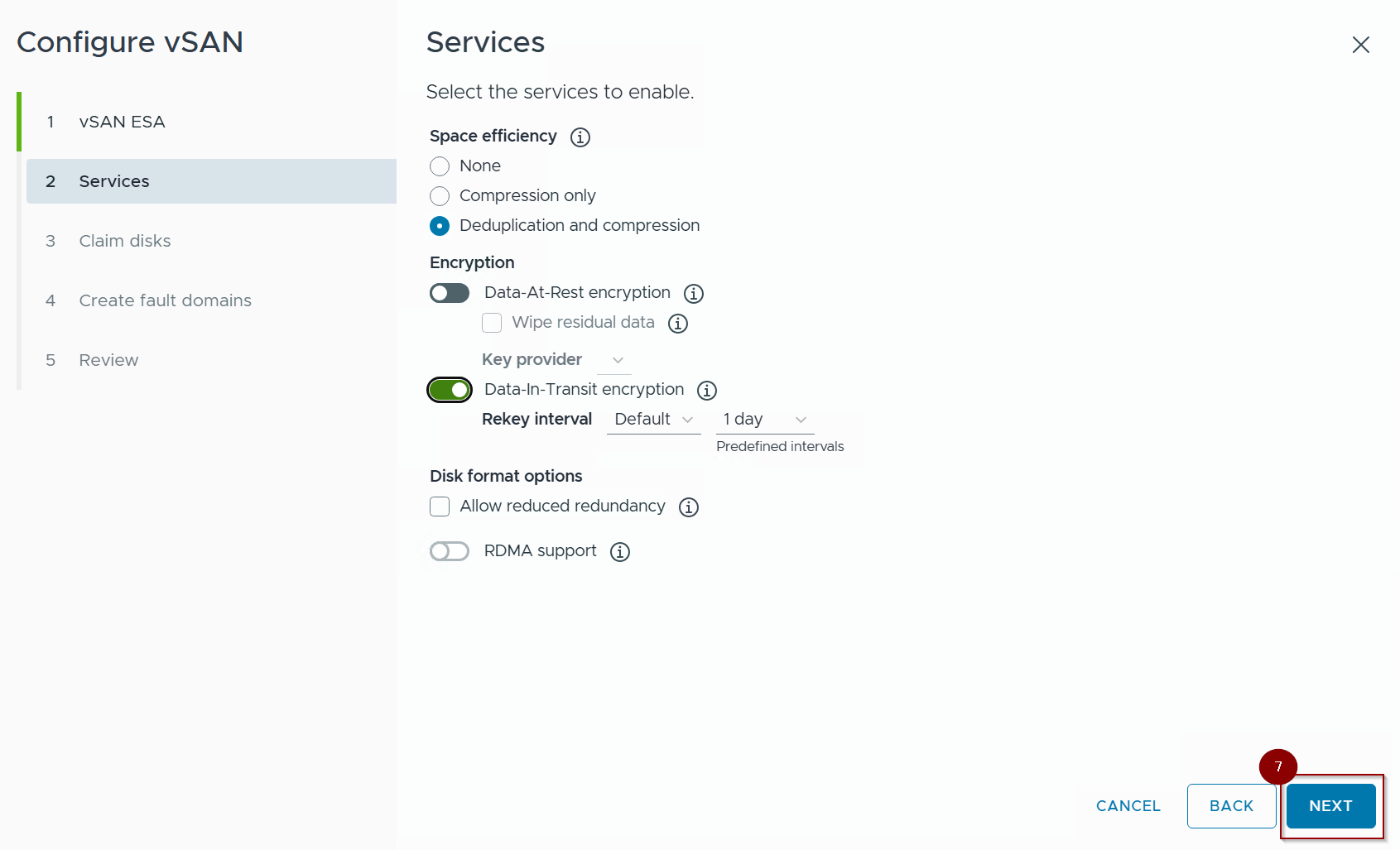
7. Click on Next.
Capture 4: –
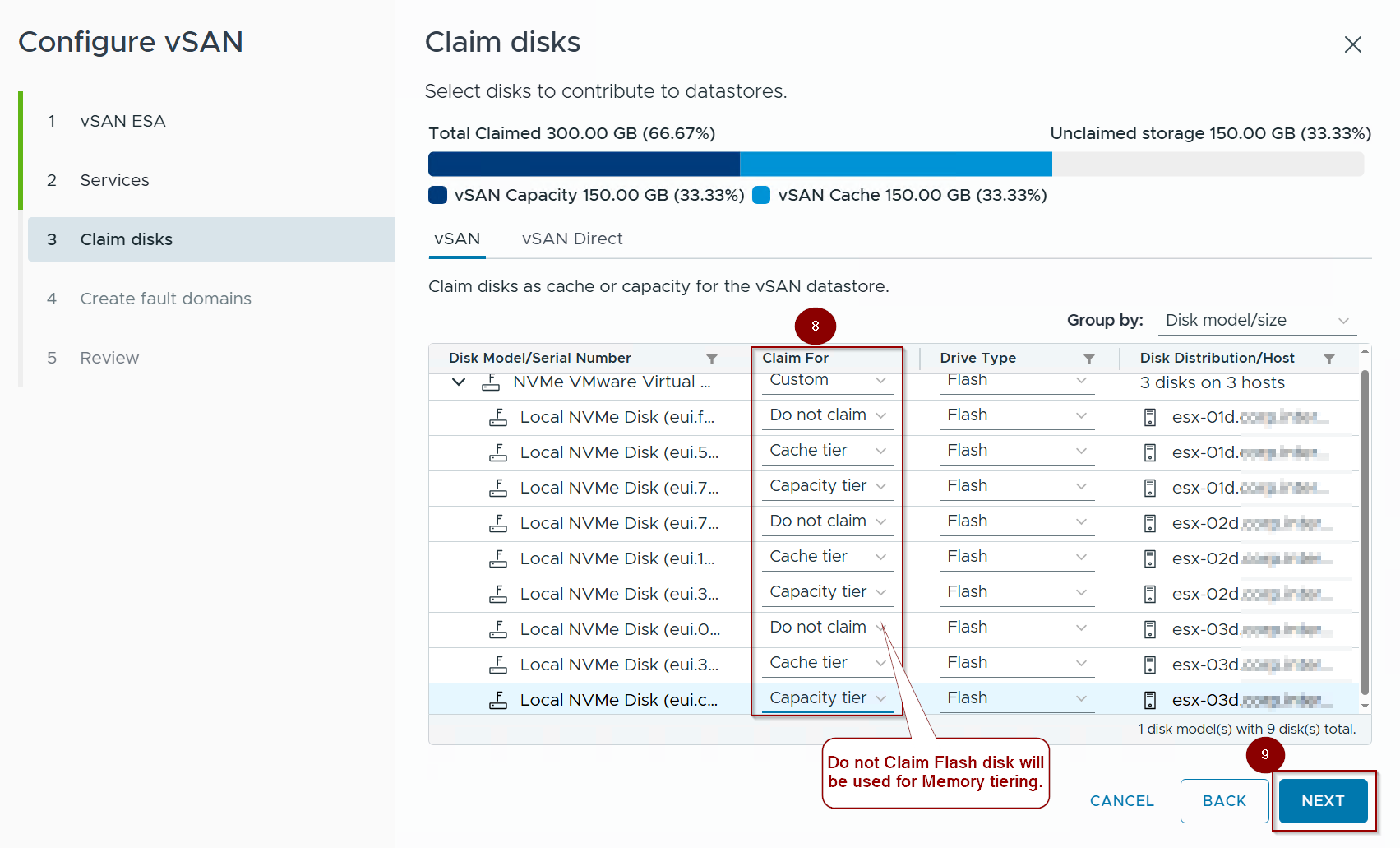
8. Under Claim we can see the below flash disks:
- Do Not Claim:- This will be used for memory tiering.
- Cache Tier: – This flash disk will be used for cache.
- Capacity Tier: – This flash disk will be used for capacity.
9. Click on Next.
Capture 5: –
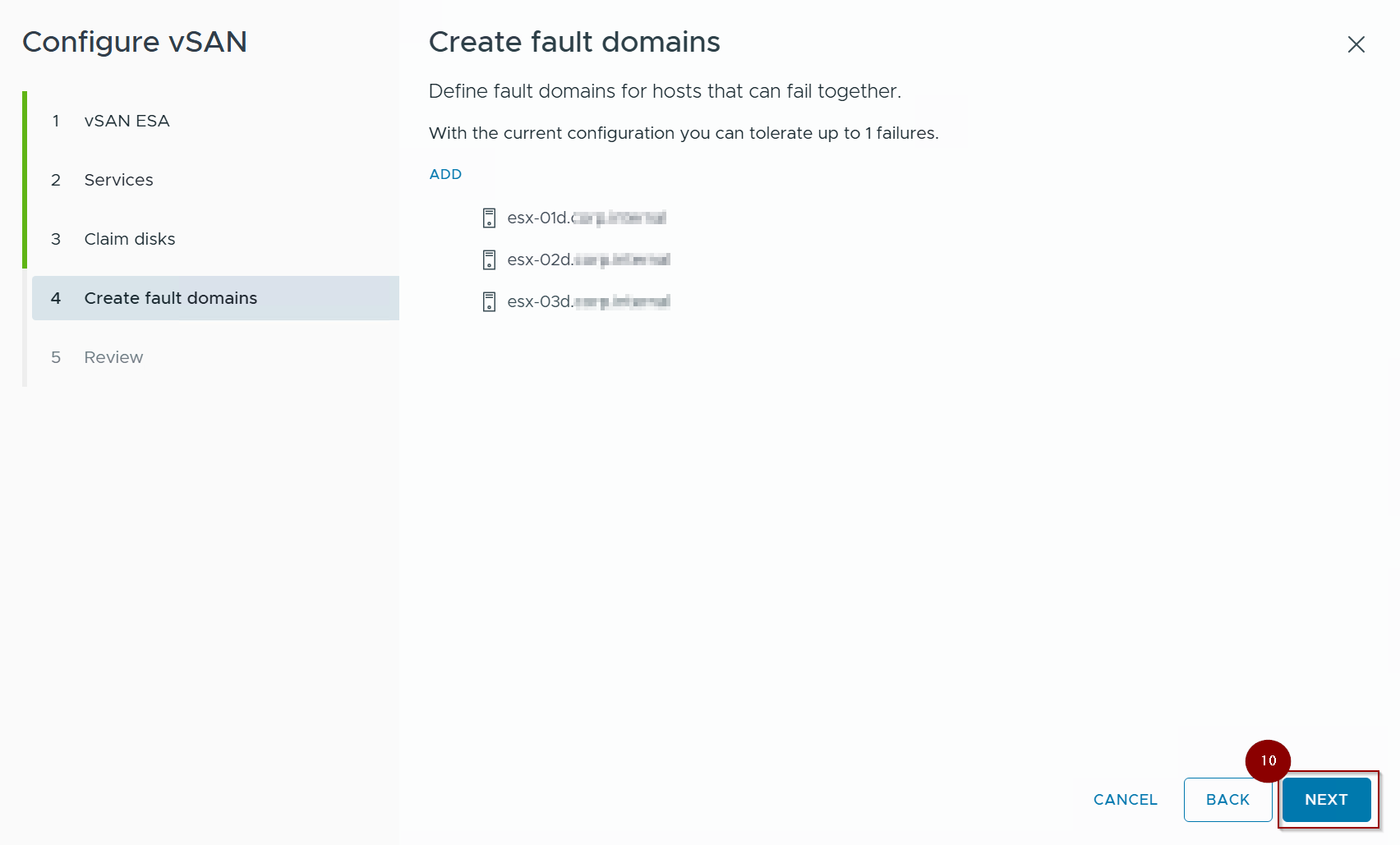
10. Click on Next.
Capture 6: –
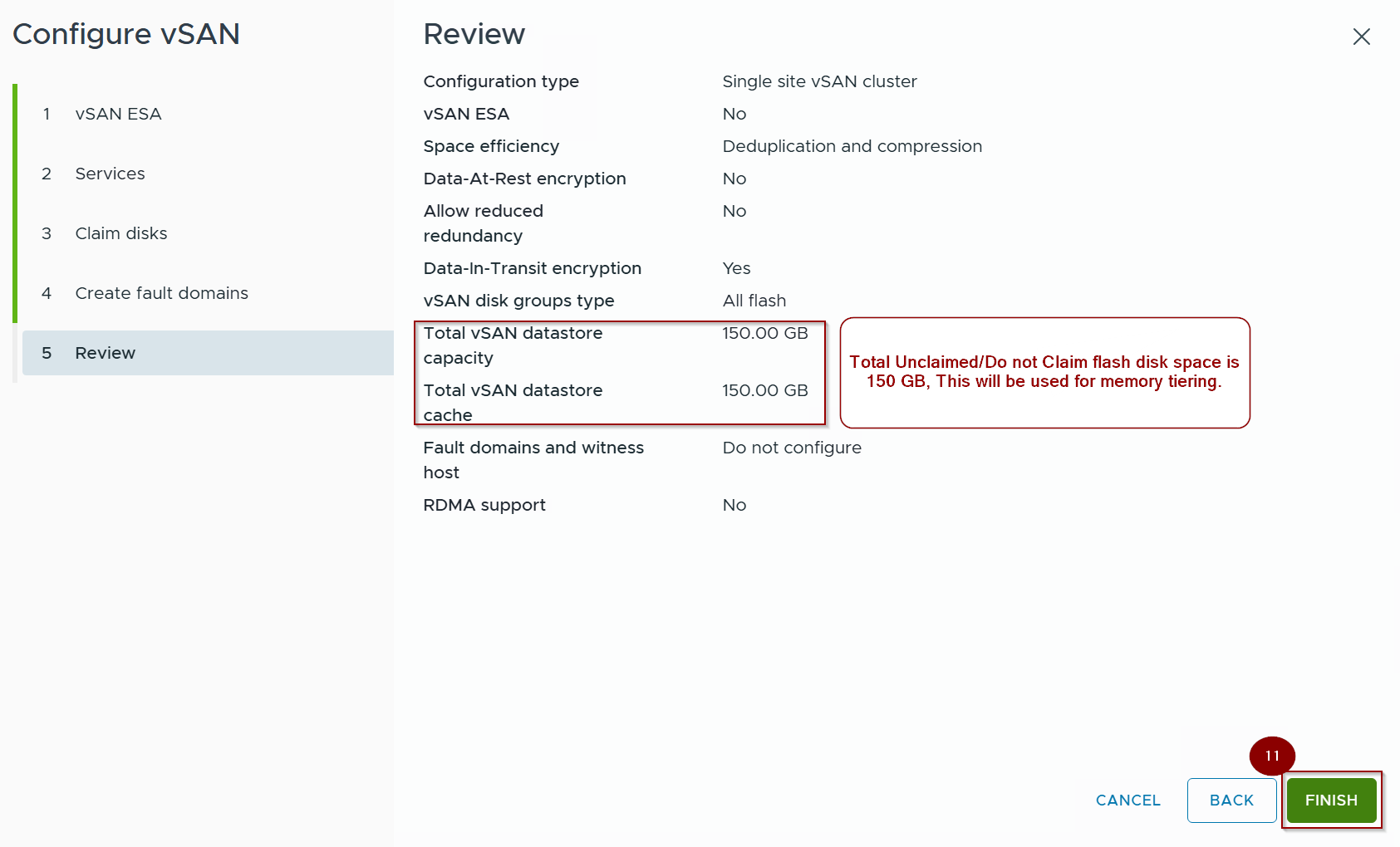
11. Click on Finish.
Capture 7: –
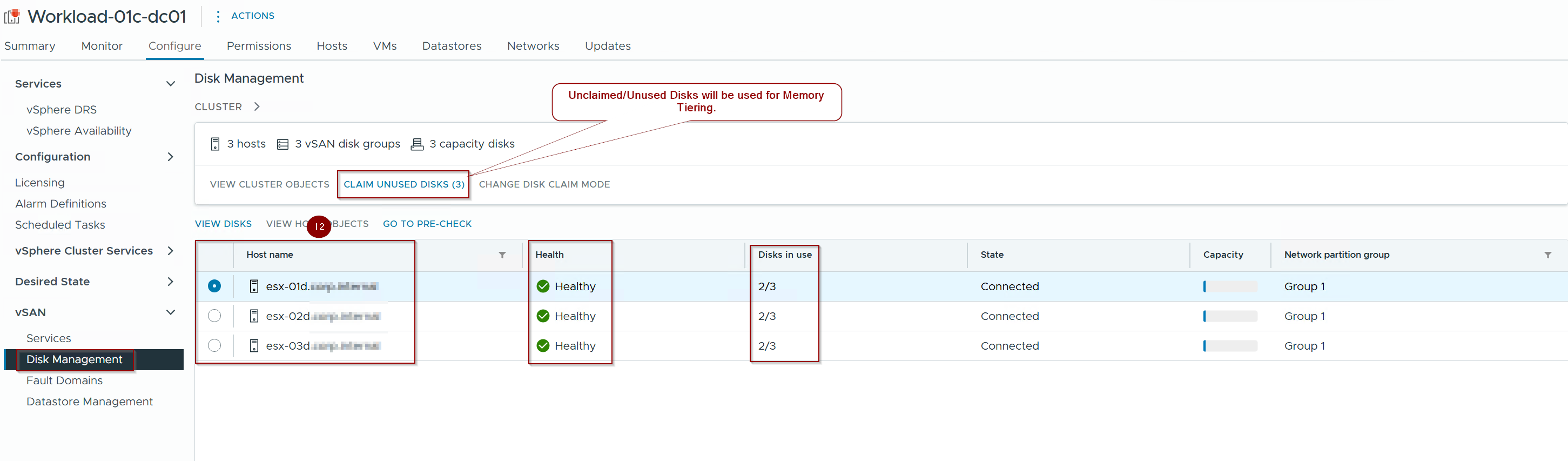
12. hosts are prepared for VSAN and Claim unused disks will be used for memory tiering.
Capture 8: –
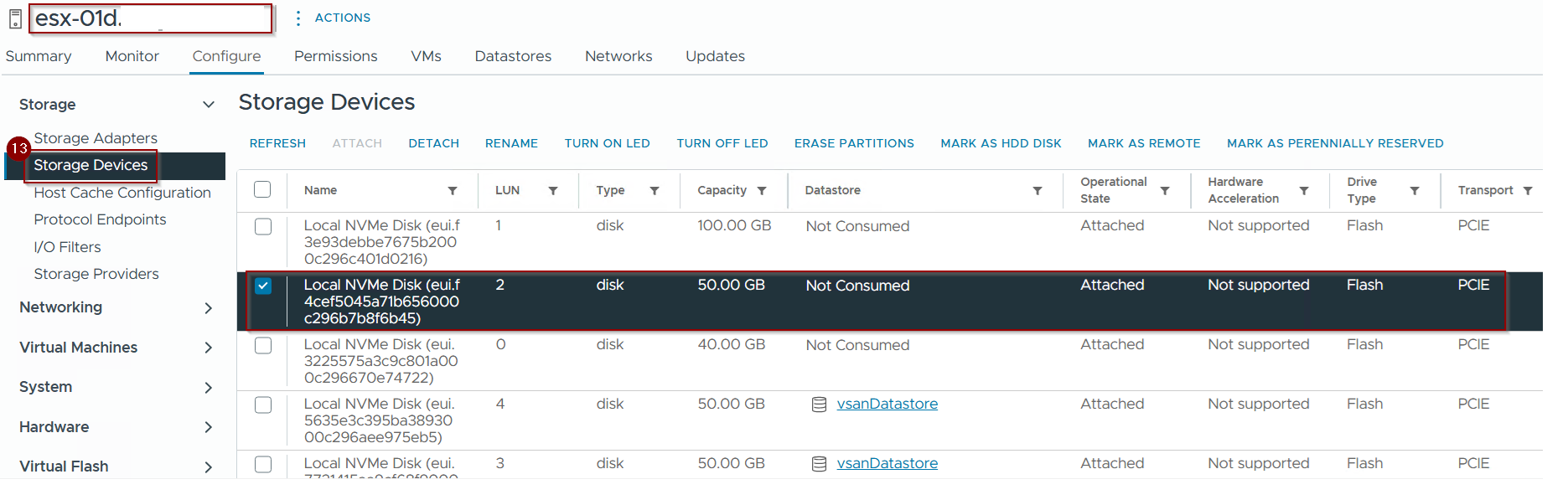
Note :- Plug a new NVMe disk into an available slot.
13. click on Storage Devices and we can see the 50GB not consumed PCIE flash disk attached.
Pre-Validation of Current Memory
Capture 1: –
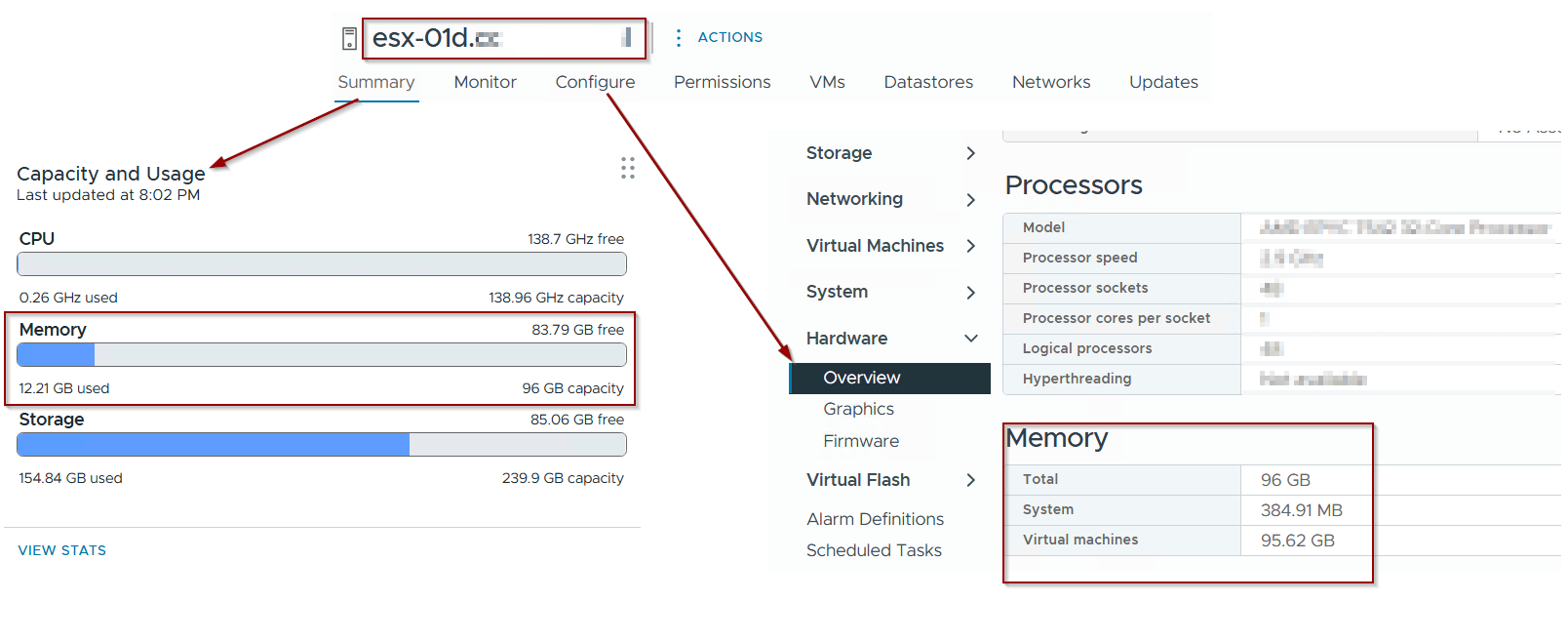
As per capture 1 we can see the total memory capacity allocated to host is 96GB.
Activating Memory Tiering
Note: For demonstration purposes and based on defined architectural parameters, Memory Tiering configuration will be presented on ESXi host esx01d.puneetsharma.blog. To ensure cluster-wide operational homogeneity, this identical configuration must be replicated across all remaining hosts within the cluster.
Capture 1: –

- run the below cmd to check the status of tier partition
cmd : – esxcli system tierdevice list
Capture 2: –
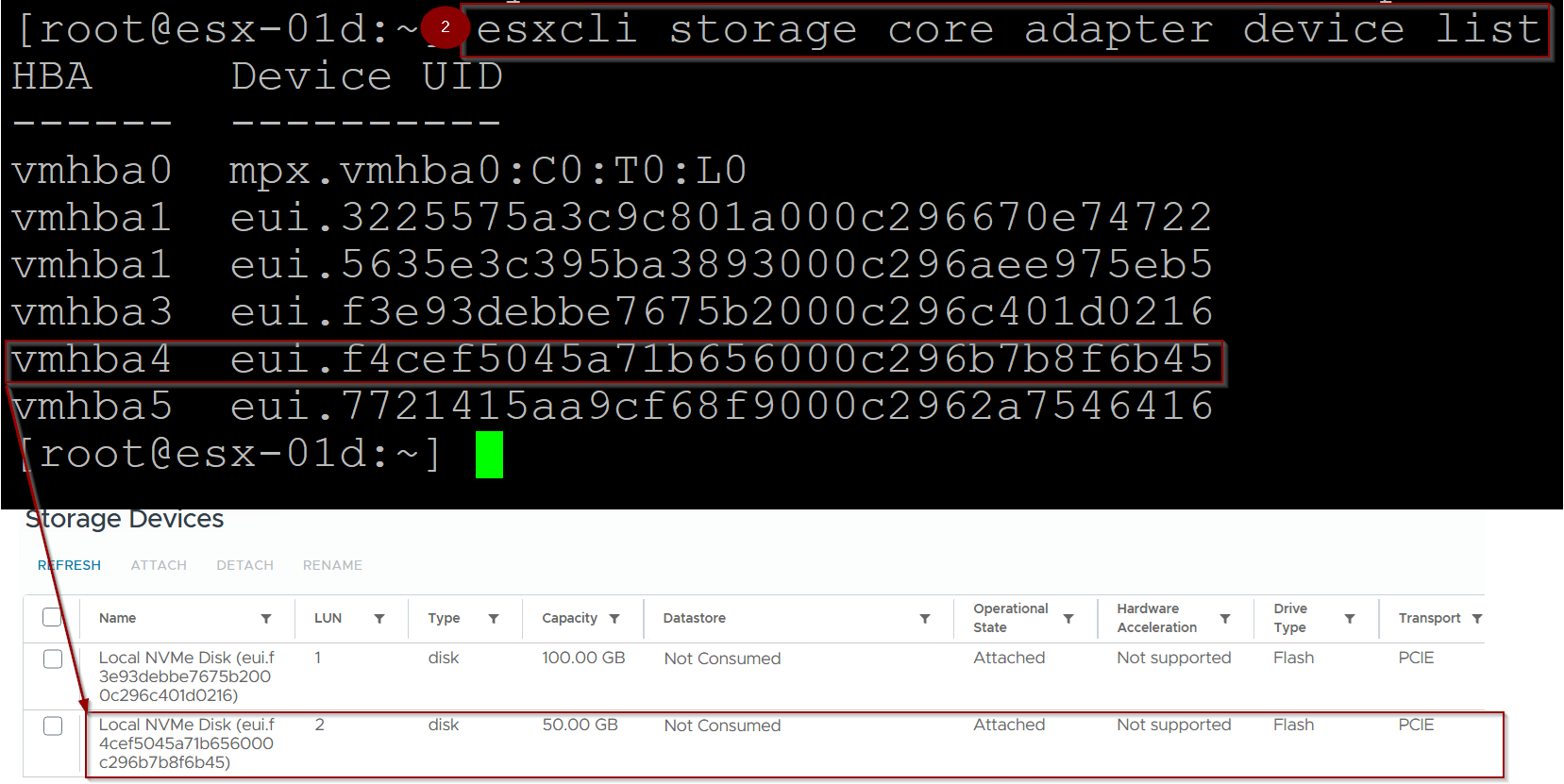
2. Run the below cmd to check the storage adaptor device list.
cmd: – esxcli storage core adapter device list
Note: – Copy the UUID of NVME .As per our requirement we will copy the vmhba4 :-eui.f4cef5045a71b656000c296b7b8f6b45.
Capture 3: –

3. Run the belo cmd for creating the tier partition on the NVMe device.
cmd: – esxcli system tierdevice create -d /vmfs/devices
/disks/<UUID of NVMe>
Capture 4: –
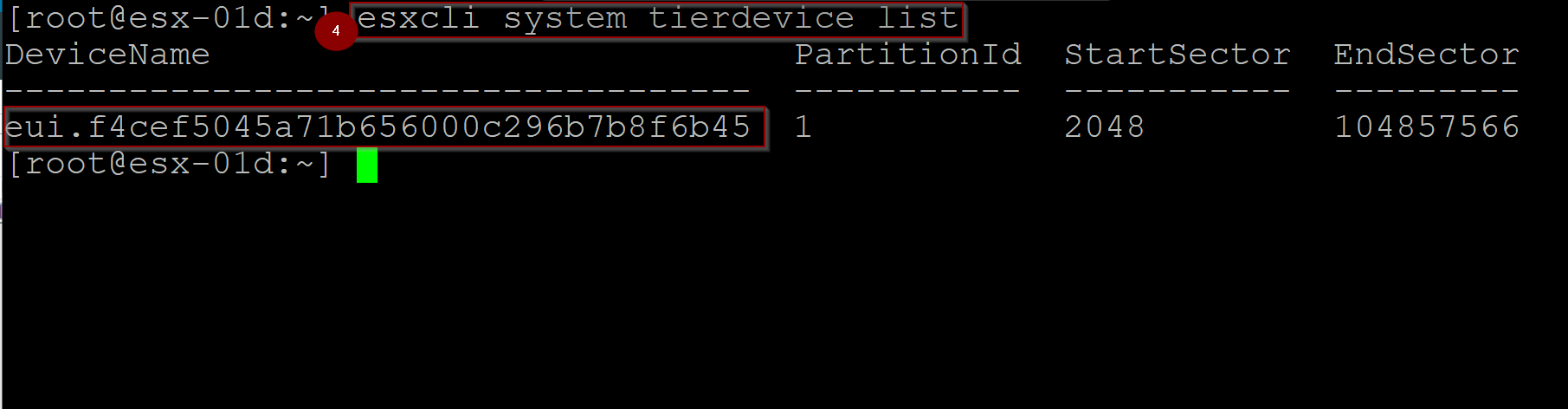
4. Run the below cmd to check the status of tier partition
cmd : – esxcli system tierdevice list
Note: – As you can see in the capture 4 partition has created.
Capture 5: –
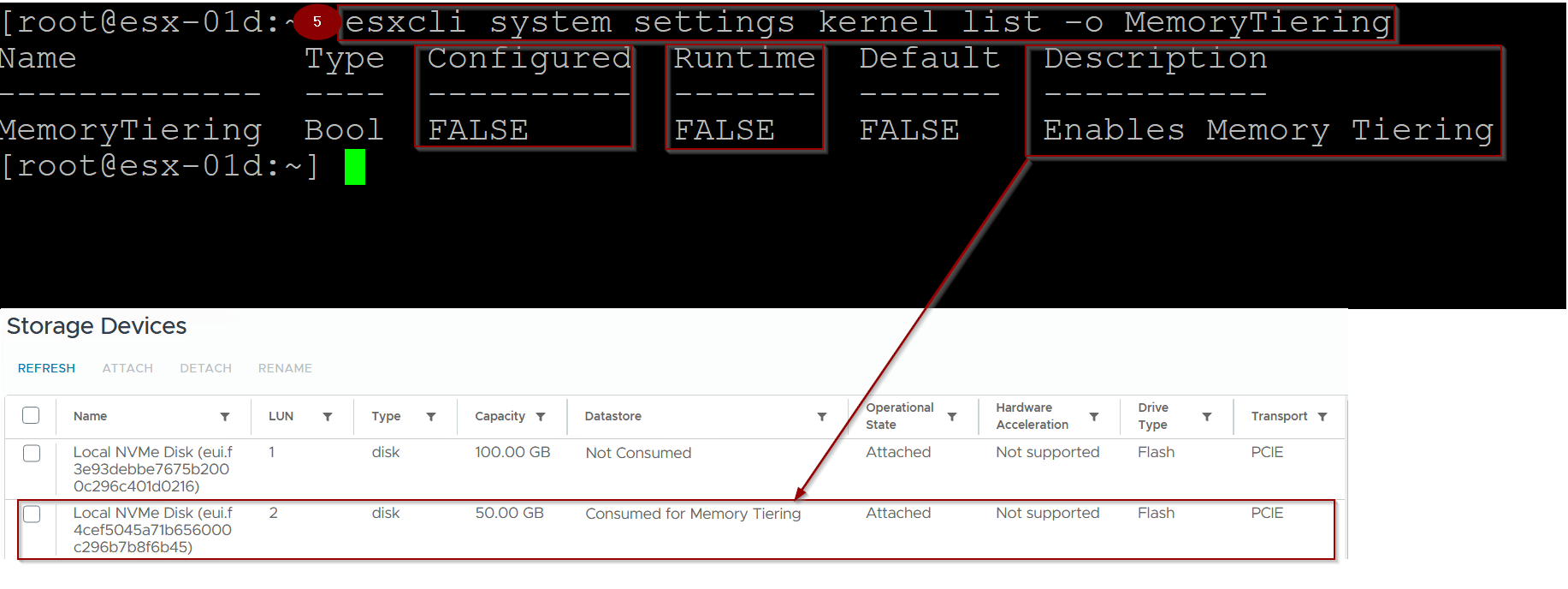
5. Run the below cmd to Verify the status of memory tiering on host.
cmd: – esxcli system settings kernel list -o MemoryTiering
Note:- As we can see the memory tiering is enabled but the runtime and configured is still false.
Capture 6: –
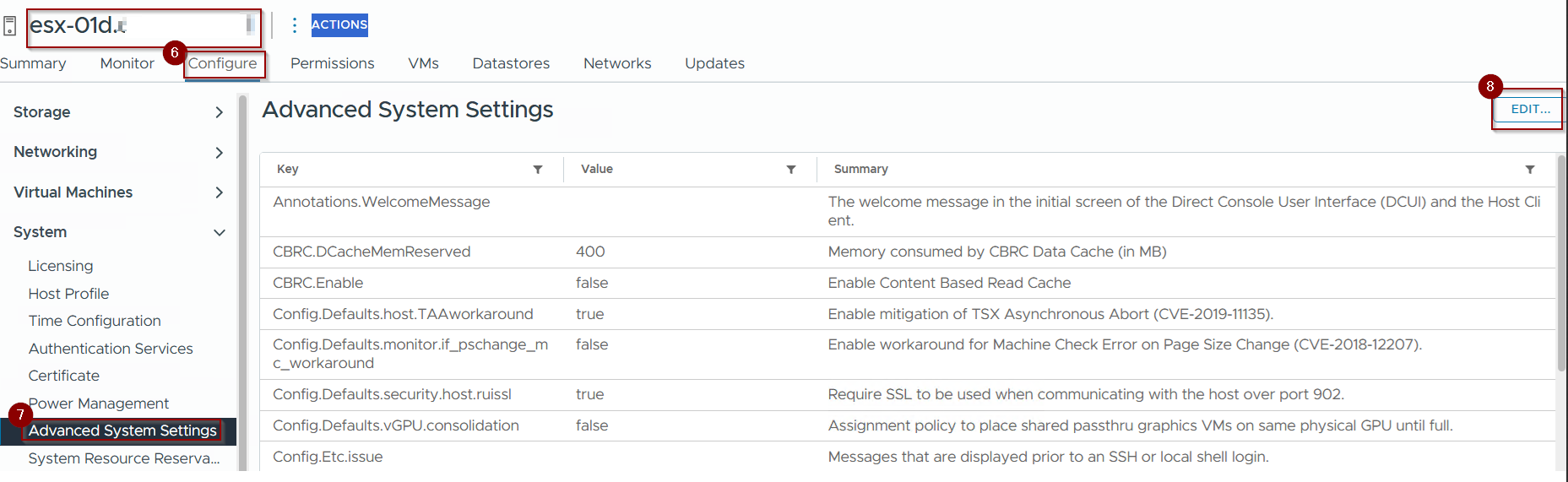
6. click on Configure.
7. Click on click on Advanced System Setting under System
8. Click on Edit.
Capture 7: –
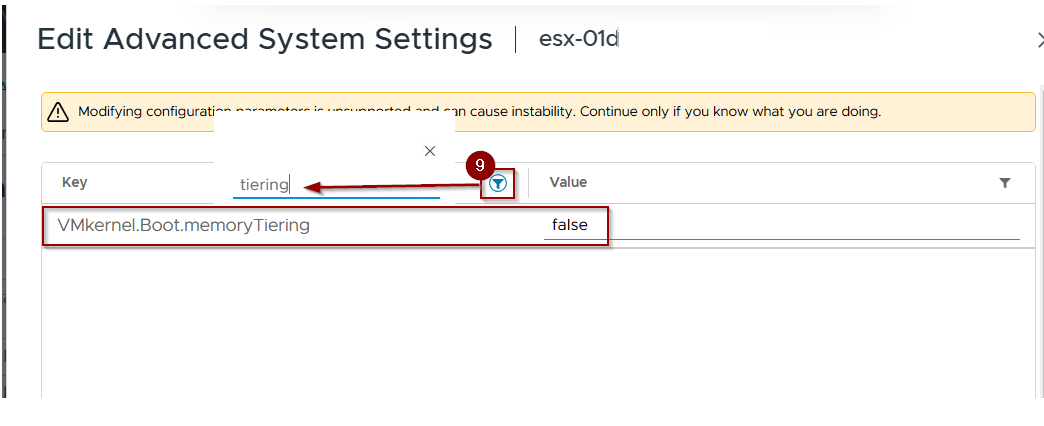
9. Click on Filter and search for tiering.
Capture 8: –
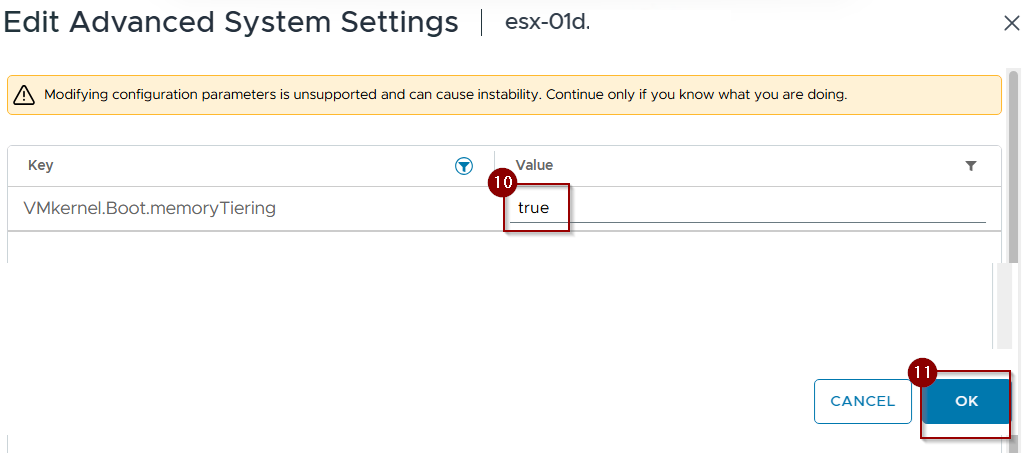
10. Change the value from false to true.
11. Click on OK.
Capture 9: –
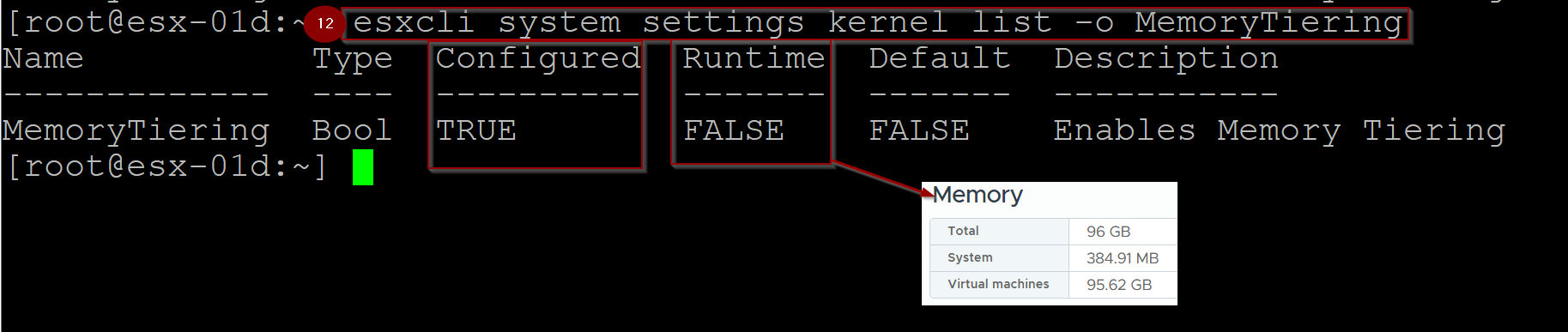
12.Run the below cmd to Verify the status of memory tiering on host.
cmd: – esxcli system settings kernel list -o MemoryTiering
Note:- As we can see the memory tiering is enabled. Configured is now true but Runtime is still false.
Capture 10.
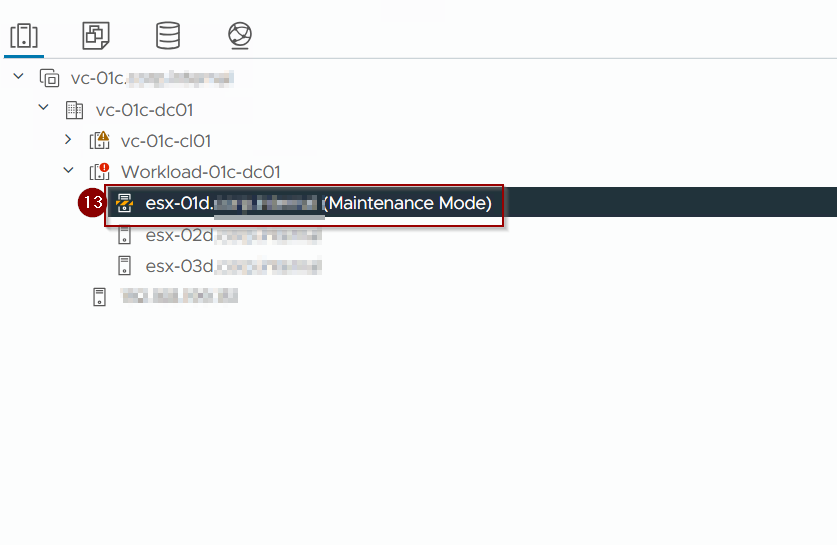
13. Put the host in maintenance mode and restart the host, so runtime value will be changed. Once the host restarted then exit the maintenance mode.
Post Validation
Capture 1: –
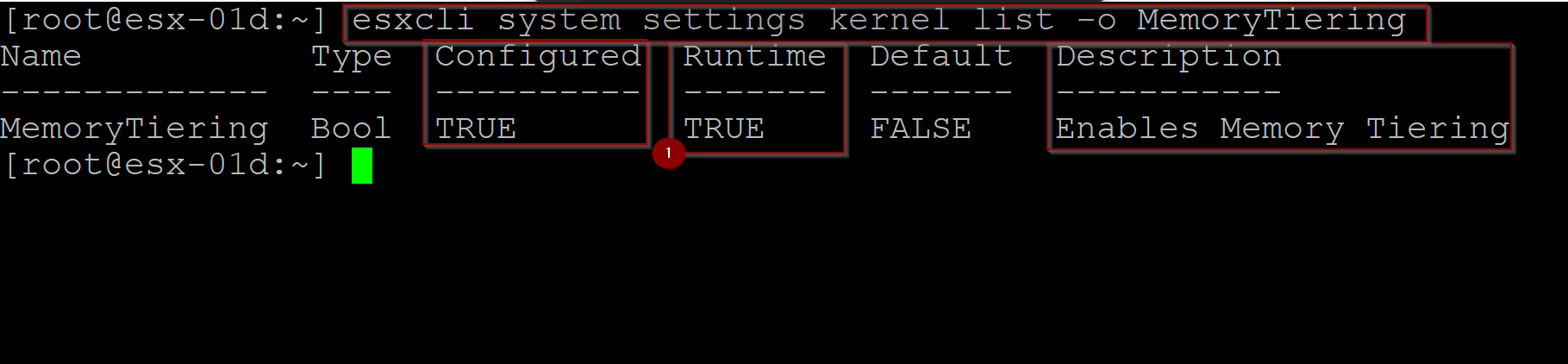
- As we can see the runtime value is now TRUE.
Capture 2: –
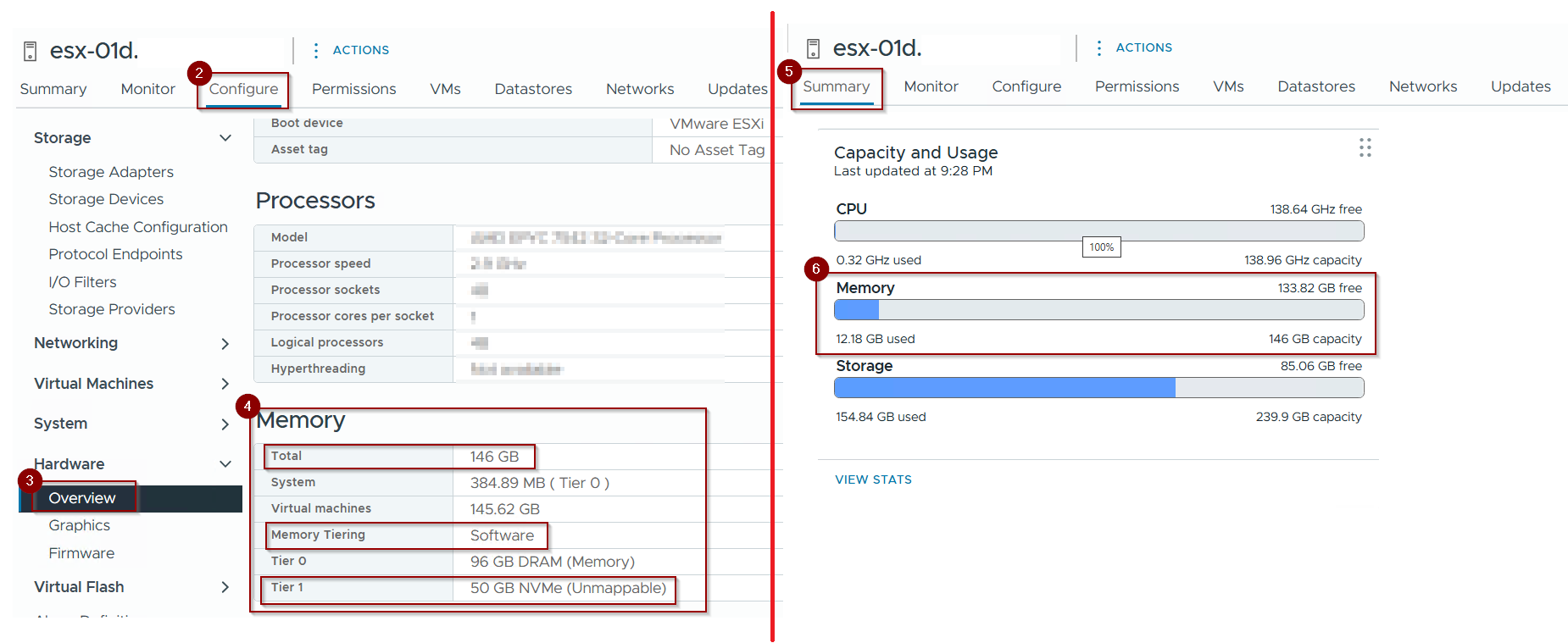
2. Click on Configure.
3. Click on Overview under hardware.
4. Under Memory we can see the below
Total memory is increased now from 96 GB to 146 GB(96 GB DRAM + 50 GB NVMe).
5. Click on Summary.
6. As you can see the Total memory is 146 GB(tier 0 (physical)+ tier 1 (Software)).
Operational Considerations and Performance Isolation
Maintaining performance and stability in a converged vSAN + Memory Tiering environment is paramount.
- Performance Isolation (Achieved by Dedication): The strict dedication of NVMe devices for Memory Tiering (separate from vSAN) inherently ensures performance isolation at the physical device level. This prevents I/O from memory operations directly impacting vSAN storage I/O, and vice-versa.
- Shared Host Resources: While devices are dedicated, they still share underlying host resources (CPU cycles for I/O processing, PCIe bus bandwidth, DRAM for I/O buffers). It is essential to ensure that the aggregate demand from both vSAN and Memory Tiering does not oversubscribe these shared internal host resources.
- Monitoring Strategy: A comprehensive monitoring strategy must encompass:
- vSAN Performance Metrics: Latency, throughput, and IOPS for vSAN disk groups (cache and capacity tiers).
- Memory Tiering Metrics: Tier 0/Tier 1 utilization, page migration rates (
Tier1_Page_Ins/sec,Tier1_Page_Outs/sec), and dedicated NVMe device performance (IOPS, latency, queue depth). - Host-Level Resource Utilization: CPU, PCIe bus utilization, and overall host memory utilization to identify potential bottlenecks that could affect either vSAN or Memory Tiering.
Conclusion
This final segment concluded our series by addressing the specific architectural and deployment considerations when integrating vSphere Memory Tiering over NVMe within a vSAN-enabled cluster. The critical takeaway is the absolute requirement for dedicated NVMe devices for Memory Tiering, completely separate from those used by vSAN. We explored the implications for host hardware, deployment strategies for new and existing vSAN clusters (following Approach 1 and Approach 2), and the importance of monitoring and capacity planning in these converged environments to ensure performance isolation and optimal resource utilization. By meticulously planning and adhering to the principle of NVMe device dedication, organizations can effectively leverage both vSAN for high-performance storage and Memory Tiering for augmented host memory, achieving a highly efficient and scalable virtualized infrastructure.
 Puneet Sharma
Leave a comment