

- Introduction
- Series Summary
- Telemetry Review and Multi-Dimensional Analysis
- The Remediation Workflow
- Implementation Steps: Executing Optimization
- Conclusion
Introduction
The VCF 9.0 execution cycle is the operational bridge between AI-driven capacity forecasting and physical infrastructure remediation. Once the engine identifies that a data center is “Not Optimized” due to a breach of operational or business intent, the system enters an analysis-action loop. This part details the technical workflow of reviewing telemetry, validating recommendations, and executing remediation through manual, scheduled, or automated modes.
Series Summary
- Part 1: Architecture and Logic of VCF 9.0 Workload Placement: Understanding the integration between VCF Operations and vSphere DRS.
https://puneetsharma.blog/2026/01/03/part-1-architecture-and-logic-of-vcf-9-0-workload-placement/ - Part 2: Defining VCF 9.0 Operational Intent for Capacity Management
Mastering Operational Intents to prioritize performance balancing versus hardware consolidation.
https://puneetsharma.blog/2026/01/15/part-2-defining-vcf-9-0-operational-intent-for-capacity-management/ - Part 3: Utilizing Business Intents and Tagging for automated license enforcement and compliance.
https://puneetsharma.blog/2026/02/20/part-3-enforcing-vcf-9-0-governance-through-business-intents/ - Part 4: (Current)The VCF 9.0 Execution Cycle: Analyzing and Implementing Optimization
Managing the Action-Recommendation Loop via manual, scheduled, and automated execution modes.
https://puneetsharma.blog/2026/03/03/part-4-the-vcf-9-0-execution-cycle-analyzing-and-implementing-optimization/ - Part 5: VCF 9.0 VM Lifecycle Optimization: Rightsizing Strategies
Precision resource management through Rightsizing oversized and undersized VMs.
https://puneetsharma.blog/2026/03/16/part-5-vcf-9-0-vm-lifecycle-optimization-rightsizing-strategies/
Telemetry Review and Multi-Dimensional Analysis
Before any workload movement occurs, VCF 9.0 performs a multi-dimensional analysis of the fleet’s current state. This analysis is not based on a single “hot” metric but on a comprehensive review of telemetry:
- Query-Based Analysis: Administrators use integrated query tools to isolate specific bottlenecks across CPU, memory, and disk space.
- “Before and After” Modeling: When an optimization plan is generated, the UI presents a data grid showing current utilization versus the projected state after the proposed moves. This ensures that a move to resolve a CPU hotspot does not inadvertently create a memory bottleneck in the destination cluster.
- Predictive Validation: The engine cross-references real-time data with historical forecasting. If a move provides immediate relief but is projected to cause stress within the next two hours due to periodic peaks, the move is suppressed.
The Remediation Workflow
Remediation in VCF 9.0 follows a structured path to ensure that infrastructure changes remain within safety parameters.
Optimization Potential vs. Actionable Recommendations
- Optimization Potential: A “what-if” view that disregards underlying constraints (such as manual DRS rules or storage affinity) to show the maximum theoretical balance achievable.
- Actionable Recommendations: The “Optimize Now” wizard excludes VMs with active constraints, focusing only on moves that can be performed safely while maintaining the 2-hour stability window.
Compatibility Check Engine
Every recommended move undergoes a technical compatibility check:
- Resource Availability: Verification of target host capacity including overhead.
- Network Readiness: Validation of L2 adjacency and vMotion network heartbeat.
- Tag Matching: Ensuring the destination host or cluster complies with the Business Intent tags defined in the policy.
Execution Modes: Manual, Scheduled, and Automated
Administrators can choose the level of intervention required for the execution cycle:
- Manual (Optimize Now): Used for immediate remediation after an ad-hoc workload deployment or a hardware maintenance event.
- Scheduled: Allows rebalancing to occur during defined maintenance windows, minimizing the impact of the minimal vMotion-related downtime on sensitive applications.
- Automated (Self-Driving): VCF 9.0 continuously monitors intent. When a breach is detected, the system autonomously issues vMotion API calls to vCenter to re-align the fleet with the desired state.
Implementation Steps: Executing Optimization
To technically manage the execution cycle in VCF 9.0, follow this process:
Step 1: Identify Optimization Triggers
Capture 1: –
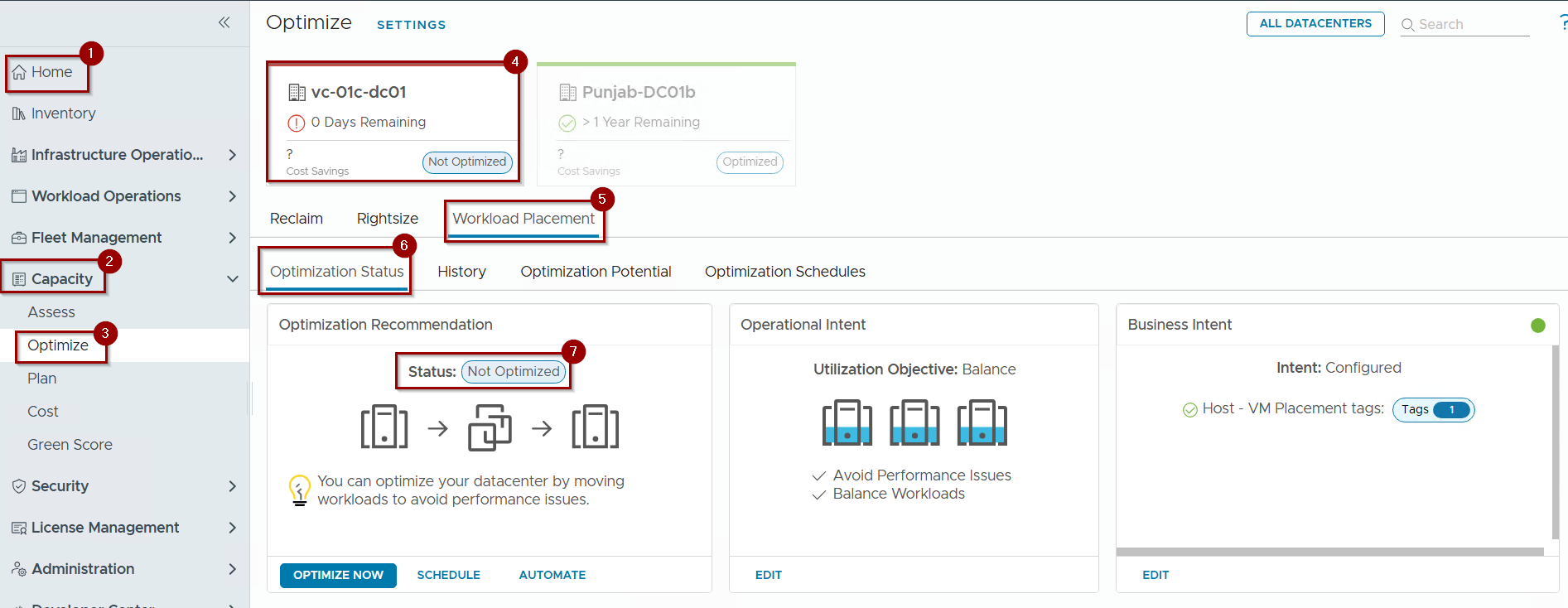
- Navigate to Home.
- Click on Capacity.
- Click on optimize.
- Review the carousel for any Data Center marked in red or orange (“Not Optimized”).
- Click on Workload Placement.
- Examine the Optimization Status Tab to identify the breach cause (e.g., Contention, Imbalance, or Tag Violation).
- Status “Not Optimized”
Step 2: Review and Validate the Plan
Capture 2: –
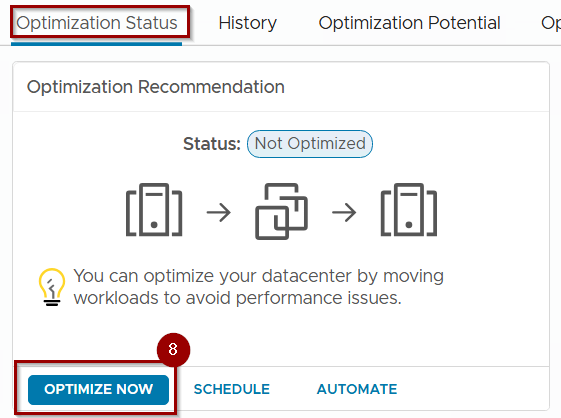
8.Click Optimize Now to open the remediation wizard.
Capture 3: –
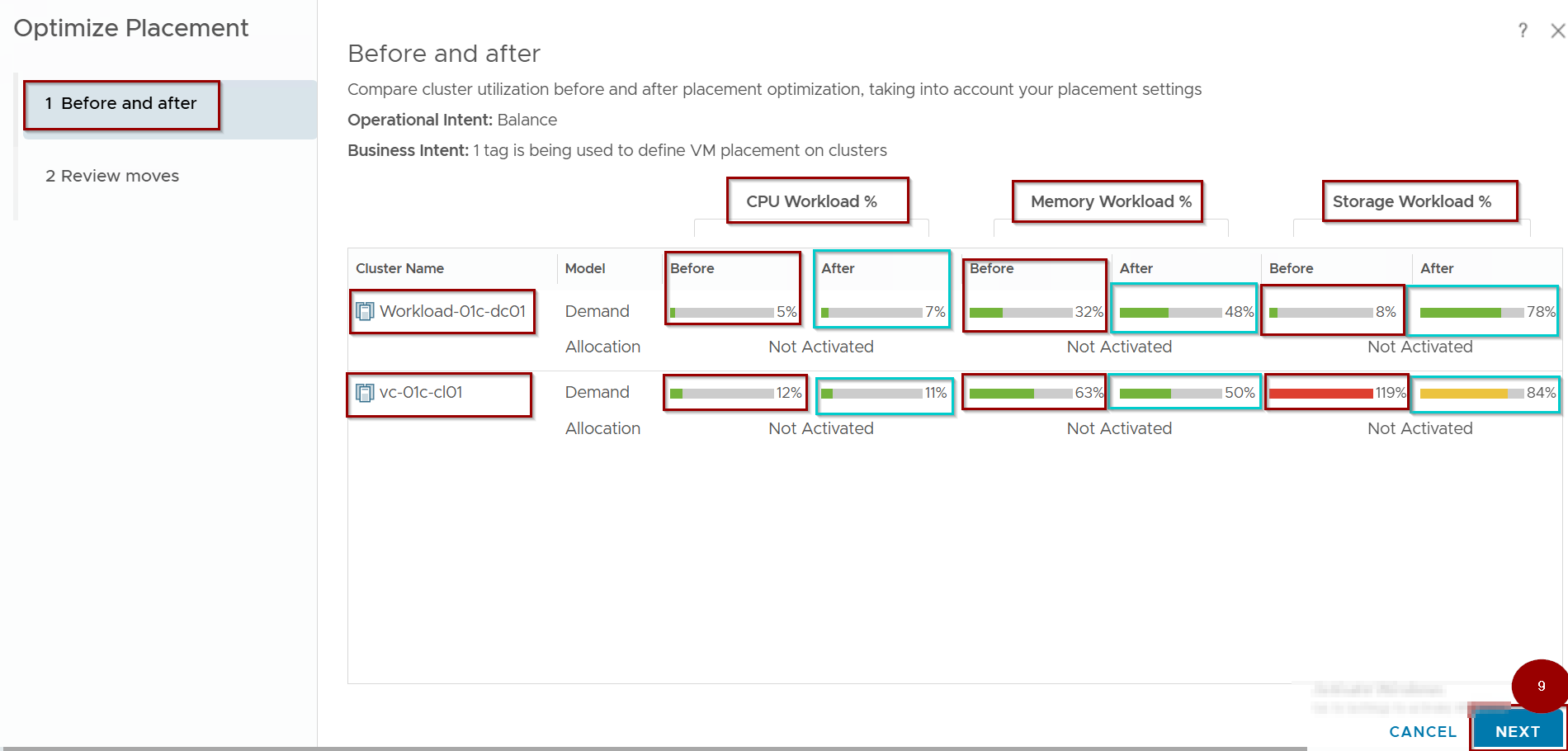
9. Click on Next.
Note: – In the Capture Colour RED is used for Before and Colour Sky Blue is used for After.
Capture 4: –
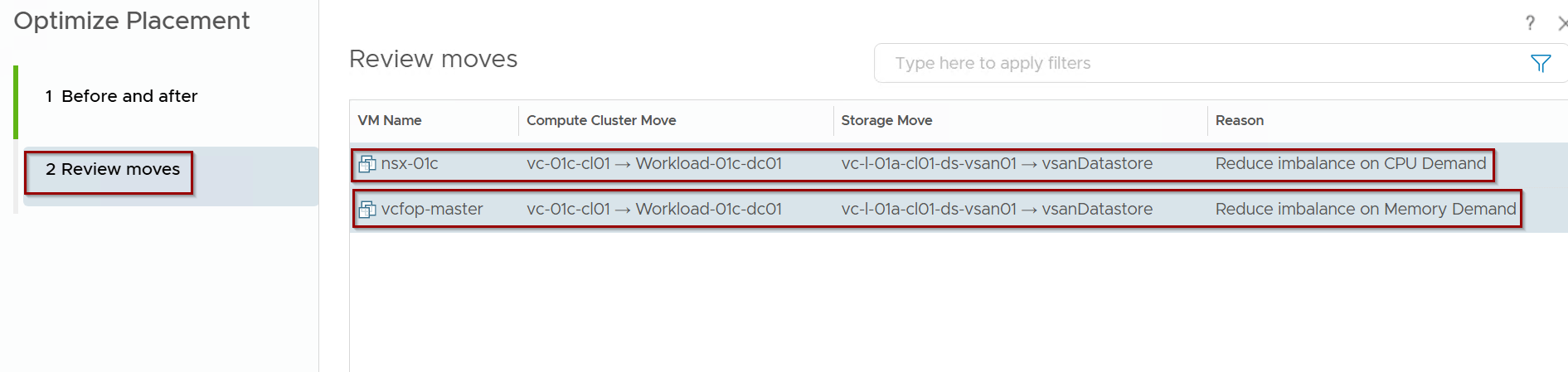
In the Review Moves pane, verify the list of VMs targeted for migration and their destination clusters.
Capture 5: –
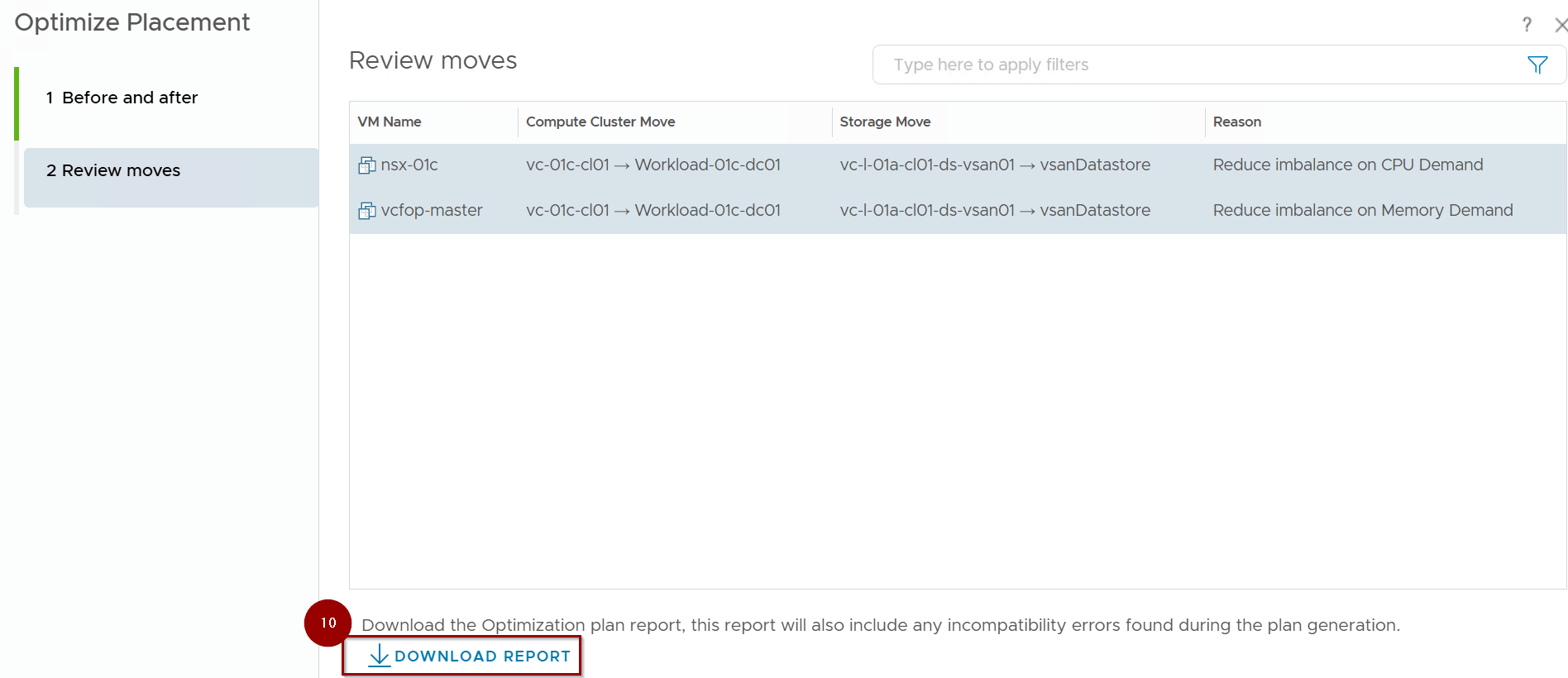
10.Download the Optimization Potential Report if you need to identify why certain VMs were excluded from the plan (e.g., incompatible DRS rules).
Step 3: Commit and Monitor
Capture 6: –
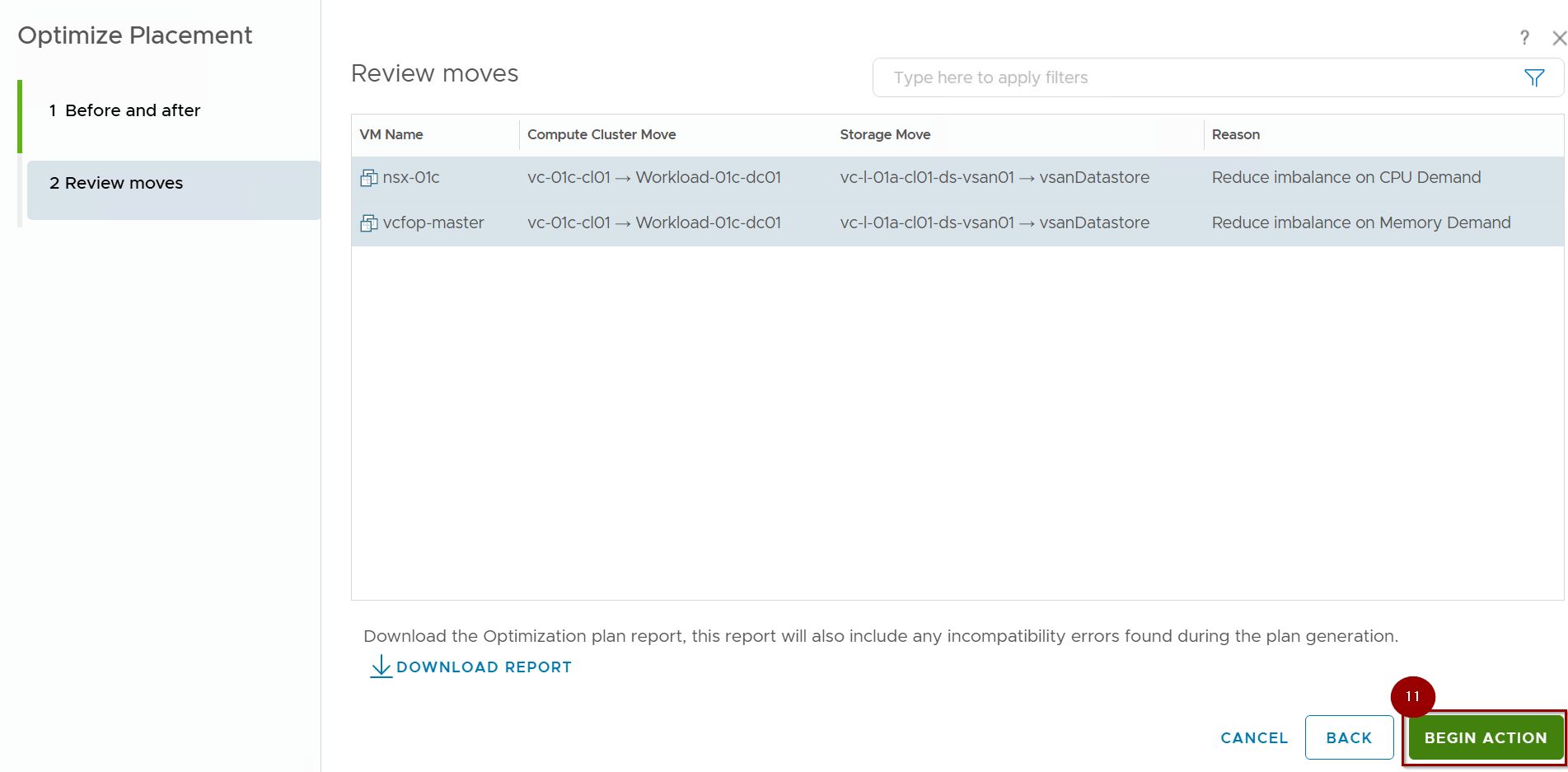
11.Click Begin Action to start the migration tasks.
Capture 7:-
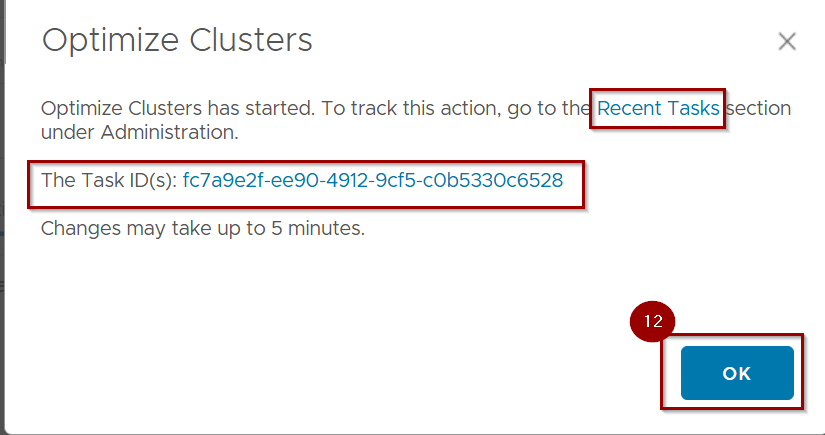
12. Click on OK.
Capture 8: –

In the Recent task as we can see the both VM are successfully migrated.
Capture 9: –
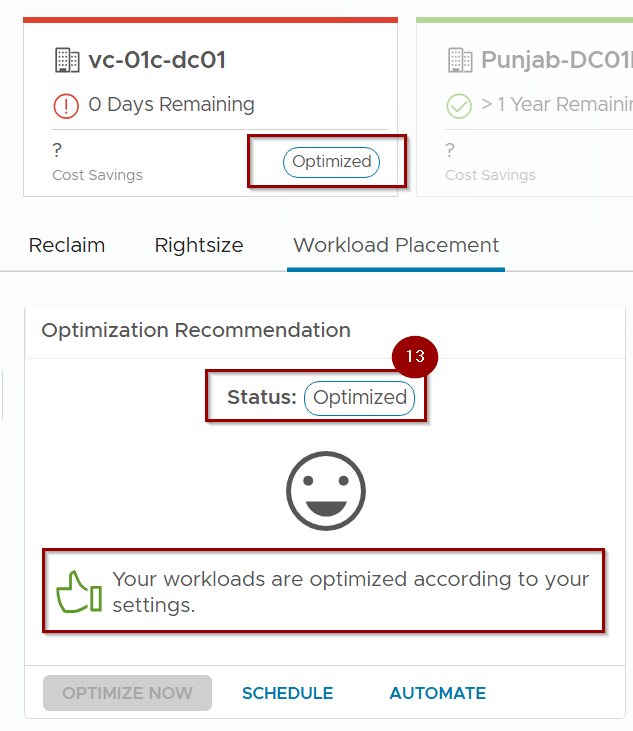
13. Workload Placement is Optimized Now.
Conclusion
The execution cycle in VCF 9.0 transforms passive monitoring into active infrastructure management. By using multi-dimensional analysis and predictive validation, the platform ensures that remediation actions are stable, compliant, and efficient. Whether executing manually or utilizing self-driving automation, this cycle is the final step in ensuring the VCF fleet remains in its desired state.
Next Step: In Part 5, we will conclude the series by exploring VM Lifecycle Optimization, focusing on precision rightsizing strategies for oversized and undersized VMs.


Leave a comment