

- Introduction
- Series Summary
- Advanced Rightsizing Metrics
- Precision Rightsizing Strategies
- Performance Tuning: NVMe Memory Tiering
- Implementation Steps: Precision Rightsizing
- Conclusion: The Self-Optimizing Lifecycle
Introduction
The final phase of VCF 9.0 workload placement is lifecycle optimization through precision Rightsizing. While rebalancing handles cluster-wide distribution, rightsizing addresses the individual resource efficiency of virtual machines (VMs). By utilizing AI-driven demand forecasting, VCF 9.0 identifies VMs that are provisioned with excessive resources (oversized) or insufficient resources (undersized), allowing for a high-density, high-performance environment that minimizes total cost of ownership (TCO).
Series Summary
- Part 1: Architecture and Logic of VCF 9.0 Workload Placement: Understanding the integration between VCF Operations and vSphere DRS.
https://puneetsharma.blog/2026/01/03/part-1-architecture-and-logic-of-vcf-9-0-workload-placement/ - Part 2: Defining VCF 9.0 Operational Intent for Capacity Management
Mastering Operational Intents to prioritize performance balancing versus hardware consolidation.
https://puneetsharma.blog/2026/01/15/part-2-defining-vcf-9-0-operational-intent-for-capacity-management/ - Part 3: Utilizing Business Intents and Tagging for automated license enforcement and compliance.
https://puneetsharma.blog/2026/02/20/part-3-enforcing-vcf-9-0-governance-through-business-intents/ - Part 4: The VCF 9.0 Execution Cycle: Analyzing and Implementing Optimization
Managing the Action-Recommendation Loop via manual, scheduled, and automated execution modes.
https://puneetsharma.blog/2026/03/03/part-4-the-vcf-9-0-execution-cycle-analyzing-and-implementing-optimization/ - Part 5: (Current)VCF 9.0 VM Lifecycle Optimization: Rightsizing Strategies
Precision resource management through Rightsizing oversized and undersized VMs.
https://puneetsharma.blog/2026/03/16/part-5-vcf-9-0-vm-lifecycle-optimization-rightsizing-strategies/
Advanced Rightsizing Metrics
VCF 9.0 rightsizing logic is driven by actual workload behavior rather than static limits. The platform utilizes two primary telemetry points to calculate demand:
- CPU Demand (MHz): Calculates the actual MHz required if all contention factors (CPU Ready, Co-Stop, and Hyper-threading) were removed.
- Memory Utilization (KB): Collected directly from the guest OS via VMware Tools (VMTools). This metric is superior to host-level memory counters as it accounts for guest-level swapping and paging, providing a precise view of active memory pressure.
Precision Rightsizing Strategies
VCF 9.0 classifies VMs into two technical categories, each requiring a distinct optimization strategy:
A. Oversized VMs (Waste Identification)
- Definition: VMs with resource allocations significantly higher than their peak historical demand.
- Technical Impact: Wasted DRAM and CPU cycles on the physical host, which can lead to unnecessary memory ballooning on other VMs.
- Step-Size Logic: To prevent performance regressions, VCF 9.0 caps reduction recommendations at 50% of current resources (e.g., an 8-vCPU VM will be recommended for reduction to 4 vCPUs first, even if its demand is only 1 vCPU).
B. Undersized VMs (Performance Remediation)
- Definition: VMs whose demand consistently breaches their allocated limits, causing application-level bottlenecks.
- Technical Impact: High CPU Ready times and guest OS swapping.
- Step-Size Logic: Additions are capped at 100% of current resources to allow for safe scaling and reassessment of the workload’s organic growth.
Performance Tuning: NVMe Memory Tiering
VCF 9.0 introduces Memory Tiering over NVMe as a supplemental lifecycle optimization strategy.
- Tiering Logic: The ESXi kernel treats local NVMe flash as a secondary layer to physical DRAM. Cold memory pages are automatically moved to NVMe, freeing high-cost DRAM for active working sets.
- Density Impact: This allows administrators to increase VM density per host by up to 38% while maintaining predictable performance for chatty AI pipelines or micro-service meshes.
Implementation Steps: Precision Rightsizing
To technically execute a rightsizing task in VCF 9.0, follow this process:
Step 1: Access the Rightsizing Workspace
- Navigate to Capacity > Optimize > Rightsize.
- Review the Scoreboard for a summary of total reclaimable and required resources across the cluster.
Capture 1: –
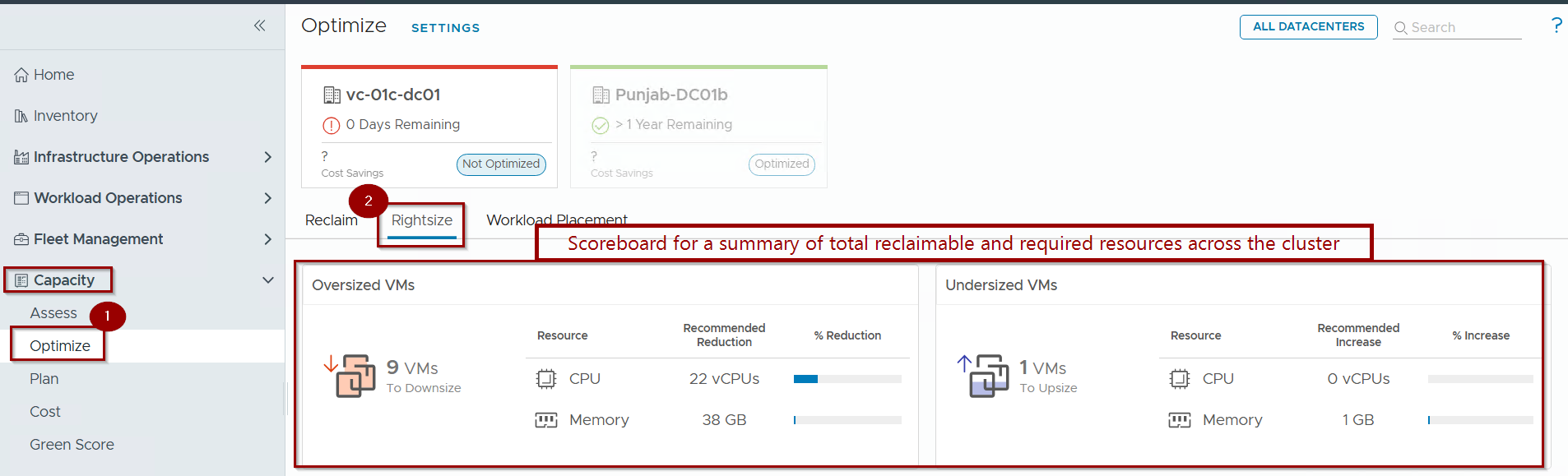
- Navigate to Capacity > Optimize.
- Select the Rightsize.
Note: -We can Review the Scoreboard for a summary of total reclaimable and required resources across the cluster.
Step 2: Analysis and Identification
- Filter for Oversized or Undersized VMs.
- Select a VM to view the Rightsizing Rationale, which compares the Current Size against the Recommended Size (calculated as the maximum projected utilization over the next 150 days).
Capture 2: –
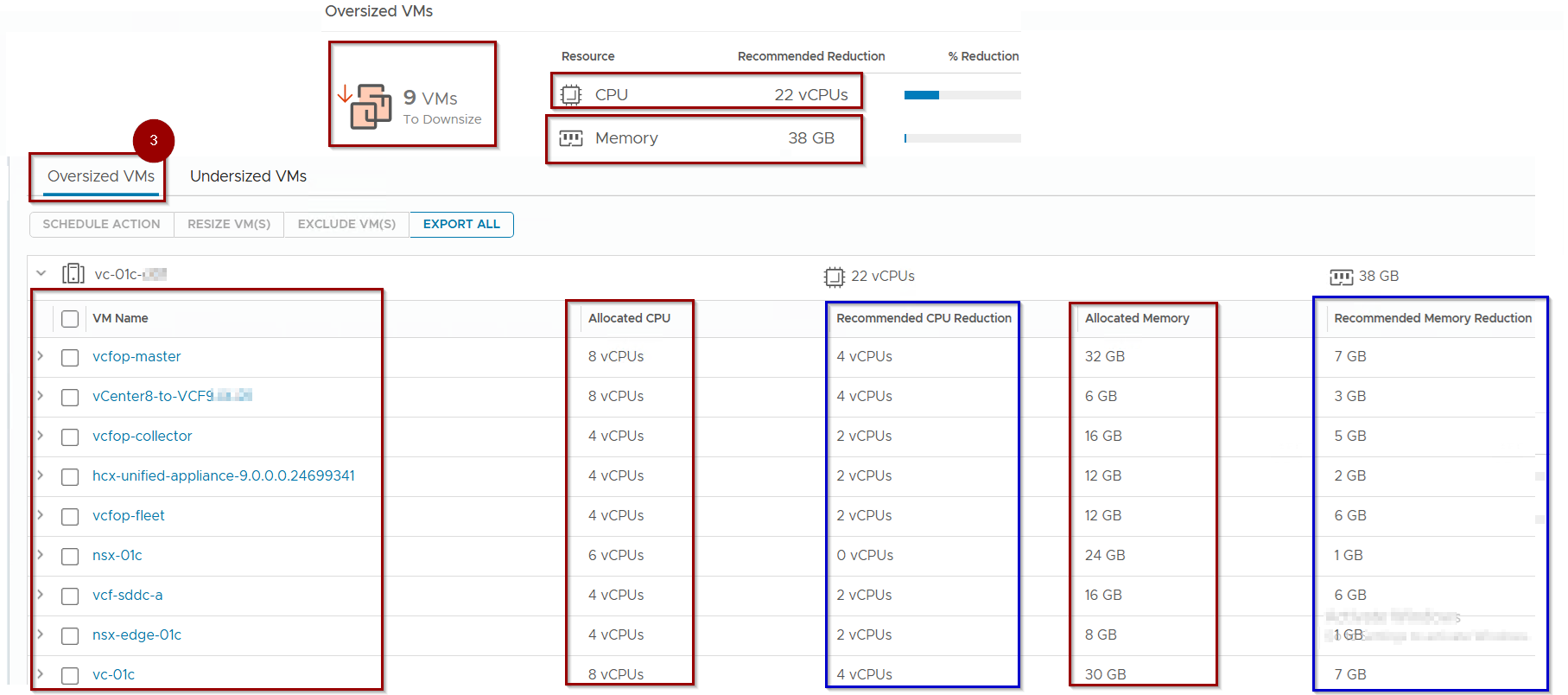
3. Filter for Oversized VMs.
Note: – In Capture 2, we can see a total of 9 VMs where we can reduce CPUs and memory. Focus on the “Allocated” and “Recommended” sections.
Capture 3: –
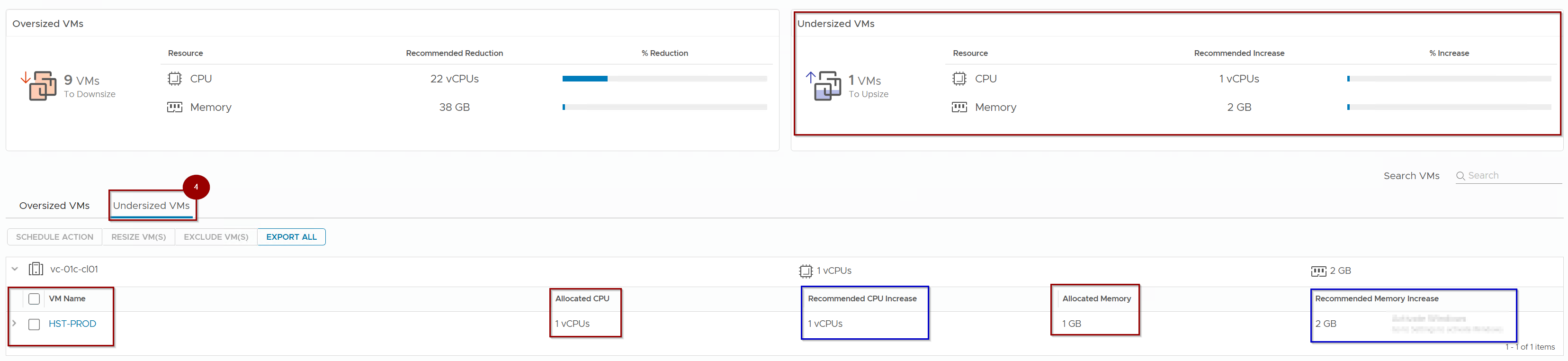
4. Filter for Undersized VMs.
Note: – In Capture 3, we can see a single VM and determine why it is listed under the undersized VM section. Please focus on the “Allocated” and “Recommended” sections.
Step 3: Execution of the Resize Action
Capture 4: –

5. Select the target VM(s).
6. Click Resize VM(s).
Capture 5: –
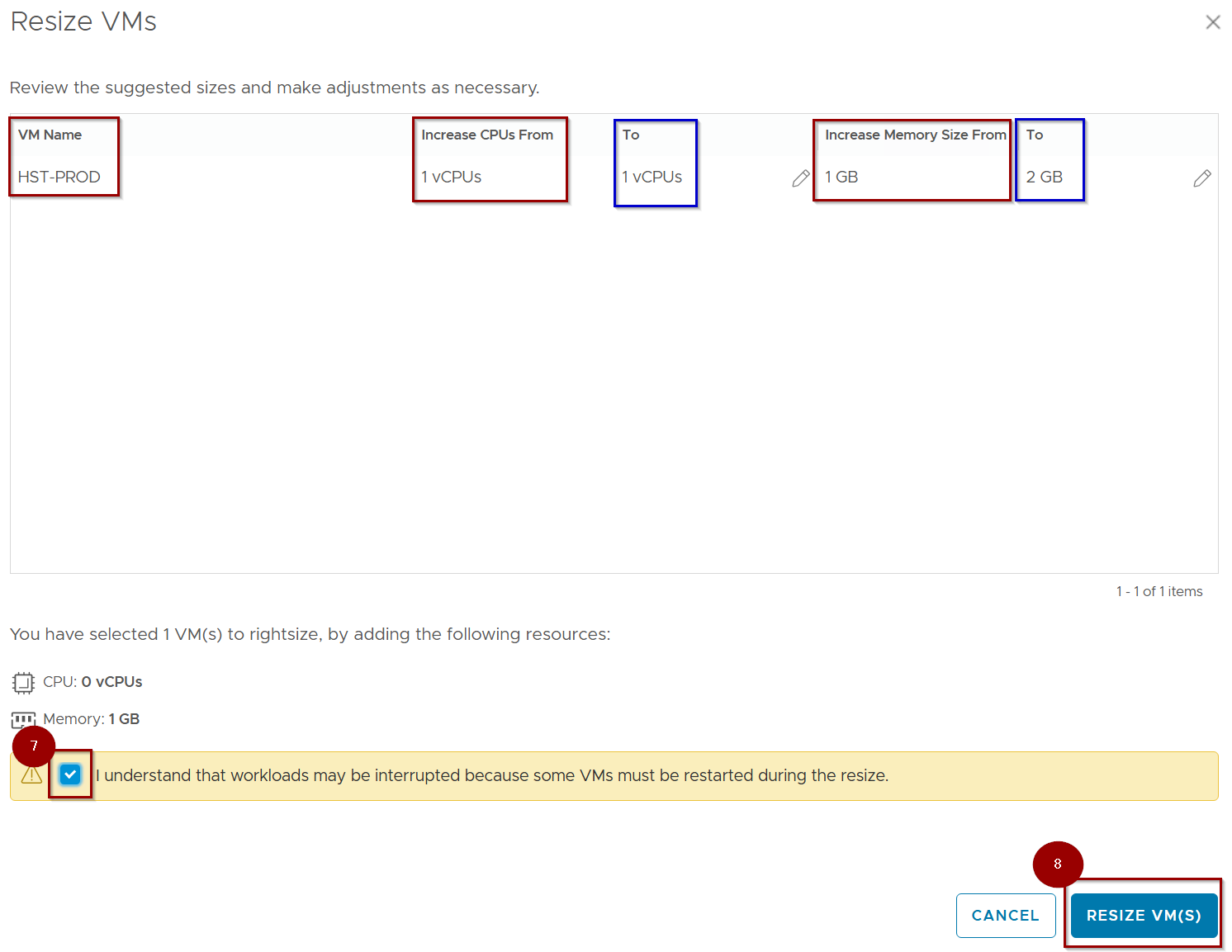
7. Select the Check box .
8. Click on RESIZE VM(s).
Capture 6: –
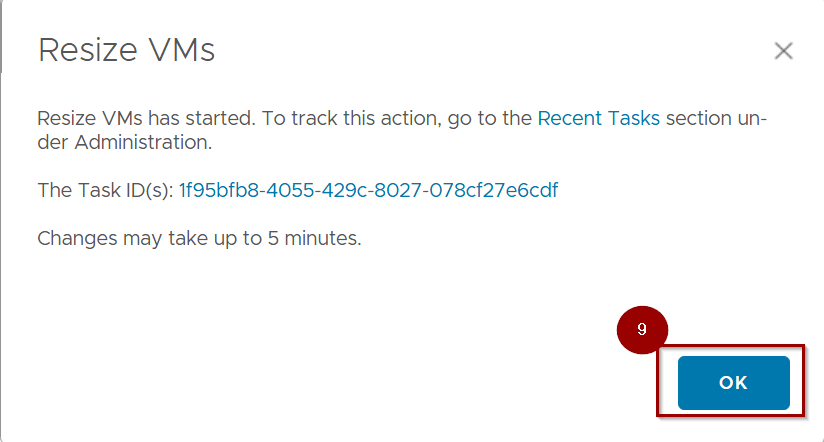
9. CLick on OK.
Capture 7: –
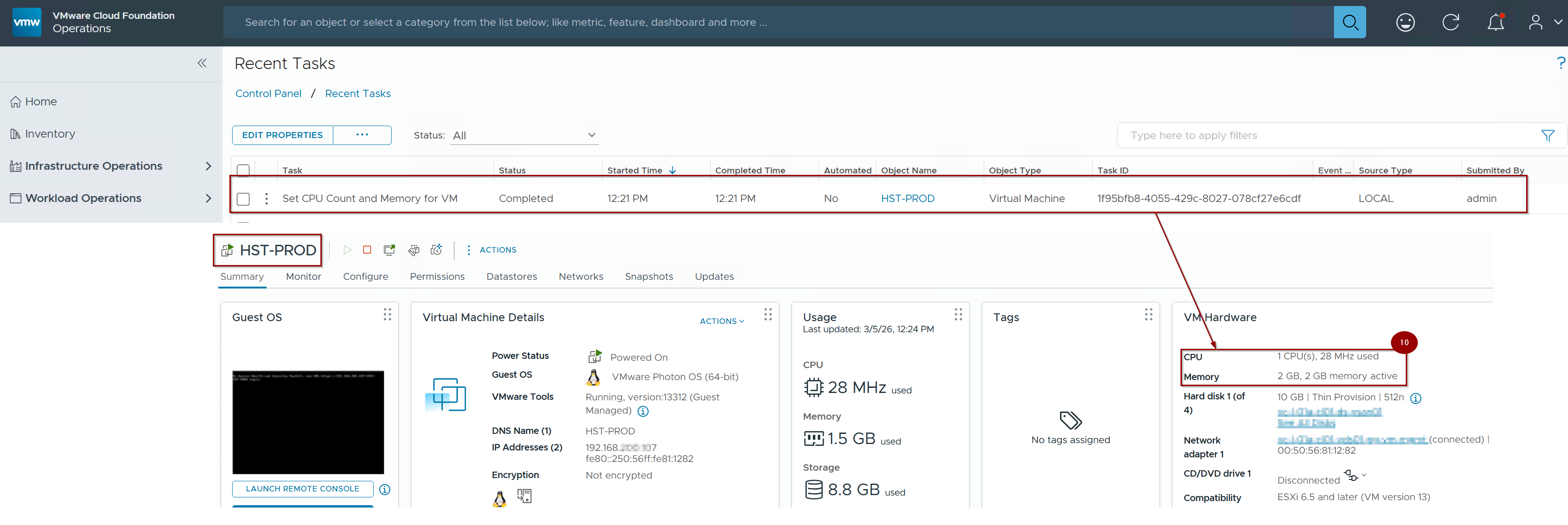
10. As we can see the recommendations are applicable.
Note: –Hot-Add Awareness: If vCPU/Memory Hot-Add is enabled on the VM, the changes are applied instantly without a reboot.
If Hot-Add is disabled, acknowledge the restart requirement and click Begin Action. Track the progress in the Recent Tasks pane of vCenter.
Conclusion: The Self-Optimizing Lifecycle
VM Lifecycle Optimization through rightsizing and hardware tiering is the final piece of the VCF 9.0 workload placement puzzle. By addressing efficiency at the VM level, administrators ensure that the rebalancing efforts covered in Parts 1 through 4 are performed on a fleet of perfectly sized, highly efficient workloads. This holistic approach turns the private cloud into a resilient, self-optimizing engine that scales according to actual technical demand.
Series Conclusion: We have successfully navigated the architecture, intents, governance, execution, and lifecycle strategies of VCF 9.0 Workload Placement. Your environment is now architected to be not just a pool of resources, but an intelligent, intent-driven ecosystem.
 Puneet Sharma
Leave a comment