

- Introduction
- The Architectural Challenge: NFC vs. vMotion
- Visualizing the Shift: Legacy NFC vs. Unified Data Transport
- Technical Comparison: Why UDT is Faster
- Advanced Aspects: What You Need to Know
- Step-by-Step Configuration: Enabling the Provisioning Service
- Conclusion
Introduction
In modern data centers, migrating virtual machines across non-shared storage or over long distances has traditionally been a performance bottleneck. While live vMotion is highly optimized, cold migrations and snapshot-heavy transfers often hit a “protocol ceiling.” vSphere 8 and 9 resolve this through Unified Data Transport (UDT).
The Architectural Challenge: NFC vs. vMotion
To understand UDT, we must first look at the legacy protocol: Network File Copy (NFC).
- Legacy NFC: Used for cold migrations (powered-off VMs), cloning, and transferring snapshots. NFC is a synchronous, single-threaded protocol. It requires a “Read-Write-Acknowledge” cycle for every block, making it highly sensitive to latency. Its throughput is effectively capped at approximately 1.3 Gbps, regardless of whether you have a 25GbE or 100GbE physical link.
- vMotion Protocol: Used for live migrations. It is asynchronous, multi-threaded, and capable of saturating high-bandwidth links by using multiple stream connections.
The Problem
When an administrator performs a “Change Compute and Storage” migration on a powered-off VM, vSphere historically defaulted to NFC. This resulted in a “performance tax” for cold data, where a 1TB VM could take hours to move despite a high-speed backbone.
Visualizing the Shift: Legacy NFC vs. Unified Data Transport
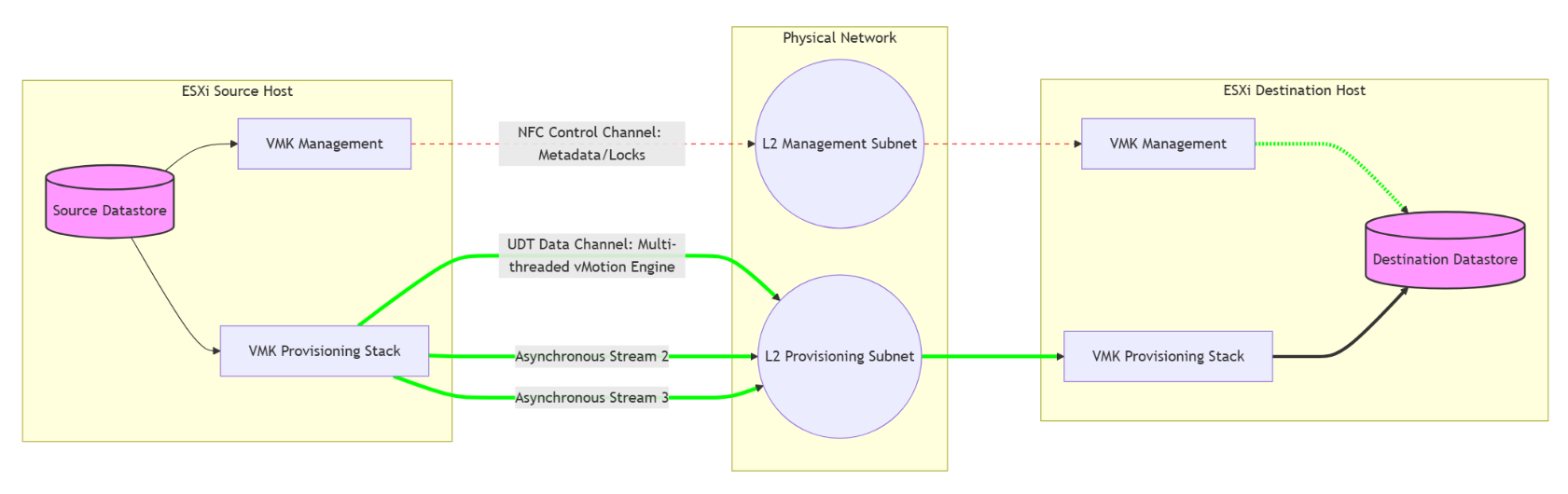
This diagram illustrates how Unified Data Transport (UDT) overcomes the performance limits of legacy vSphere migrations.
- The Legacy Path (Left): Cold migrations traditionally use Network File Copy (NFC). Because NFC is synchronous and single-threaded, it creates a massive bottleneck on the Management Network, typically capping speeds at ~1.3 Gbps regardless of your hardware.
- The UDT Path (Right): UDT re-engineers this by decoupling the process. It uses NFC only as a Control Channel for metadata, while offloading the heavy data payload to the vMotion Engine.
- The Result: By using the asynchronous, multi-threaded vMotion stack, data moves across parallel streams on the Provisioning Network, saturating high-speed links (25/100 GbE) and slashing migration times.
Technical Comparison: Why UDT is Faster
UDT is a hybrid approach. It uses NFC as a Control Channel (to handle metadata and file locks) but offloads the actual Data Payload to the vMotion engine.
| Feature | Legacy NFC | Unified Data Transport (UDT) |
| Execution | Synchronous (Single-threaded) | Asynchronous (Multi-threaded) |
| Typical Speed | capped at ~1.3 Gbps | Physical Link Speed (10/25/100 Gbps) |
| Use Case | Powered-off VMs / Snapshots | Powered-off VMs / Snapshots / Content Lib |
| Primary Bottleneck | Protocol Overhead / Latency | Physical Network Bandwidth |
| Security | Standard Management Traffic | Inherits Encrypted vMotion settings |
Advanced Aspects: What You Need to Know
The Provisioning TCP/IP Stack (Best Practice)
In complex environments, UDT traffic should not run on the Default TCP/IP stack. vSphere 8/9 provides a dedicated Provisioning TCP/IP stack. Using this allows UDT traffic to have its own routing table and default gateway, preventing “asymmetric routing” where traffic leaves via the vMotion network but attempts to return via the Management gateway.
Stream Limits and Concurrency
UDT follows the same “Resource Cost” rules as vMotion. A cold migration over UDT has a cost of 1. On a standard 10GbE+ network, vSphere typically allows a max cost of 8 per host. This means UDT allows you to run 8 concurrent bulk migrations per host efficiently, whereas legacy NFC would frequently time out or throttle under that same load.
Secure Data Transfer
UDT automatically inherits the Encrypted vMotion configuration of the VM. If you are moving sensitive or encrypted workloads, UDT ensures the data payload is encrypted in transit using the vMotion engine, providing a higher security posture than standard Management-based NFC transfers.
Content Library Acceleration
UDT isn’t just for migrations. When you deploy a template from a Content Library to a host that doesn’t share the same storage, vSphere uses UDT to push that template. This is a massive benefit for VDI (Horizon) or automation workflows where rapid deployment from templates is required.
Step-by-Step Configuration: Enabling the Provisioning Service
Prerequisites
- vSphere Version: ESXi and vCenter 8.0 or 9.0 on both source and destination.
- Storage: UDT triggers when the destination datastore is not mounted on the source host (Non-shared storage).
- MTU Consistency: If using Jumbo Frames (9000), it must be consistent across the vMotion and Provisioning VMKs.
Execution Steps
Capture 1: –
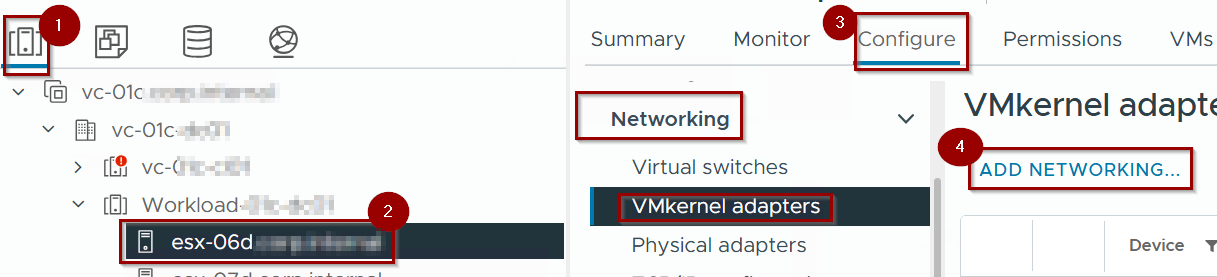
- Navigate to Hosts and Clusters.
- Select an ESXi host.
- Go to Configure > Networking > VMkernel adapters.
- Click on Add networking.
Capture 2: –
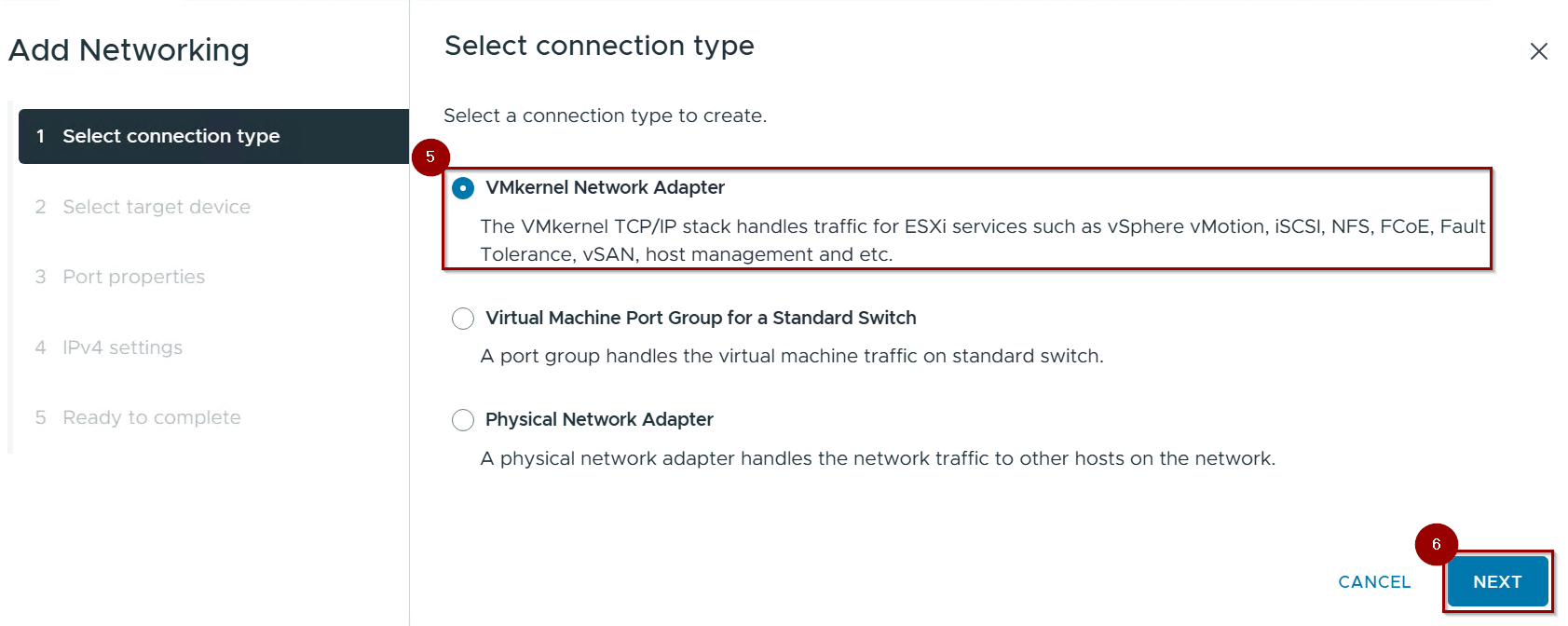
5.Select the Connection Type(VMkernel Network Adapter).
6. Click Next.
Capture 3: –
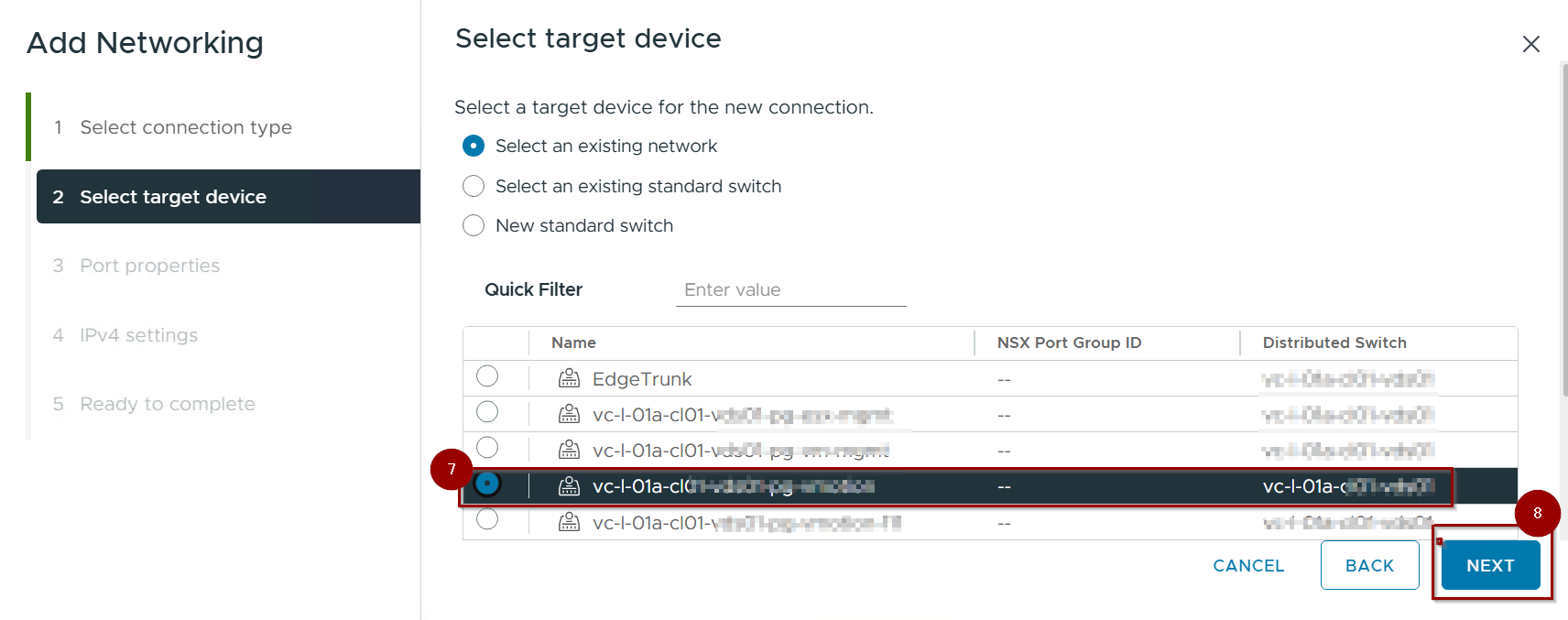
7. Select the Portgroup using for provisioning.
8. Click on Next.
Capture 4: –
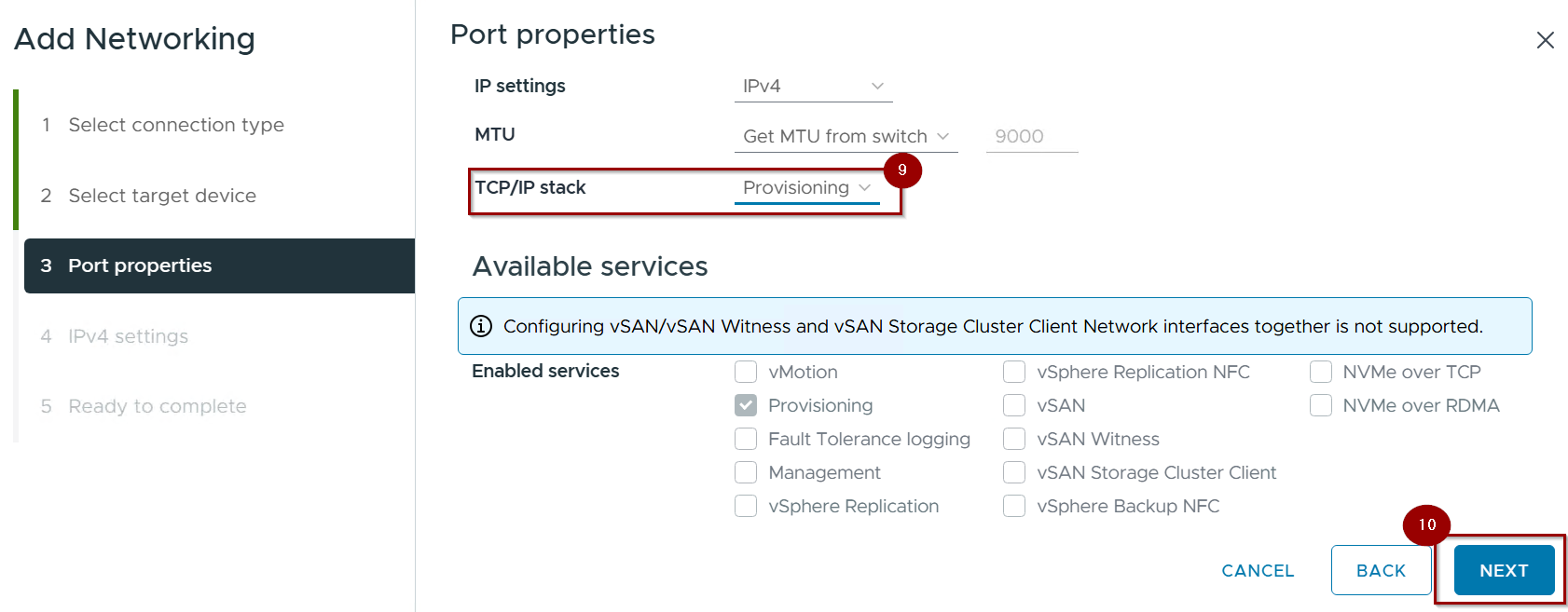
9. Under TCP/IP Stack, check the box for Provisioning.
Pro-Tip: For enterprise environments, select the Provisioning Stack in the TCP/IP stack dropdown to isolate the routing.
10.Click on Next.
Capture 5:-
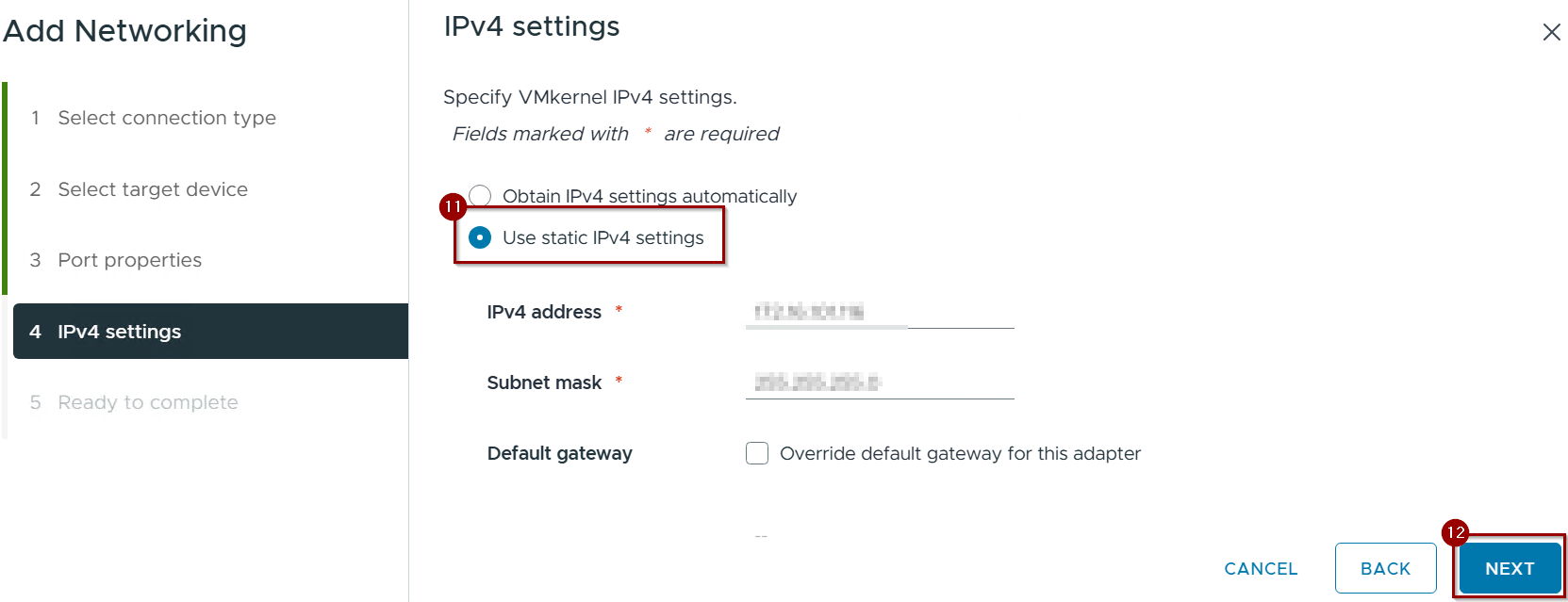
11.Click on use static IPV4 setting.
12. Click on finish.
Capture 6: –
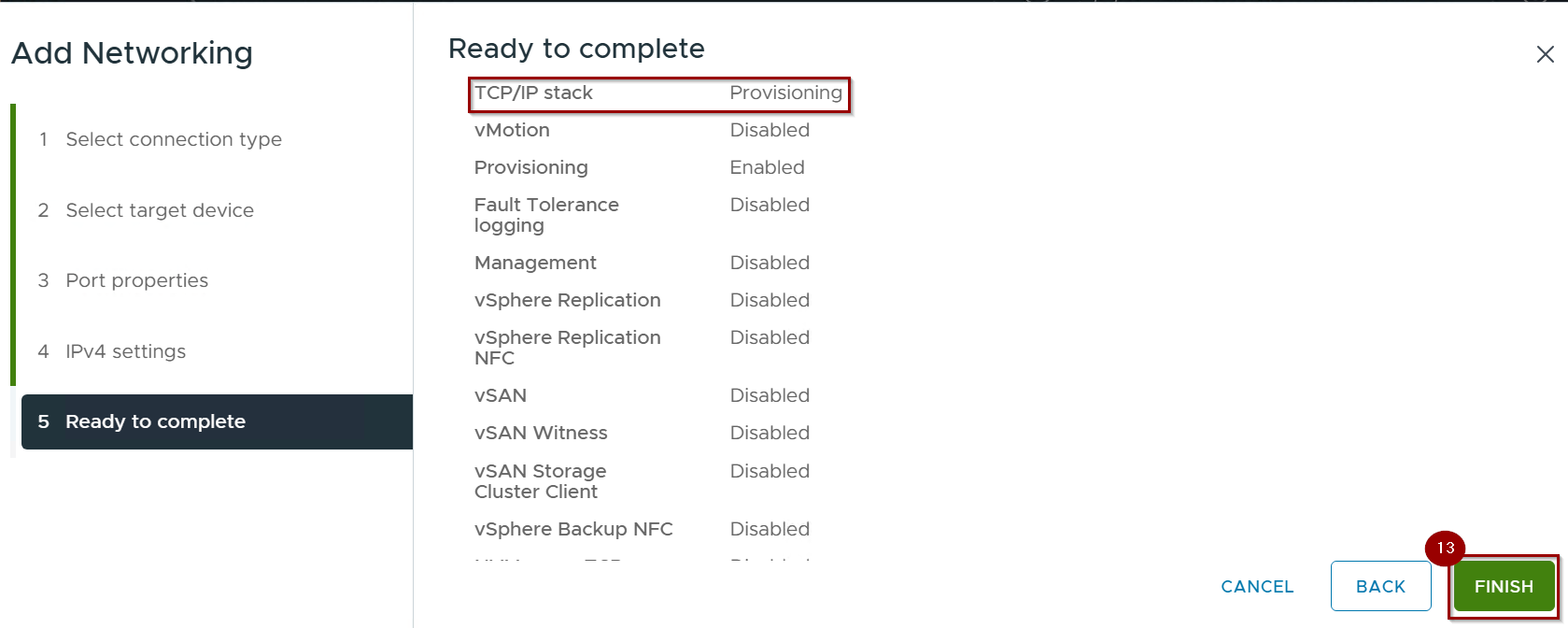
12. Click on Finish.
Capture 7: –
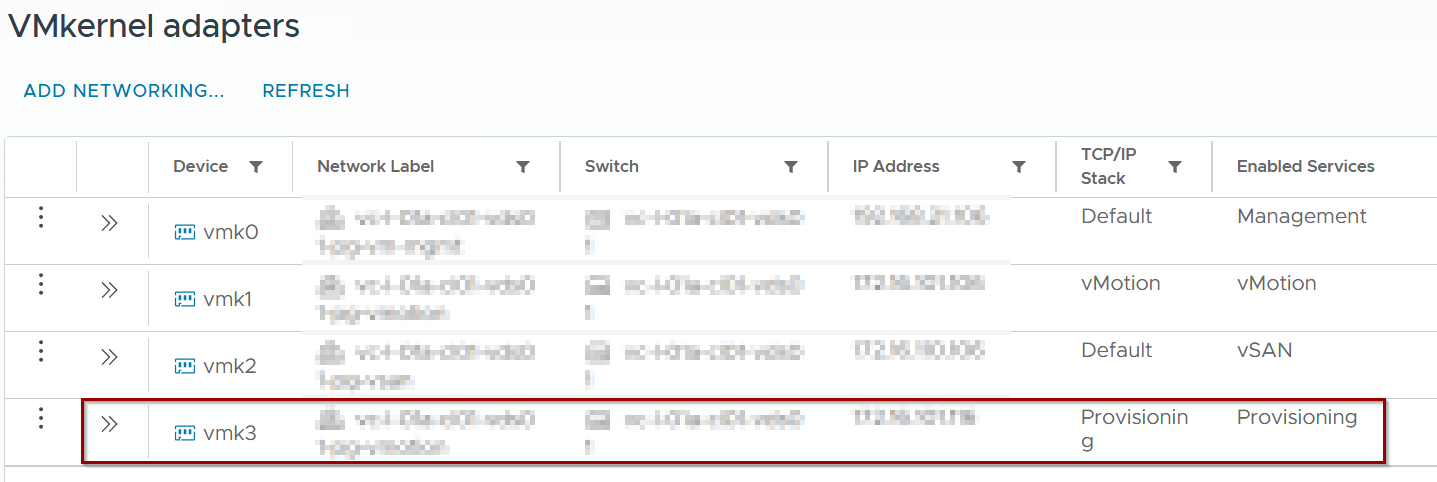
Repeat for all hosts in the cluster.
Verification
To verify UDT is active during a migration, check the vmkernel.log on the destination host via CLI:
Bash
grep UDT /var/log/vmkernel.log
Look for: Migrate: Clean up UDT session. This confirms the transfer bypassed the legacy NFC path.
Conclusion
Unified Data Transport (UDT) is a vital protocol for modern vSphere 9 environments. By bridging the gap between legacy file-copying methods and high-speed vMotion streams, it ensures that “Cold” data moves with “Hot” performance. For any environment performing frequent cross-vCenter migrations, bulk template deployments, or managing “Monster VMs,” enabling the Provisioning service is a mandatory optimization.
 Puneet Sharma
Leave a comment