

Introduction
In modern enterprise data centers running VMware Cloud Foundation (VCF) 9.1, security teams face an ongoing race against time: the gap between when a Critical Vulnerability and Exposure (CVE) is disclosed and when a guest operating system is physically patched. This metric—the Mean Time to Patch (MTTP)—frequently spans 30 to 90 days due to change control windows, mandatory application regression testing, and maintenance downtime restrictions. During this window, unpatched workloads remain exposed to automated network exploit scanners.
Distributed Virtual Patching (DVP) in VMware vDefend 9.1 resolves this operational tension. By inspecting traffic inline inside the ESXi hypervisor at the virtual Network Interface Card (vNIC) layer, vDefend intercepts exploit payloads before they can reach the guest operating system. This eliminates guest agent overhead, avoids server reboots, and provides immediate zero-day protection while granting infrastructure teams the runway needed to perform scheduled guest maintenance.
Virtual Patching Modalities in VCF 9.1
Before examining the underlying architecture, it is essential to distinguish between the different mechanisms designed for vulnerability mitigation within the VMware Cloud Foundation ecosystem. While VCF 9.1 introduces ESXi-level Live Patching for hypervisor hygiene, this guide focuses on workload protection via vDefend Distributed IDPS Virtual Patching.
| Virtual Patching Mechanism | Primary Layer & Component | Mechanism & Scope | Architectural Objective | Guide Focus |
| Distributed IDPS Virtual Patching | L4–L7 Inspection (vDefend IDPS Kernel Module) | Deep Packet Inspection (DPI) matching signature profiles to specific CVE IDs inline at the vNIC interface. | Intercepts and drops exploit payloads targeting unpatched guest OS/App vulnerabilities. | PRIMARY FOCUS |
| Distributed Firewall (DFW) Isolation | L2–L7 Micro-segmentation (vDefend DFW) | Dynamic Security Grouping using VM Tags (e.g., CVE-2026-XXXX) to restrict network exposure. | Limits lateral movement and shrinks the blast radius around vulnerable assets. | Supporting Control |
| Hypervisor ESXi Live Patching | Infrastructure Kernel (VCF Lifecycle Manager / SDDC Manager) | Fast-Suspend-Resume (FSR) patching of ESXi host daemons without rebooting hosts or evacuating VMs. | Patches underlying hypervisor vulnerabilities with zero workload disruption. | Out of Scope (Host OS) |
Note: – Note: While hypervisor live patching ensures host-level security, vDefend Distributed IDPS Virtual Patching operates specifically on the workload data plane—shielding application VMs from targeted network exploits without requiring guest operating system reboots or maintenance windows.
Distributed Virtual Patching Architecture & High-Level Workflow
Unlike traditional perimeter security architectures that force traffic through centralized physical appliances, vDefend Virtual Patching is embedded directly inside the ESXi kernel. The architecture relies on a control-plane to data-plane pipeline that receives threat feeds, compiles localized inspection rules, enforces virtual patches inline, and exports telemetry to centralized analytics engines.
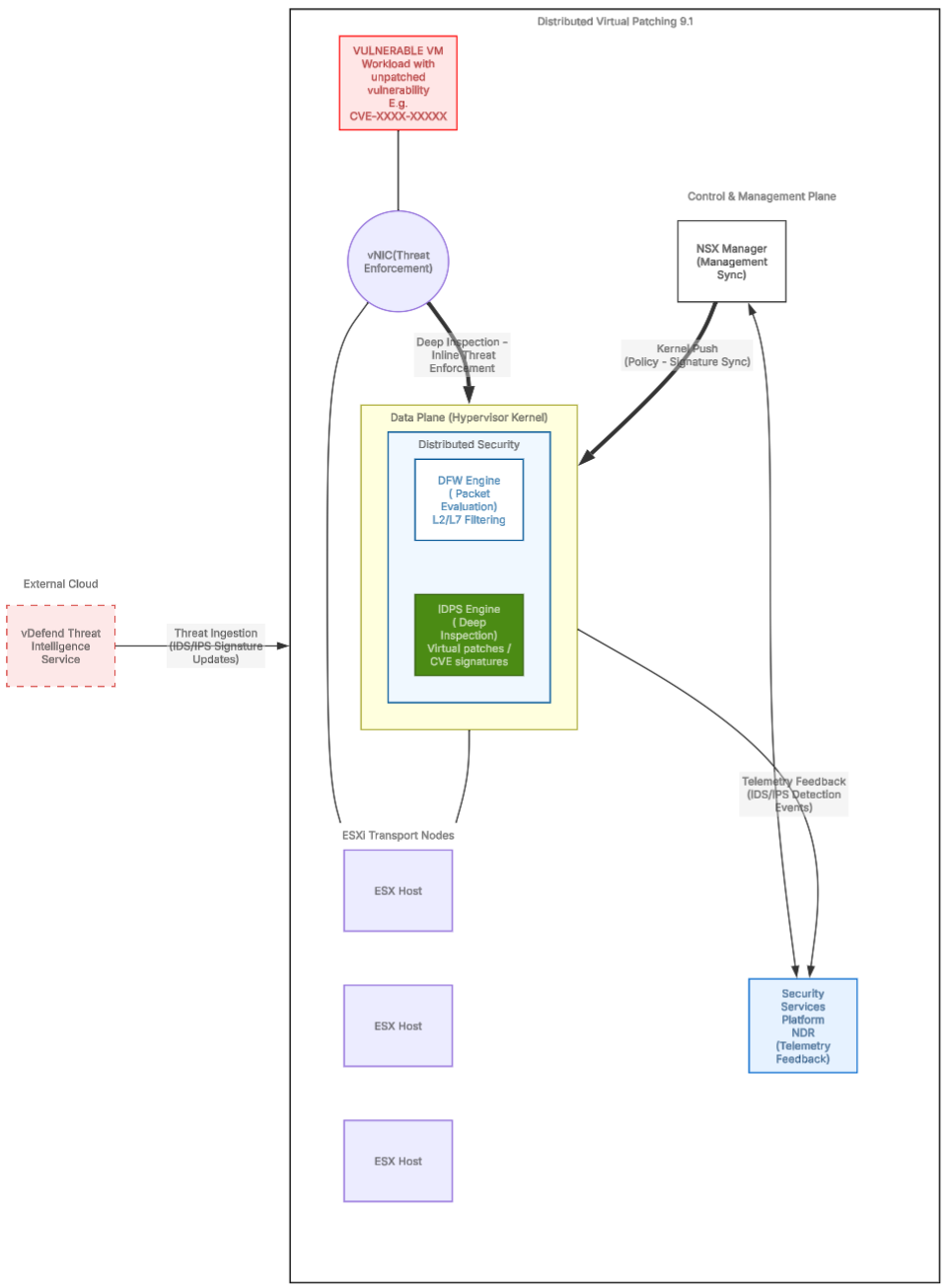
Architectural Workflow: Distributed Virtual Patching
| Workflow Phase | Platform Component | System Action & Technical Execution | Security Outcome |
| Threat Ingestion | Broadcom Threat Intelligence Cloud | Pushes updated IDS/IPS signature packages and CVE definitions automatically (Online Mode) or via offline air-gapped bundles. | Ensures zero-day threat feeds and CVE mappings remain up to date. |
| Management Sync | VMware vDefend | Ingests signature definitions and translates selected CVE rules into localized IDPS inspection profiles. | Prepares targeted, low-overhead virtual patch rules for cluster distribution. |
| Kernel Push | Control Plane → ESX Hosts | Syncs compiled IDPS rules directly to the Kernel Modules (Distributed Security) on every host in the transport zone. | Eliminates network hairpinning by distributing rule enforcement across hypervisor CPU cores. |
| Packet Evaluation | DFW Engine | Processes incoming network packets through Layer 2–Layer 7 stateful firewall policies. | Validates whether the network connection tuple is authorized to proceed. |
| Deep Inspection | IDPS Engine | Executes Deep Packet Inspection (DPI) on permitted traffic, matching payloads against assigned CVE signatures. | Scans network traffic at the vNIC boundary before packets touch the VM network stack. |
| Threat Enforcement | Vulnerable VM vNIC | Neutralizes matching exploit attempts instantly inline based on rule action (Drop/Reject). | Protects unpatched workloads from exploitation without guest OS reboots. |
| Telemetry Feedback | Security Services Platform (SSP) / NDR | Exports event logs, threat indicators, and signature match telemetry from kernel modules to the central analytics core. | Provides SecOps with real-time event correlation and threat campaign visibility. |
Key Operational & Engineering Considerations
To ensure smooth execution in production environments, administrators should align their implementation with three operational practices:
3.1 Connectivity & Signature Ingestion Modes
- Connected Mode (Online): The vDefend management engine establishes a secure outbound connection to the Broadcom Threat Intelligence Cloud, automatically fetching updated IDS/IPS signature packages as new CVE definitions are published.
- Air-Gapped Mode (Offline): For restricted or highly regulated environments without internet connectivity, administrators download offline signature bundle archives (ZIP) directly from the Broadcom Support Portal and upload them manually into the vDefend console to maintain signature freshness.
3.2 Dynamic Tagging Strategy
Rather than manually adjusting static security policies during an active vulnerability incident, leverage vDefend’s dynamic membership rules using vSphere/NSX tags (e.g., CVE-2026-1234 = True or Vulnerability-Status = Unpatched):
- When vulnerability assessment tools flag a vulnerable VM, apply the corresponding tag via API or vCenter.
- The VM instantly inherits the associated IDPS Virtual Patching profile via dynamic group membership.
- Once the physical guest patch is subsequently applied, removing the tag automatically detaches the IDPS profile, reverting the workload to baseline Distributed Firewall rules.
3.3 ESXi Host Capacity & Resource Sizing
Distributed Deep Packet Inspection (DPI) executes within ESXi host memory and CPU cycles. While kernel-native processing eliminates external appliance bottlenecks, administrators must ensure that ESXi clusters maintain adequate buffer capacity—typically reserving 2% to 5% CPU overhead—to handle deep packet inspection during high-throughput network bursts without inducing latency.
The Operational Life Cycle (From Audit to Enforcement)
| Phase | Operational Mode | Technical Objective & Action |
| 1. Vulnerability Ingestion | Feed Synchronization | Fetch and update CVE signature packs into the vDefend management engine (Online or Air-Gapped bundle). |
| 2. Scoped Profile Assignment | Detect Only | Attach CVE-specific IDPS profiles to dynamic Security Groups targeting affected workload tags without dropping traffic. |
| 3. Event Correlation & Tuning | Audit & Baseline | Monitor telemetry alerts in SSP/NDR to analyze signature matches, baseline normal behavior, and rule out false positives. |
| 4. Active Virtual Patching | Inline Prevention (Drop) | Switch rule actions from Detect to Drop/Reject to actively block exploit payloads at line rate at the vNIC layer. |
Step-by-Step Implementation Guide
- Create a new IDS/IPS Profile
Capture 1: –
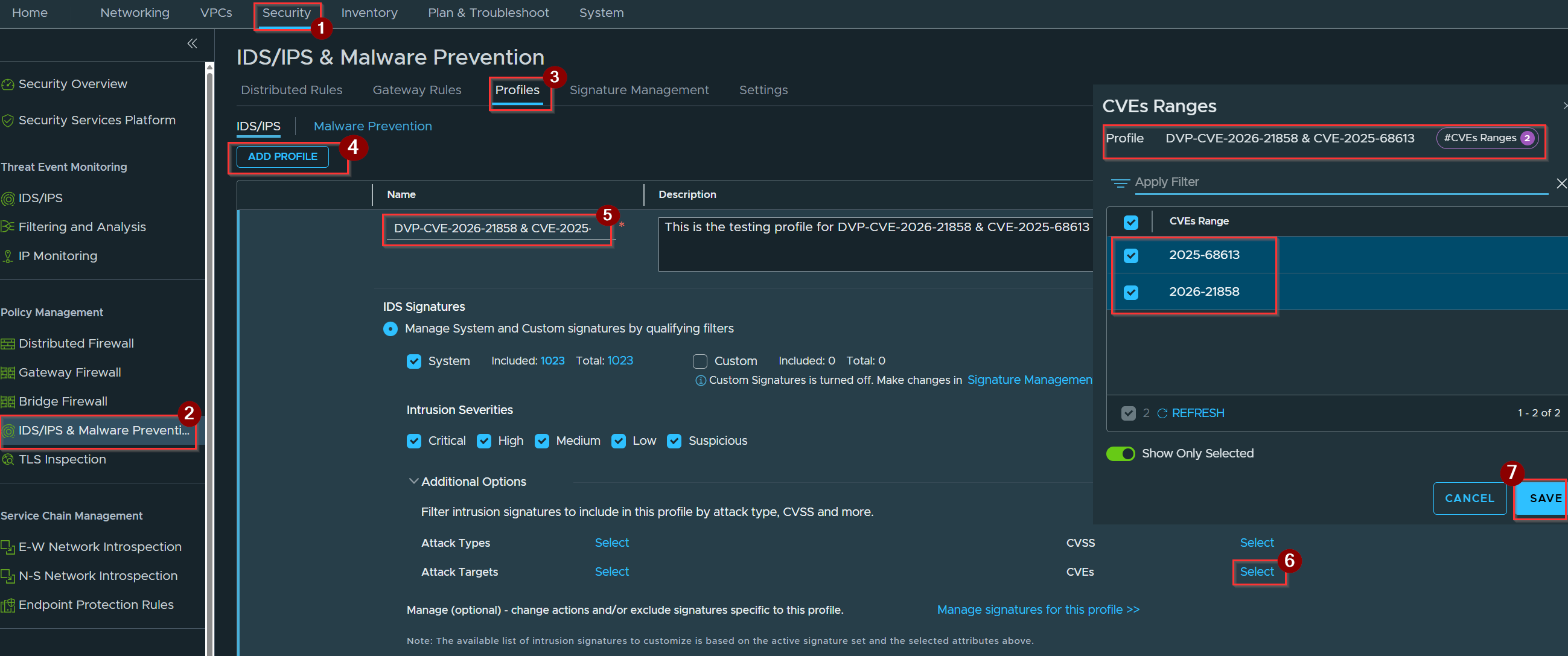
- Click on Security.
- Click on IDS/IPS & Malware Prevention under Policy Management.
- Click on profiles.
- Click on Add Profile.
- Give the Name of the Profile.
- Click on Select under CVEs.
Note:- CVE-2026-21858 & CVE-2025-68613 :- An unauthenticated RCE flaw in the n8n automation platform opens the door for attackers to seize total control of a system through a crafty trick called Content-Type confusion. vDefend steps in as a vigilant guard, spotting malformed JSON payloads and suspicious header mismatches, shutting down the exploit before attackers can hijack internal workflows and roam freely through the data center. - Click on Save.
Capture 2: –
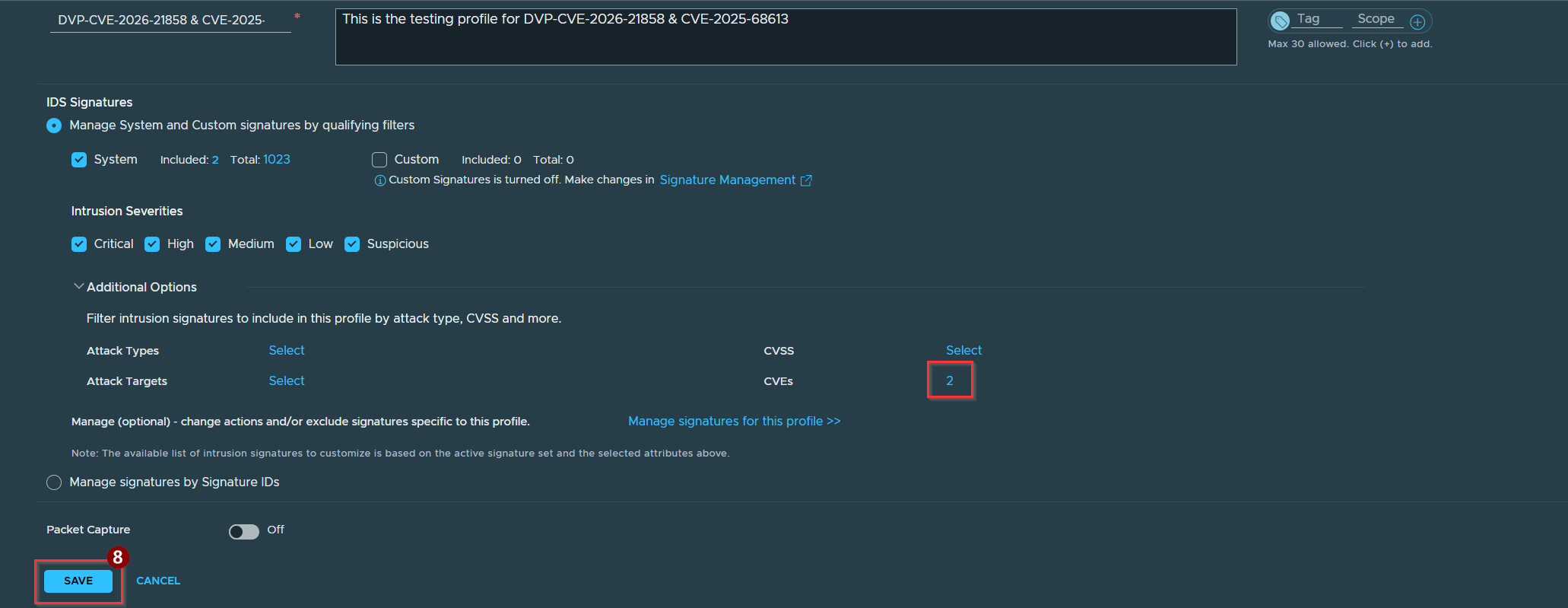
8. Click On Save
2. Add a Service object with Service Entries
Capture 1: –
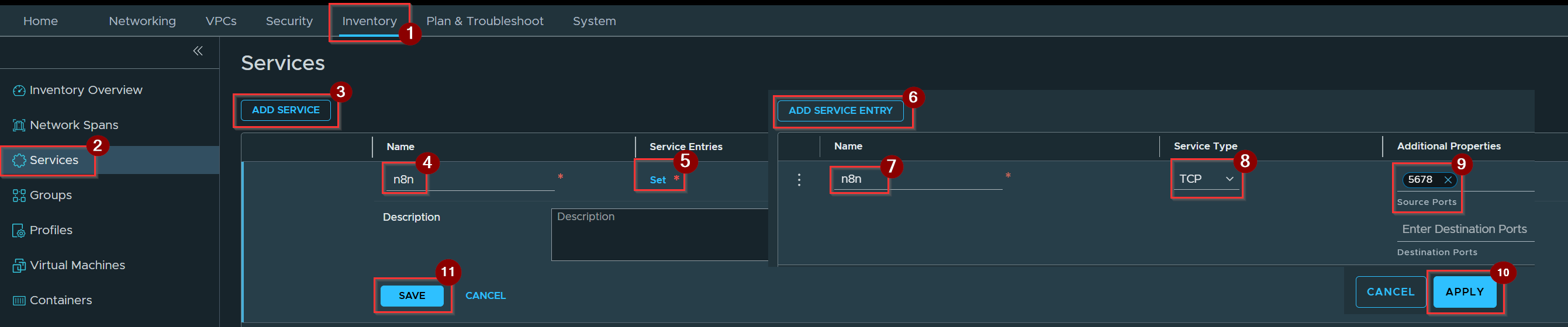
- Click on Inventory.
- Click on Services.
- Click on ADD SERVICE.
- Give the Name of the Service.
- Click on set.
- Click on ADD Service Entry.
- Give the Name .
- Select the Service Type.
- Give the Additional properties detail.
- Click on Apply.
- Click on Save.
3. Create Virtual Patching Policy
Capture 1: –
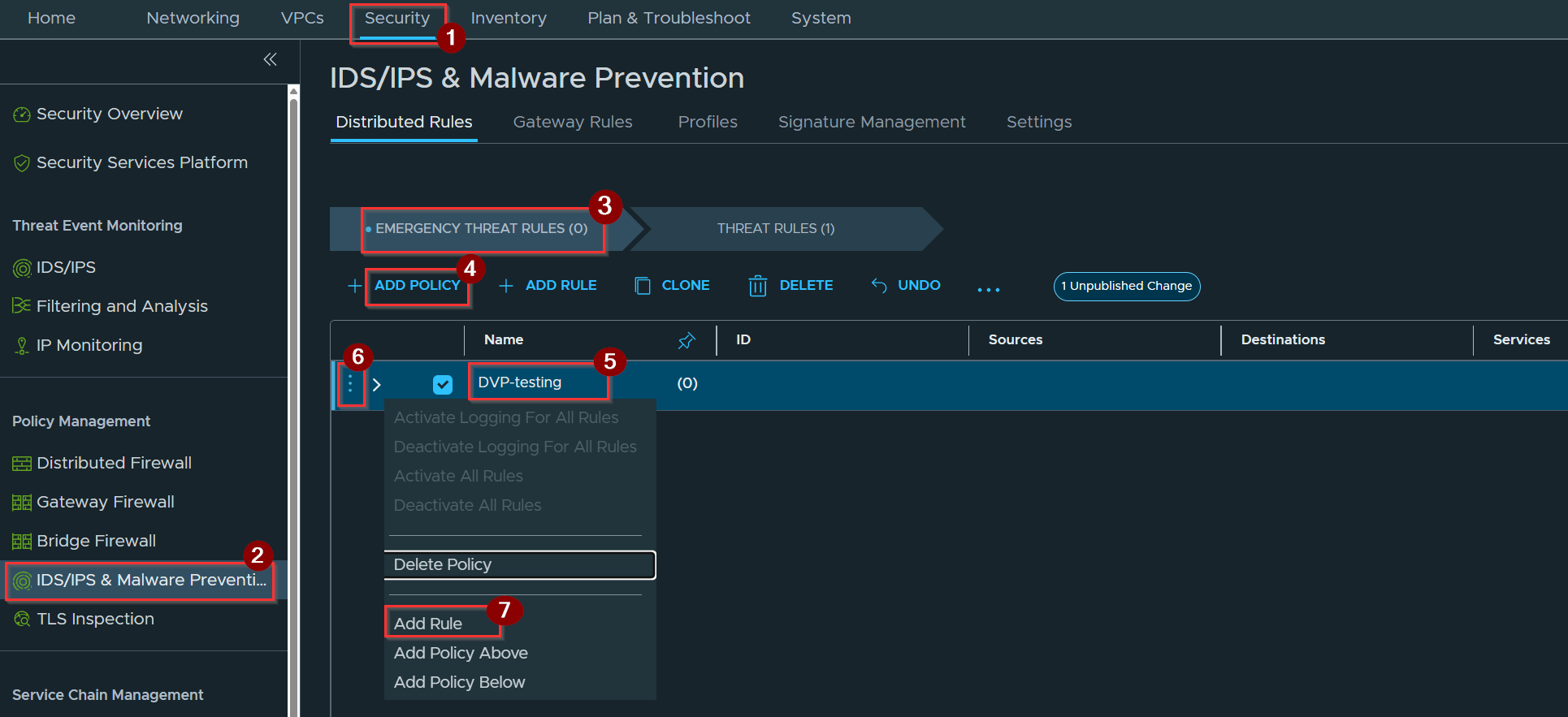
- Click on Security.
- Click on IDS/IPS & Malware Prevention.
- Select the Emergency Threat Rules under Distributed rules.
- Click on ADD Policy.
- Give the name of the Policy.
Note on Rule Ordering & Placement:
- Placement: Configure these rules in the Emergency Section of the IDPS Rule Table.
- Why: Specific virtual patching rules can be inadvertently bypassed or shadowed by broader threat rules. Placing them in the Emergency Section ensures top-priority evaluation while keeping general inspection active in the Threat Rules Section.
- Evaluation Logic: Rules process in a strict top-down, left-to-right sequence within each section, halting instantly on the first match.
6. Click on 3 Dots.
7. Click on ADD Rule.
Capture 2: –
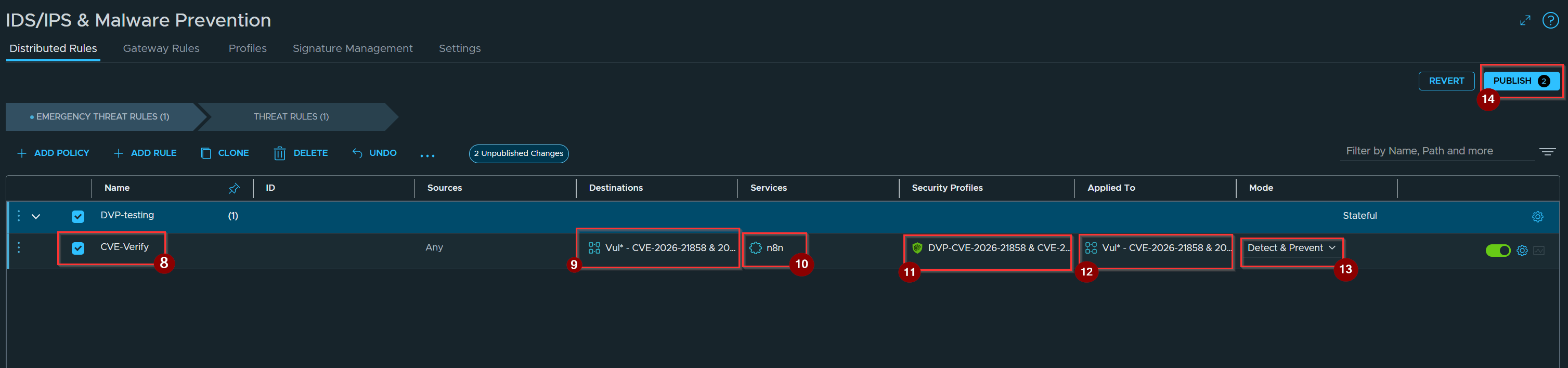
8. Give the Name of the Rule.
9. Select the destination.
10. Select the service.
11. Select the security profiles.
12. Called the destination under applied to.
13. Mode should be select –> Detect & Prevent.
14. Click On Publish.
4. Validation

exploit attempt was rejected by our policy.
Conclusion
Distributed Virtual Patching in VMware vDefend transforms zero-day vulnerability management across VMware Cloud Foundation 9.1 deployments. By moving threat inspection into the ESXi hypervisor kernel, organizations eliminate the traditional patch gap, shield vulnerable workloads directly at the vNIC boundary, and maintain robust security compliance without imposing emergency server reboots or disrupting business applications.
Useful Resources :-
Virtual Patching: Guarding Against a Tsunami of AI-discovered Exploits with vDefend and Avi
The Distributed Virtual Patching blueprint


Leave a Reply