

- Introduction
- The Technical Flow: How VCF 9 Achieves “Liquid” Compute
- Architectural Guardrails: Conditions for Success
- Technical Comparison: Legacy vs. VCF 9
- Practical Validation: Capturing the Data
- Technical Spec: The High-Performance Configuration
- Troubleshooting: Common Pitfalls
- Summary
Introduction
In the era of Generative AI, the “GPU Stun Wall” has been the primary bottleneck for private cloud agility. Historically, moving a Virtual Machine (VM) with an active vGPU required pausing the workload to transfer the entire frame buffer (VRAM). For an 80GB NVIDIA H100 or a 192GB Blackwell profile, this often led to multi-minute outages, causing LLM training jobs to crash or inference streams to time out.
VMware Cloud Foundation (VCF) 9 redefines this reality. By moving from a “Stop-and-Copy” approach to a hardware-accelerated Iterative Pre-copy model, VCF 9 transforms GPUs into fluid, “liquid” resources that can be moved across the cluster with zero downtime.
The Technical Flow: How VCF 9 Achieves “Liquid” Compute
VCF 9 introduces an AI-native vMotion engine that treats GPU memory with the same granularity as system RAM.
Phase A: Iterative GPU Memory Pre-copy (The 70/30 Rule)
VCF 9 is the first stack to implement Memory Page Tracking for GPUs. It distinguishes between the “Cold” and “Hot” states of an AI model:
- The Static 70%: Large Language Models (LLMs) consist largely of static weights. VCF 9 copies these parameters in the background while the VM is still running.
- The Dynamic 30%: Using IOMMU D-bit (Dirty-bit) Tracking at the silicon level (Intel Sapphire Rapids+ or AMD Genoa+), the hypervisor tracks only the changed pages—such as the KV (Key-Value) cache—for final transfer.
Phase B: Multi-Threaded Data Channel
In previous versions, vGPU migrations were often bottlenecked by single-threaded transfer protocols. VCF 9 utilizes a multi-threaded data path that can fully saturate 100GbE or 400GbE links, drastically reducing the transfer window for massive vGPU profiles.
Phase C: Sub-Second Stun & Resume
When the remaining “dirty” memory is minimal, the VM is stunned. In VCF 9, a VM with an 8x H100 cluster (640GB VRAM) that previously timed out now migrates with a deterministic stun time of under 2 seconds.
Architectural Guardrails: Conditions for Success
Based on official vSphere 9.0 Management Documentation, several technical conditions must be met to ensure the iterative engine can converge successfully.
- The 100-Second Stun Limit: By default, vSphere allows a 100-second window for the “final stun.” While VCF 9’s engine minimizes this, for “Monster VMs” (>128GB VRAM), architects may need to manually adjust the vMotion Stun Time Limit in VM Advanced Options to allow for network variances during high-load periods.
- vGPU vs. DirectPath I/O: vMotion is only supported for VMs using vGPU profiles. Attempting a migration while a physical device is in “DirectPath I/O” (standard pass-through) will trigger a compatibility error.
- CPU Compatibility (EVC): Source and destination hosts must share a compatible instruction set. AI workloads rely heavily on AVX-512 or AMX instructions; if the destination host lacks these, the VM will fail to resume.
- Device Hygiene: Migrations will fail if the VM has a local ISO image mounted or a physical serial port attached.
Technical Comparison: Legacy vs. VCF 9
| Feature | Legacy vMotion (vSphere 7/8) | VCF 9 (AI-Native) |
| Migration Method | Stun-and-Copy (Serial) | Iterative Pre-copy (Parallel) |
| Tracking Level | Software-defined bitmap | Hardware-assisted IOMMU D-bits |
| Data Channel | Single-threaded | Multi-threaded (High Throughput) |
| Stun Duration | 100s – 180s (Likely Timeout) | < 2 Seconds (Deterministic) |
| KV Cache Integrity | Risk of loss/corruption | Fully Preserved |
Practical Validation: Capturing the Data
Step 1: – Enable the AI-Native Switch
Capture 1: –
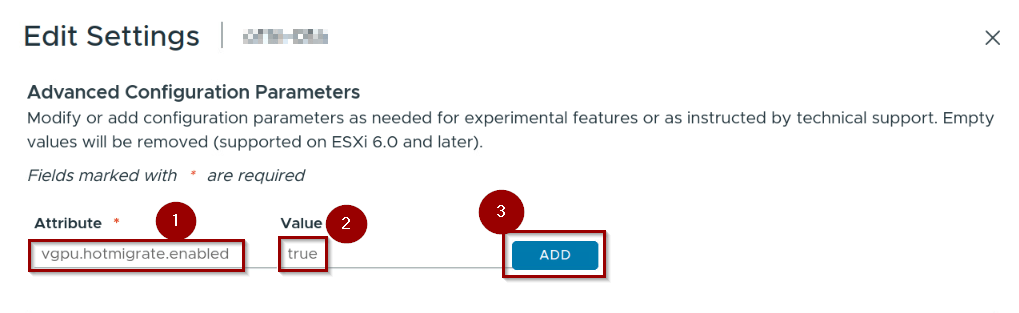
- Location: vSphere Client → Select VM → Configure → Advanced parameters.
Step1: – Under Attribute “vgpu.hotmigrate.enabled"
Step2: – Under value “true”
Step 3:- Click on ADD.
Capture 2:-
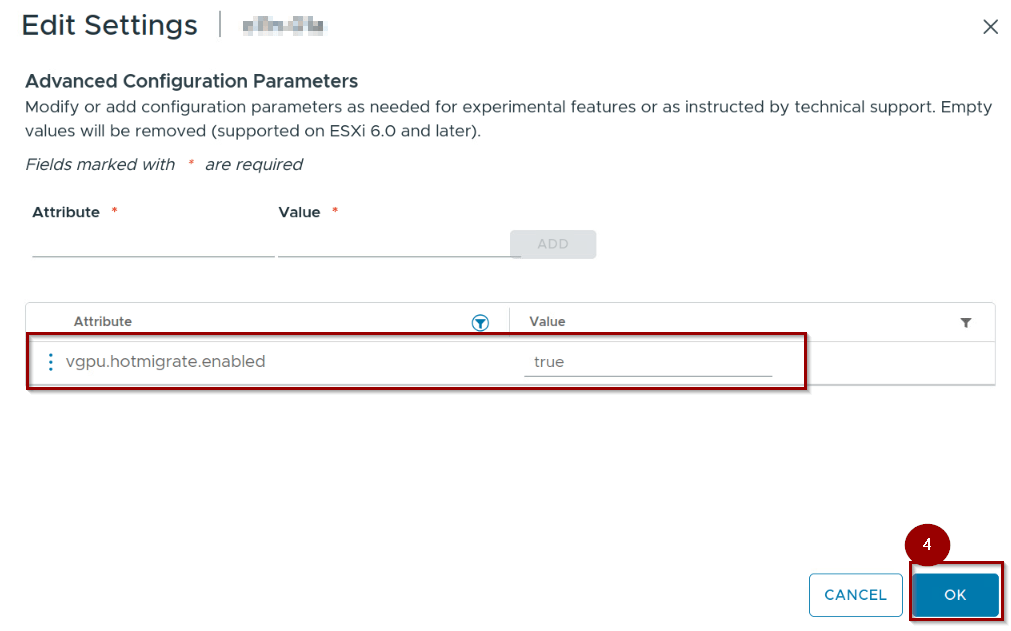
Step 4: – Click on Ok.
Note:- Verify vgpu.hotmigrate.enabled = true. This is the core kernel switch for the iterative engine.
Step 2: – Configure the Stun Threshold
Capture 3: –
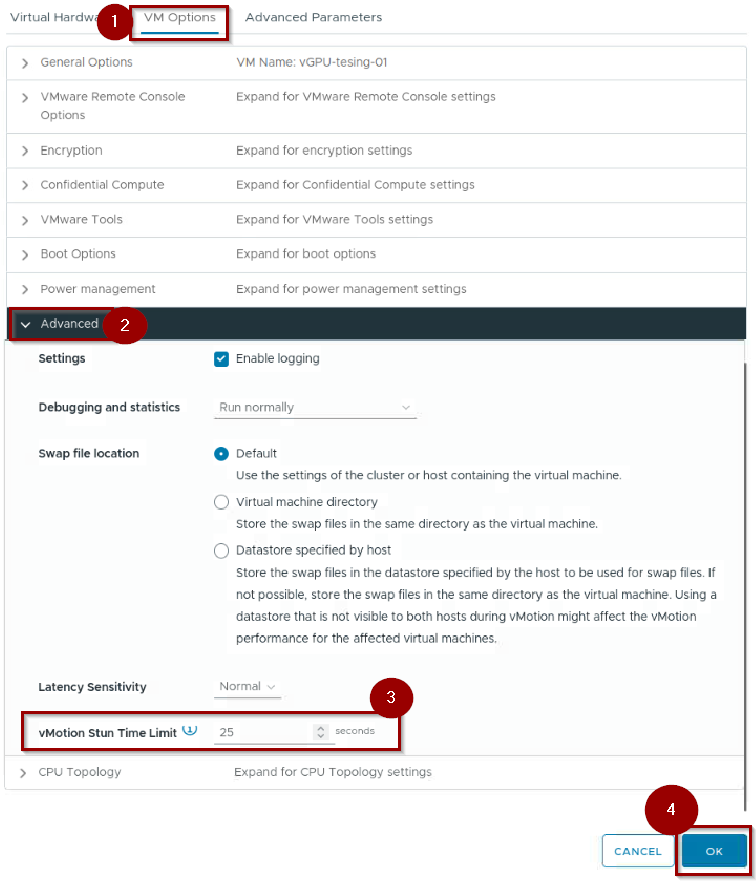
Step 1: VM Options
Step 2 :- Expand the Advanced
Step 3: – Set the value under the vMotion Stun Time Limit.
Step 4: – Click on OK.
Note: Observe this value. In VCF 9, even with a default 100s limit, the iterative engine ensures the actual stun is a fraction of this time.
Step 3: – Verify via vmware.log
Capture 4: –
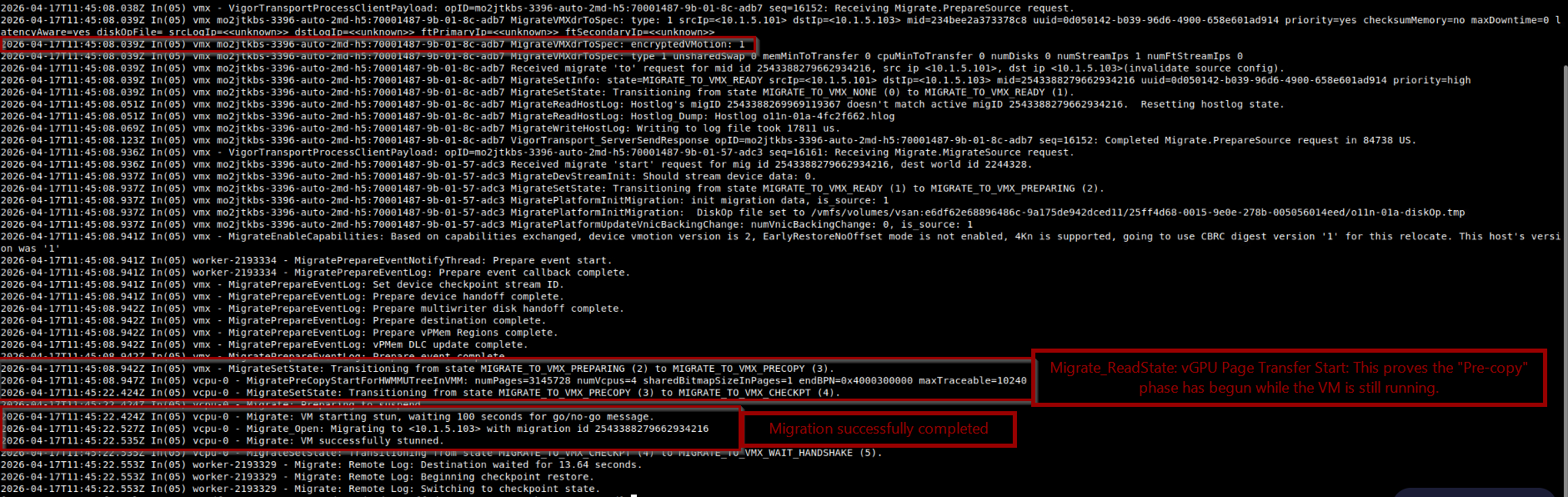
Access the ESXi host via SSH and navigate to /vmfs/volumes/[Datastore]/[VM_Name]/vmware.log.
- Look for:
Migrate_ReadState: vGPU Page Transfer Start. - The Proof: Multiple iterations of this log entry indicate the “Liquid” iterative copy is active. A single entry would indicate a legacy, non-optimized migration.
Technical Spec: The High-Performance Configuration
To achieve sub-2 second stun times, the hardware-software handshake must be precise:
| Layer | Requirement |
| BIOS | Intel VT-d / AMD-Vi (Enabled); SR-IOV (Enabled) |
| Network | 100GbE Recommended; RoCE v2 (RDMA) support |
| MTU | 9000 (Jumbo Frames) |
| vGPU Driver | NVIDIA AI Enterprise (NVAIE) 16.x or newer |
| VM Hardware | Version 22 (Standard in VCF 9) |
Troubleshooting: Common Pitfalls
The enable_uvm Lock: In some Linux guests, the NVIDIA Unified Virtual Memory (uvm) module may prevent the GPU from yielding state. Ensure your guest OS image is optimized for VCF 9 vMotion.
Network Oversubscription: If stun times exceed 10 seconds on a 100GbE link, verify that your vMotion traffic is not competing with vSAN storage traffic on the same physical link without proper Network I/O Control (NIOC) tagging.
Summary
Motion for AI in VCF 9 is a fundamental shift in infrastructure logic. By moving from a “stun-and-copy” model to an “iterative-pre-copy” model, VCF 9 eliminates the downtime associated with GPU mobility. By following the documented guardrails regarding CPU compatibility and stun limits, organizations can finally treat their AI clusters as liquid assets—ready to be moved, balanced, and maintained without impacting production inference. Click here for official resource.


Leave a Reply