

- Introduction
- Architectural Comparison: SSPI, SSP 5.1.1, and SSP 5.1.2
- Centralized Licensing Policies and Compliance Mechanics
- Environmental Dependencies and Deployment Sequence
- Compute, Storage, and Network Allocation Blueprints
- High-Level Deployment Workflow
- Conclusion
Introduction
The release of VMware Cloud Foundation (VCF) 9.1 introduces structural updates to the licensing architecture of VMware vDefend components, specifically the Distributed Firewall (DFW), Gateway Firewall, and Advanced Threat Prevention (ATP). Traditional 25-character alpha-numeric license keys are replaced by digitally signed subscription license files.
To activate, manage, and distribute entitlements across your environment, you must implement the Security Services Platform (SSP) 5.1.2 License Hub. This appliance acts as a central proxy that aggregates subscription configurations and provides license visibility across multiple platform endpoints.
This technical guide covers the structural differences between software builds, core resource footprints, infrastructure dependencies, and the deployment sequence for the License Hub.
Architectural Comparison: SSPI, SSP 5.1.1, and SSP 5.1.2
Navigating the naming conventions of the vDefend components requires understanding the division of responsibilities across separate packages:
| Component Feature | SSPI (Platform Installer) | SSP 5.1.1 (Security Intelligence) | SSP 5.1.2 (License Hub / VDLS) |
| Primary Function | Management container, lifecycle engine, and software deployment bootstrap. | Data collection, telemetry processing, application topology mapping, and firewall rule recommendations. | Central proxy for aggregation, verification, and distribution of digital subscription entitlements. |
| Deployment Footprint | Single standalone Virtual Machine appliance via standard OVF. | Large multi-node cluster (1 Control Plane + 3 to 9 Worker Nodes). | Lightweight two-node cluster (1 Control Plane + 1 or 2 Worker Nodes). |
| Data Ingestion Type | Installation binaries and sub software patch bundles. | Real-time network distributed flow data and security logs. | Subscription files, token usage logs, and compliance telemetry. |
| Ecosystem Target | Builds and updates the underlying security software stack. | vDefend Network Detection & Response (NDR) and Malware Prevention sensors. | Centralized licensing proxy for up to 120 NSX Managers and Avi Controllers. Click Here for more information. |
| VCF 9.1 Build Match | Build 25420504 (or matching release baseline). | RTM3 Build. | Isolated, independent release dedicated entirely to licensing logic. |
Centralized Licensing Policies and Compliance Mechanics
The License Hub introduces specific operational mandates that administrators must account for during planning phases:
| Compliance Dynamic | Operational Mandate / Policy Detail |
| Telemetry Reporting Cycle | License utilization logs must be sent from the local Hub to the backend monitoring repository at least once every 180 days. |
| Connected Mode Architecture | Establishes a direct, automated telemetry outbound stream from the License Hub to the VMware Avi Cloud Console. |
| Disconnected Mode Architecture | Air-gapped workflow requiring manual usage file extraction and manual entitlement token uploads via a secure offline web portal. |
| Subscription Failure Trigger | Triggered automatically when an active subscription term expires or when the 180-day data synchronization window is missed. |
| Grace Period Threshold | Initiates a strict 90-day grace period immediately upon subscription failure or expiration. |
| Post-Grace Period Enforcement | Restricts all management administrative modifications, constrains user interface configurations, and locks down feature edits. |
Environmental Dependencies and Deployment Sequence
The target VCF 9.1 management and workload domains must comply with a structured installation sequence. Bypassing this order results in configuration failures during endpoint authorization.
Phase 1: Core Virtualization and Networking (Day 0 Sequence)
| Order | Target Infrastructure Component | Mandatory Engineering Objective |
| 1 | vCenter Server 9.1 | Must be fully deployed, active, and managing the assigned compute cluster. |
| 2 | ESXi 9.1 Hosts | Installed on baseline physical compute hardware with uniform, shared data storage profiles mapped identically across all hosts. |
| 3 | NSX 9.1 Manager Cluster | Formed into a stable, healthy 3-node cluster with active control-plane synchronization. |
| 4 | Compute Manager Integration | Add and successfully authenticate the vCenter Server 9.1 instance as a recognized Compute Manager inside the NSX 9.1 interface. |
Phase 2: Security Services Initialization (Day 1 Sequence)
Architectural Branch Rule: The initialization path splits based on your core design scope. If your deployment only requires baseline micro-segmentation using the Distributed Firewall (DFW) and Gateway Firewall (GFW), the resource-heavy SSP 5.1.1 analytics engine cluster is not mandatory. For this design pattern, you can skip full analytics orchestration and deploy only the vDefend SSP 5.1.2 License Hub via the SSPI tool to satisfy platform compliance and push tokens to your NSX Managers.
| Order | Target Deployment Security Component | Mandatory Engineering Objective |
| 5 | SSPI Installation | Provision and power on the bootstrap Installer VM on an accessible corporate management VLAN subnet. Technical Note: Before proceeding to step 6, you must manually import the vCenter Server Root CA certificate into the SSPI trust store to allow data center discovery. |
| 6 | SSP 5.1.1 Deployment | Initialize the telemetry cluster using the SSPI console only if active analytics or Security Intelligence functions are required. |
| 7 | VDLS Deployment (SSP 5.1.2) | Trigger the License Hub cluster installation wizard within the SSPI platform UI. |
| 8 | Console Integration | Execute the handshake registration between the newly built License Hub instance and the backend Avi Cloud Console. |
Compute, Storage, and Network Allocation Blueprints
Both components operate on internal Kubernetes runtimes, meaning they require a dedicated allocation of resource footprints and isolated network configurations.
SSP 5.1.1 Resource Requirements
The analytics engine requires scaling nodes depending on the size of the infrastructure being analyzed. It utilizes a variable allocation model for network definitions.
Network Pool Configuration Formulas (SSP 5.1.1 Engine)
| Network Pool Classification | Underlying Architectural Mathematical Formula | Purpose of Allocation |
| Node IP Pool Capacity | (1 IP per Control Plane Node) + (1 Control Plane VIP) + (1 IP per Worker Node) + (2 IPs per cluster for rolling upgrades) | Assigned to core infrastructure virtual machines and physical Kubernetes node engines. |
| Service IP Pool Capacity | (1 IP for UI/API Ingress Gateway) + (Total Active Worker Node Count + 1 for External Messaging Routing) | Assigned to internal application services, programmatic API endpoints, and messaging streams. |
Sizing and IP Specifications (SSP 5.1.1)
| Cluster Scale Footprint | Total Managed Nodes | Node IP Pool Capacity | Service IP Pool Capacity | Total Subnet IPs Required |
| Large 4 Nodes (Baseline) | 1 Control + 3 Workers | 10 Static IPs | 6 Static IPs | 16 Total IPs |
| Large 5 Nodes | 1 Control + 4 Workers | 11 Static IPs | 7 Static IPs | 18 Total IPs |
| Large 6 Nodes | 1 Control + 5 Workers | 12 Static IPs | 8 Static IPs | 20 Total IPs |
| Large 7 Nodes | 1 Control + 6 Workers | 13 Static IPs | 9 Static IPs | 22 Total IPs |
| Large 8 Nodes | 1 Control + 7 Workers | 14 Static IPs | 10 Static IPs | 24 Total IPs |
| Large 9 Nodes | 1 Control + 8 Workers | 15 Static IPs | 11 Static IPs | 26 Total IPs |
| Large 10 Nodes (Maximum) | 1 Control + 9 Workers | 16 Static IPs | 12 Static IPs | 28 Total IPs |
Hardware Target Profiles: Control Plane Nodes require 16 vCPUs, 64 GB RAM, and 400 GB Storage. Worker Nodes require 8 vCPUs, 32 GB RAM, and 300 GB Storage per appliance instance.
SSP 5.1.2 License Hub Resource Requirements
The License Hub uses a fixed-size deployment profile. However, hardware footprints shift depending on whether vSphere Resource Reservations are turned on.
Sizing and Resource Allocation Table (SSP 5.1.2)
| Resource Metric Component | Standard Topology (Reservations Inactive) | High-Availability Mode (Reservations Active) | Technical Constraint / Policy |
| Controller Node Count | 1 Node | 1 Node | Baseline orchestration footprint. |
| Worker Node Count | 1 Node | 2 Nodes (Automated scaling configuration) | Triggered automatically when HA reservations are active. |
| Total vCPU Requirement | 6 vCPUs | 10 vCPUs | Allocation scales based on worker node count. |
| Total Memory Allocation | 24 GB RAM | 40 GB RAM | Minimum memory buffer required for K8s scheduling. |
| Appliance Base Storage | 150 GB (75 GB per node) | 225 GB (75 GB per node) | Encryption Policy: Storage policies cannot use third-party or VM-level storage encryption rules. |
| Persistent Volume Claim (PVC) | 50 GB | 50 GB | Supported Encryption: Only cluster-wide, native vSAN Data-At-Rest Encryption (DARE) is supported. |
| vSphere Content Library Space | 50 GB (Mandatory overhead) | 50 GB (Mandatory overhead) | Required to house deployment software bundle files. |
| Total Storage Footprint | 250 GB | 325 GB | Combined datastore reservation required. |
| Node IP Pool Allocation | 4 IPs (Contiguous) | 4 IPs (Contiguous) | Allocated to core VM engines. |
| Service IP Pool Allocation | 4 IPs (Contiguous) | 4 IPs (Contiguous) | Allocated to external endpoints and messaging. |
| Total Fixed Subnet Scope | 8 Total IPs | 8 Total IPs | Subnet size remains static regardless of node scale. |
Architect’s Design Note: While the network subnet allocation remains anchored at a total of 8 IPs for the License Hub, changing the vSphere Resource Reservation toggle will silently demand an extra 4 vCPUs, 16 GB of RAM, and 75 GB of datastore space Click Here . Ensure your management cluster has this buffer before clicking “Start Deployment.”
Core vSphere Cluster Prerequisites
Confirm the following underlying infrastructure settings match compliance parameters prior to initiating deployment workflows:
| Infrastructure Prerequisite Metric | Minimum Technical Compliance Threshold |
| Hypervisor Interoperability | Formally validated and certified exclusively for VMware vSphere 8.0 U3+, 9.0, and 9.1 baselines. |
| Distributed Resource Scheduler (DRS) | Must be enabled on the target vSphere cluster; disabling DRS blocks internal container runtime scheduling. |
| Storage Performance Policy | Must use shared storage mapped across all hosts in the compute scope with sustained latency figures under 10 ms. |
| Storage Lifecycle Options | Storage DRS (SDRS) is completely unsupported for the internal data layout structures. |
| Maximum Network Constraints | Network latency between the deployed License Hub cluster and registration endpoints (NSX/Avi) cannot exceed 150 ms. |
High-Level Deployment Workflow
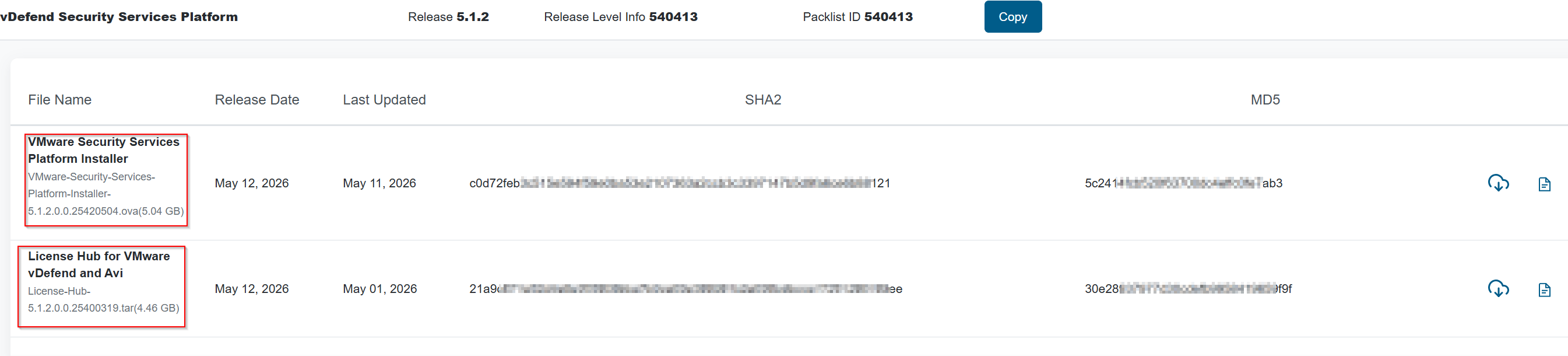
Step 0: Asset Acquisition and Build Verification
Prior to beginning the deployment, log in to the Broadcom Support Portal and confirm that your downloaded software assets exactly match the verified release level info.
Capture 1: –
Step 1: Initialize the SSP Installer
Deploy the SSPI management appliance OVA verified in Step 0 and access the central configuration console via your browser at https://<sspi-appliance-ip-or-fqdn>
Capture 2:-
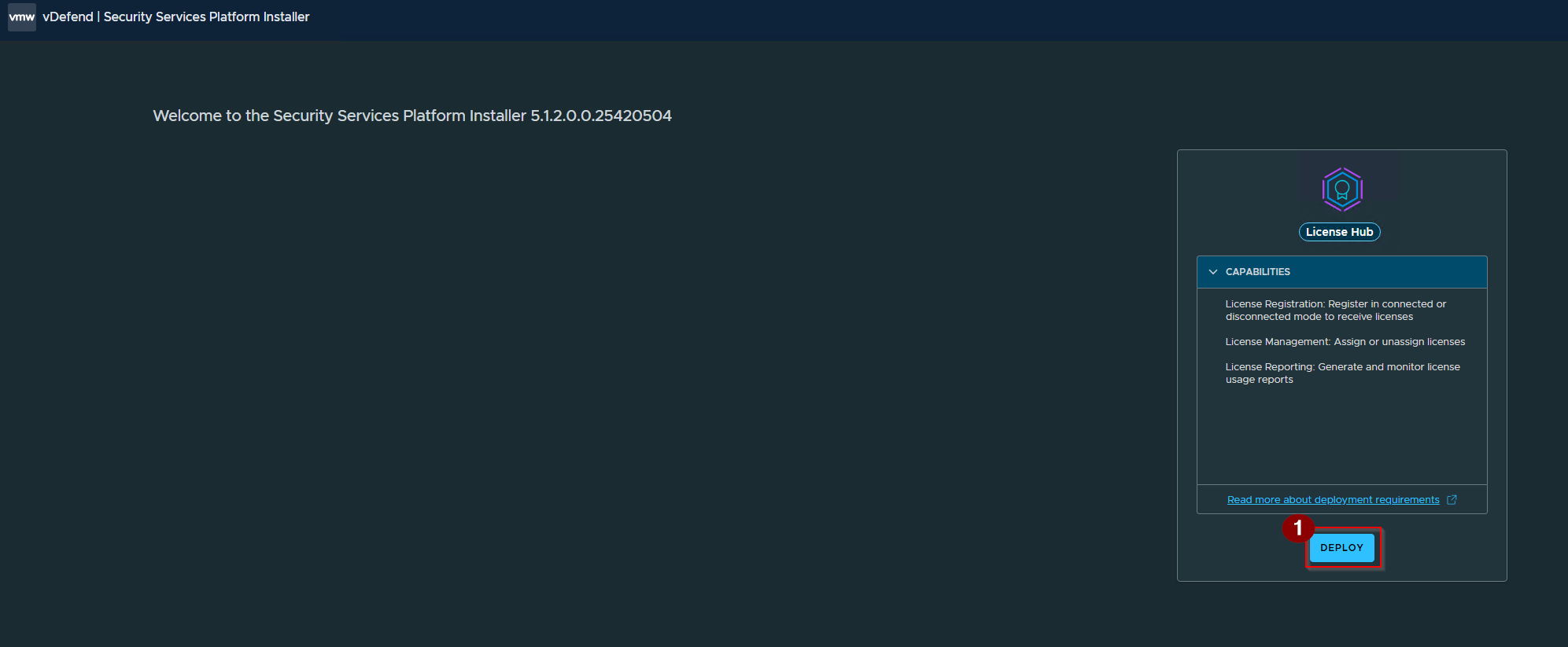
- Click on Deploy.
Capture 3: –
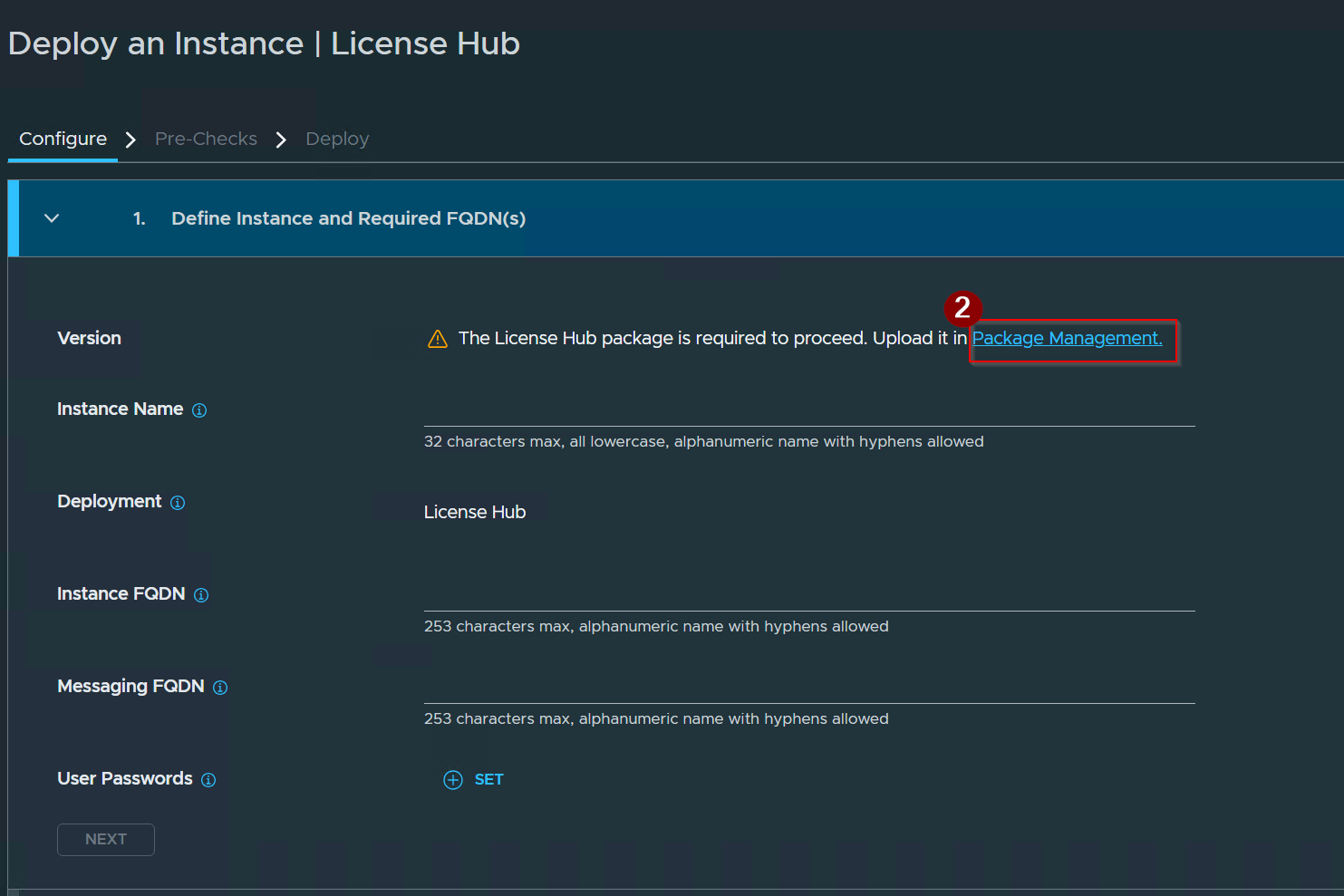
2. Click on Package Management.
Capture 4: –
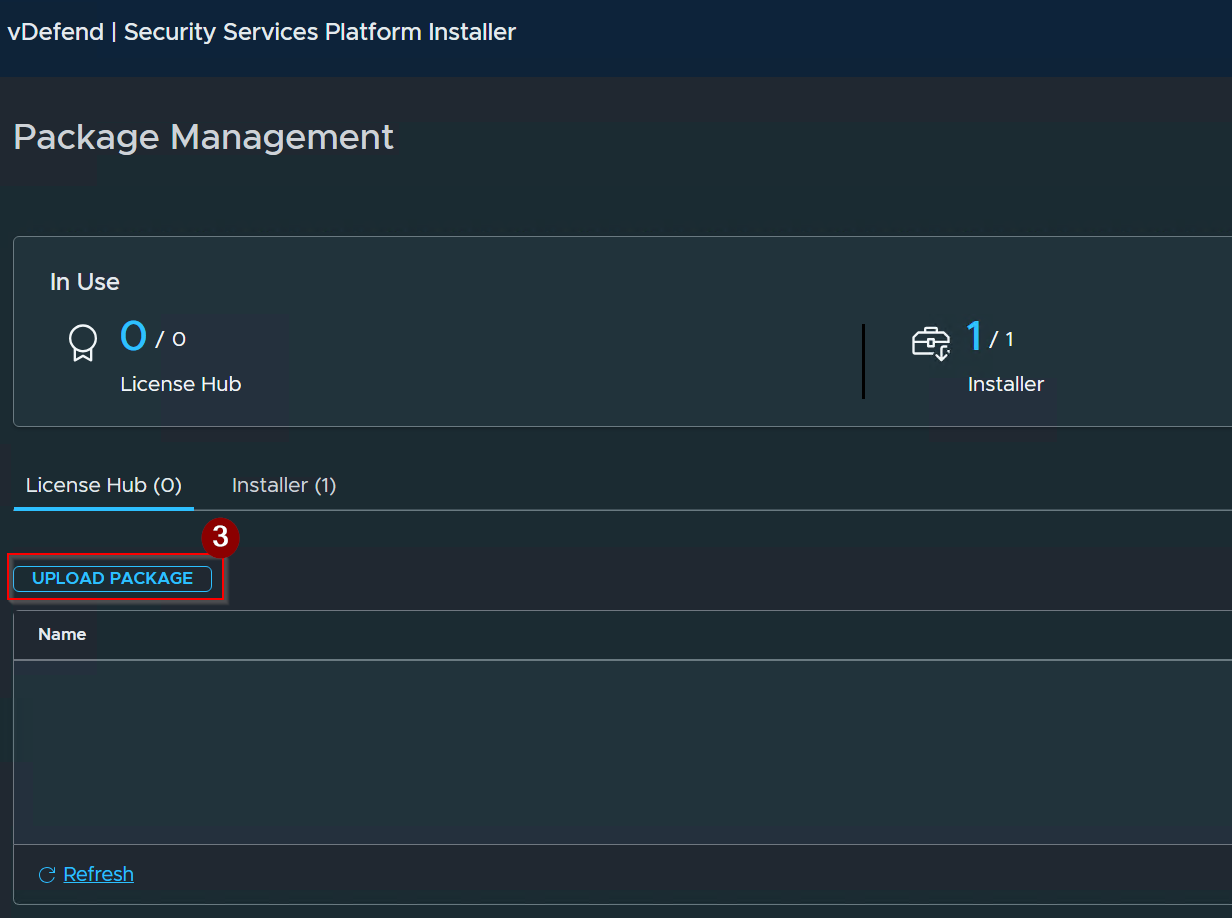
3. Click on Upload Package.
Capture 5: –
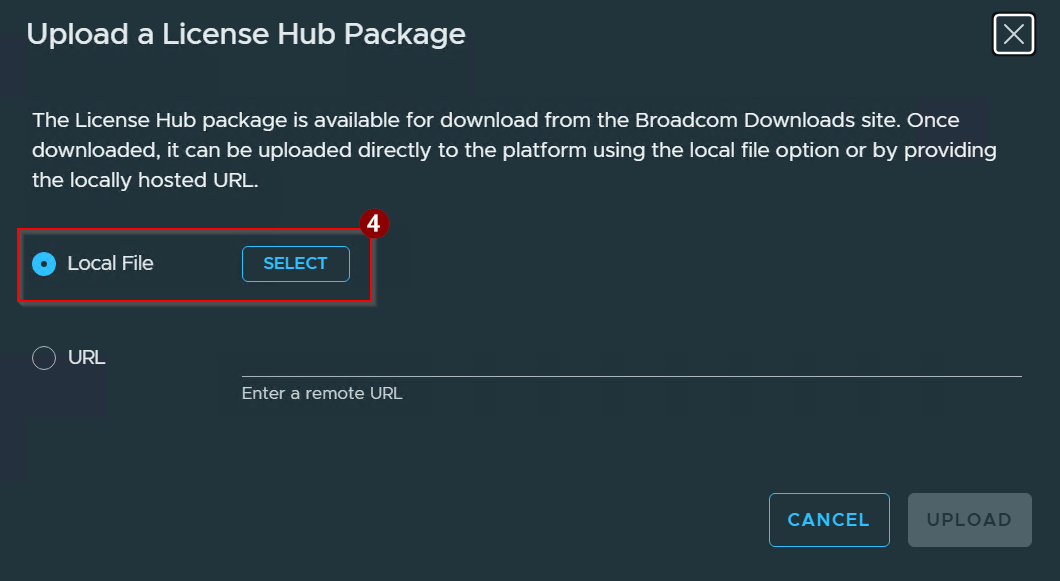
4. Click on Select.
Note: I downloaded the file using the local file upload. You can also use the URL option.
Capture 6:-
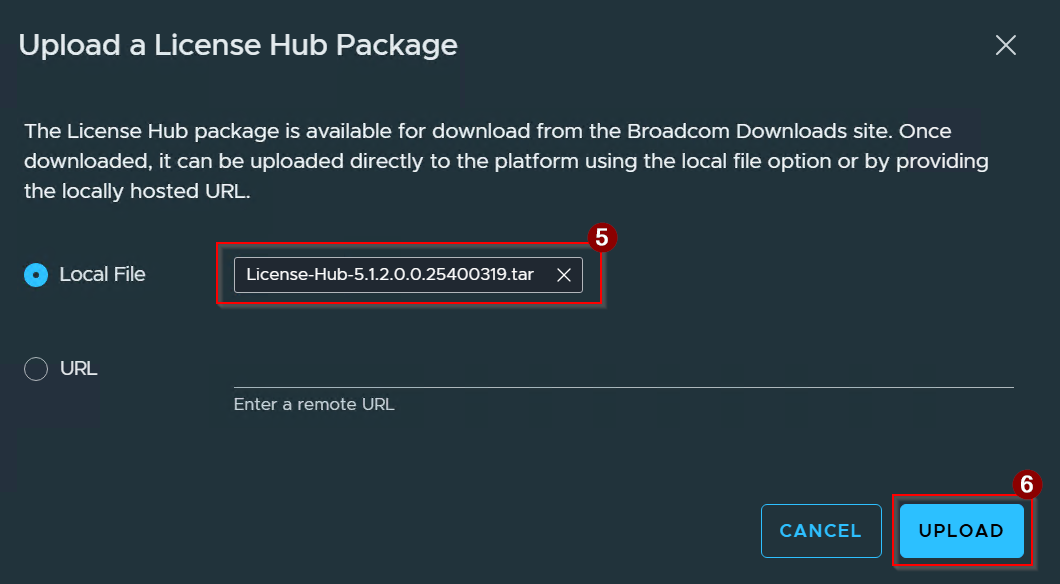
5. Upload the License Hub file.
6. Click on Upload.
Capture 7: –
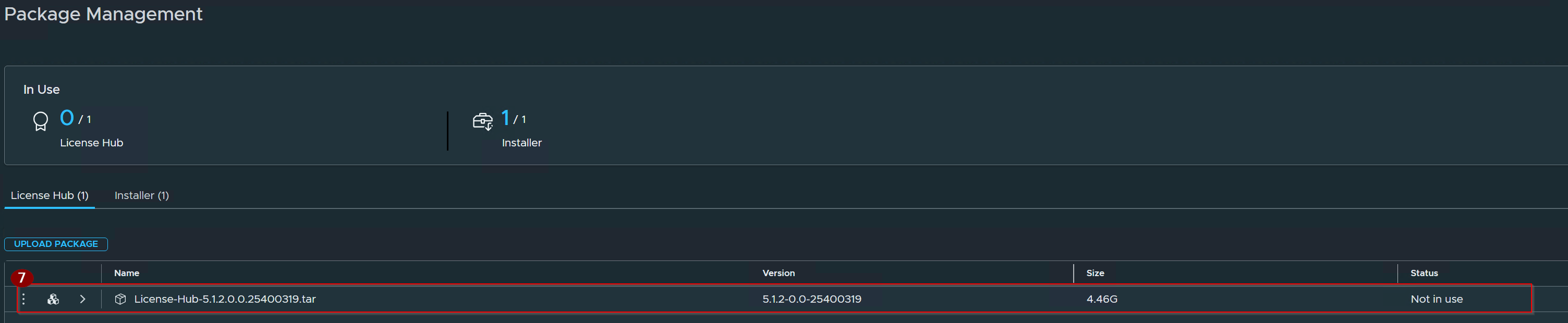
7. License hub installed successfully.
Capture 8: –
Now we will configuring the Instance.
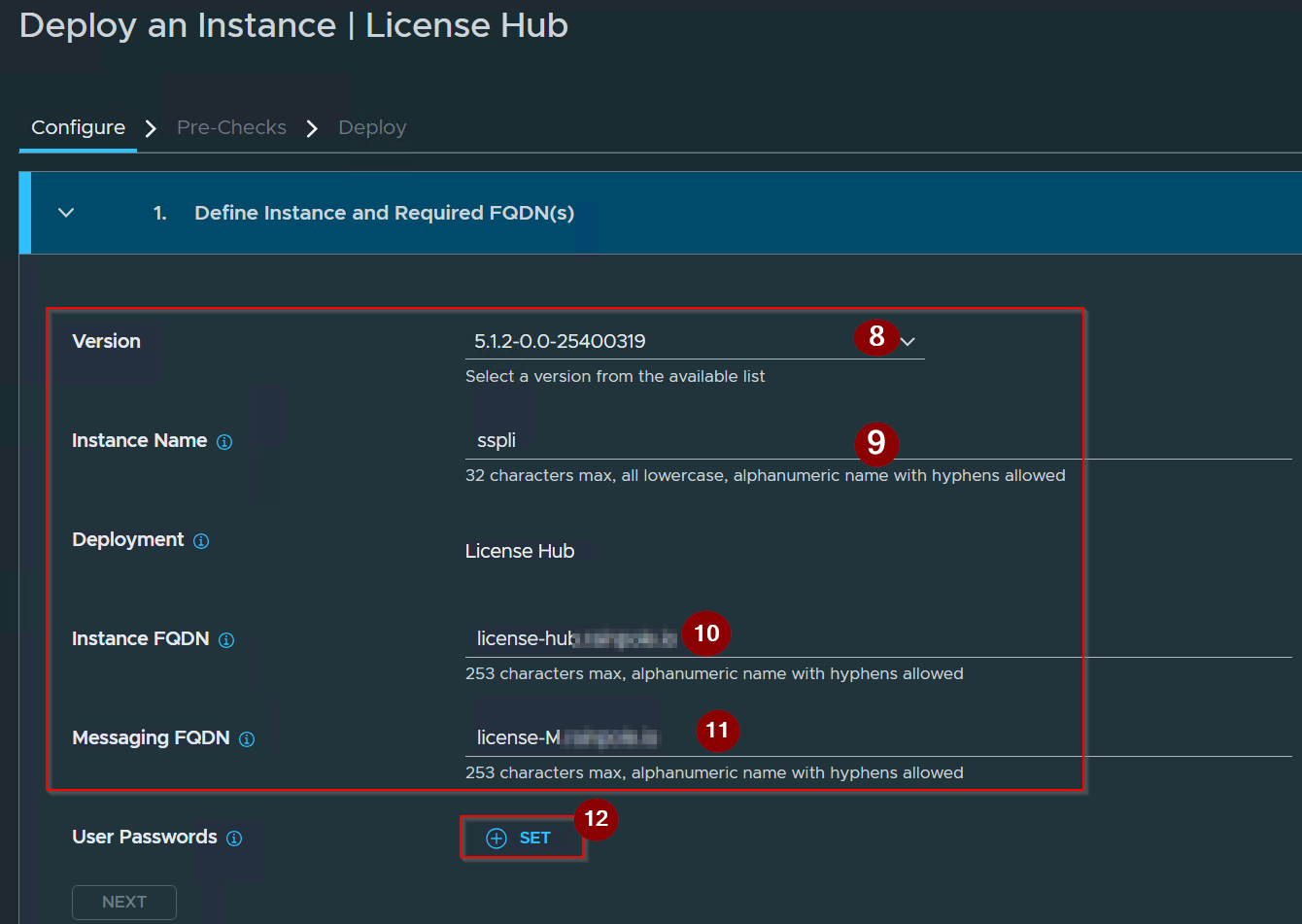
8. Select the Version.
9. Give the name of the instance.
10. Give the Instance FQDN.
11. Give the Messaging FQDN.
12. Click on SET under User Passwords.
Capture 9: –
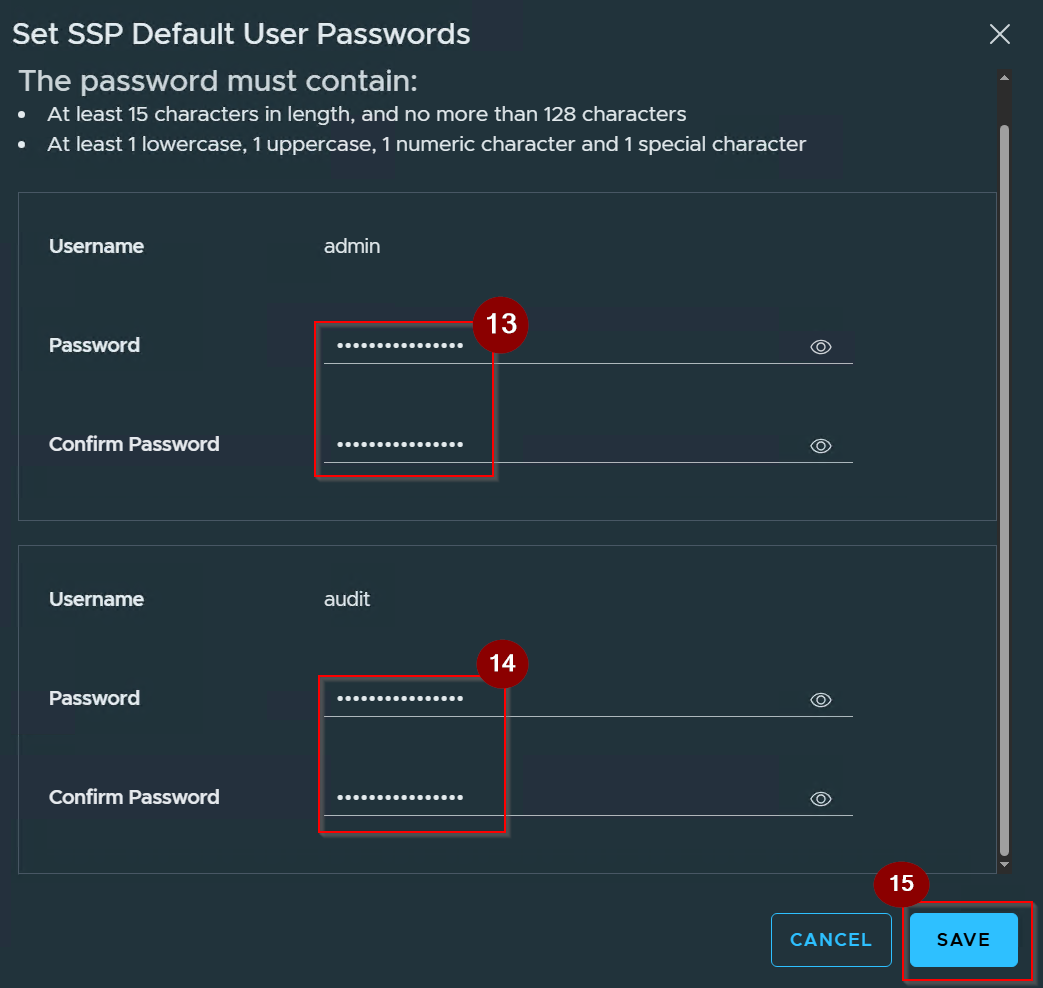
13. Give the admin password.
14. Gives the Audit password.
15. Click on Save.
Capture 10: –
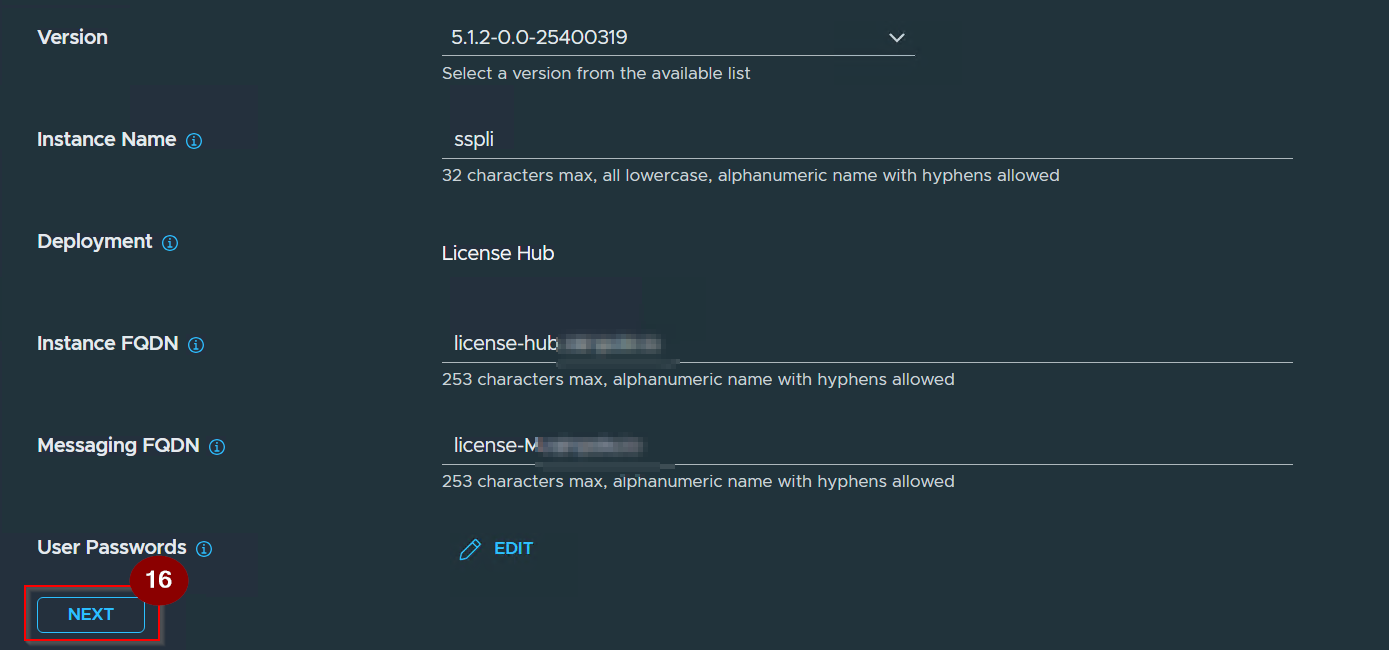
16. Click on Next.
Capture 11: –
Now we will add the SSP instance to the vCenter Server.
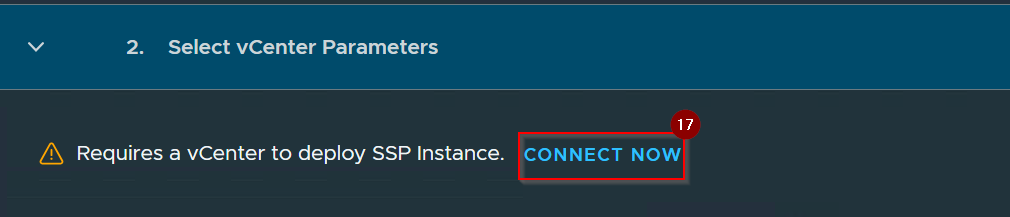
17. Click on Connect Now.
Capture 12: –
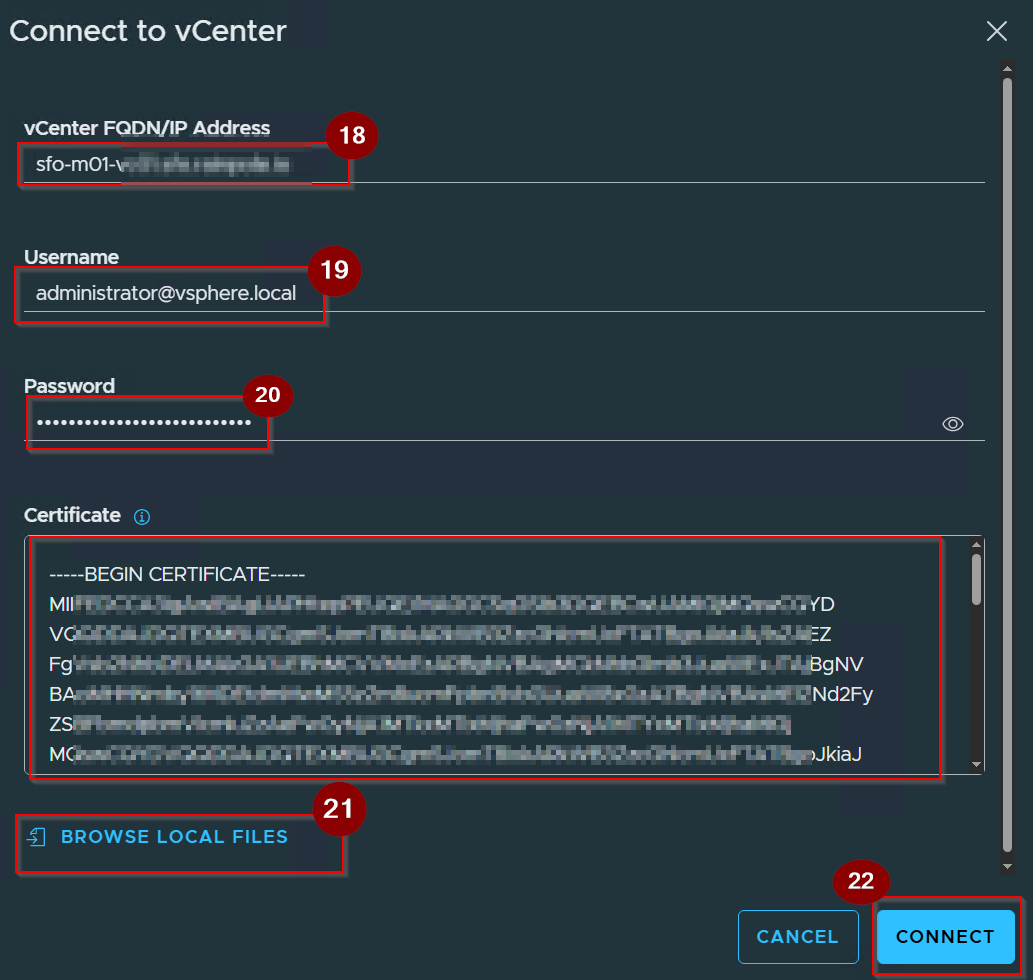
18. Give the vCenter FQDN.
19. Give the Username.
20. Give the password.
21. Click on Browse Local Files .
Note:- vCenter root CA certificate can be downloaded by connecting to the vCenter web UI and clicking “Download trusted root CA certificate”
22.Click On Connect.
Capture 13: –
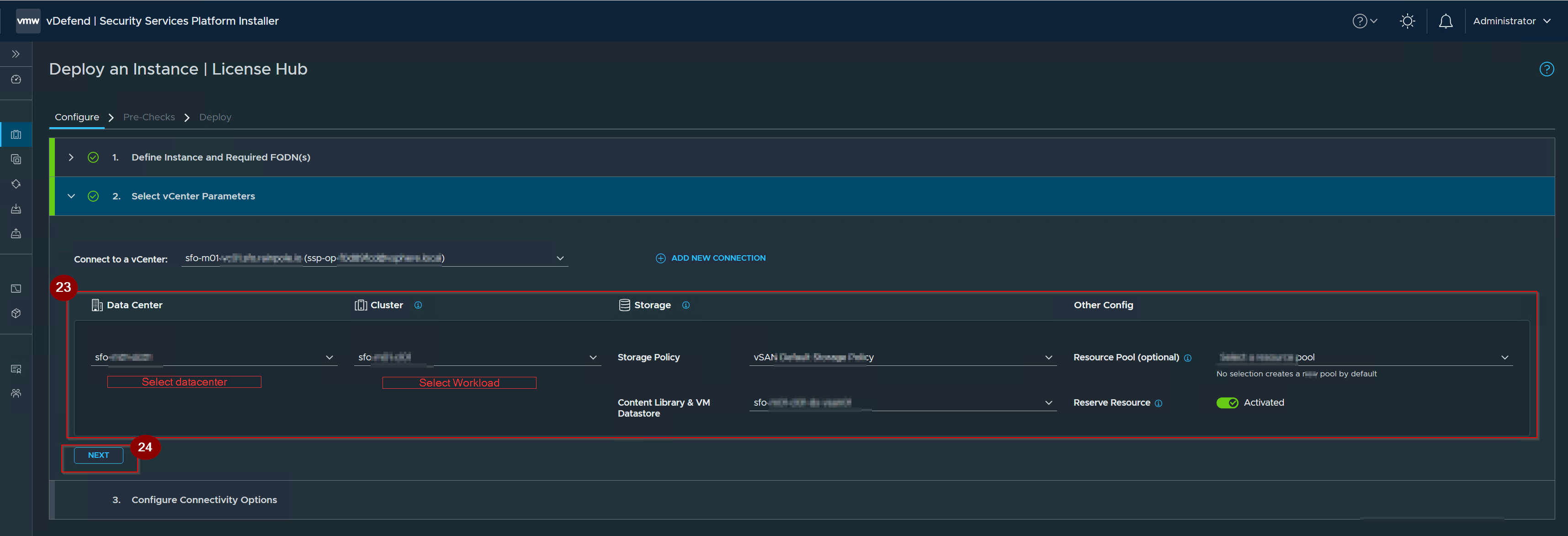
23. Give the Required details.
24. Click on Next.
Capture 14:-
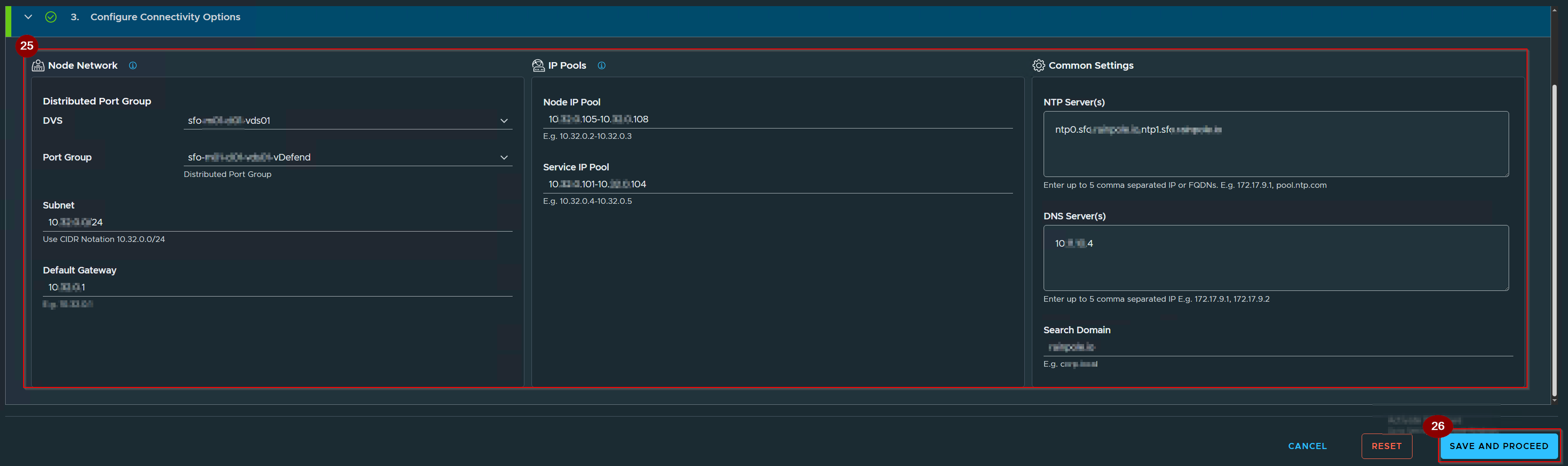
25. Give the Connectivity Details.
26. Click On Save and Proceed.
Capture 15.
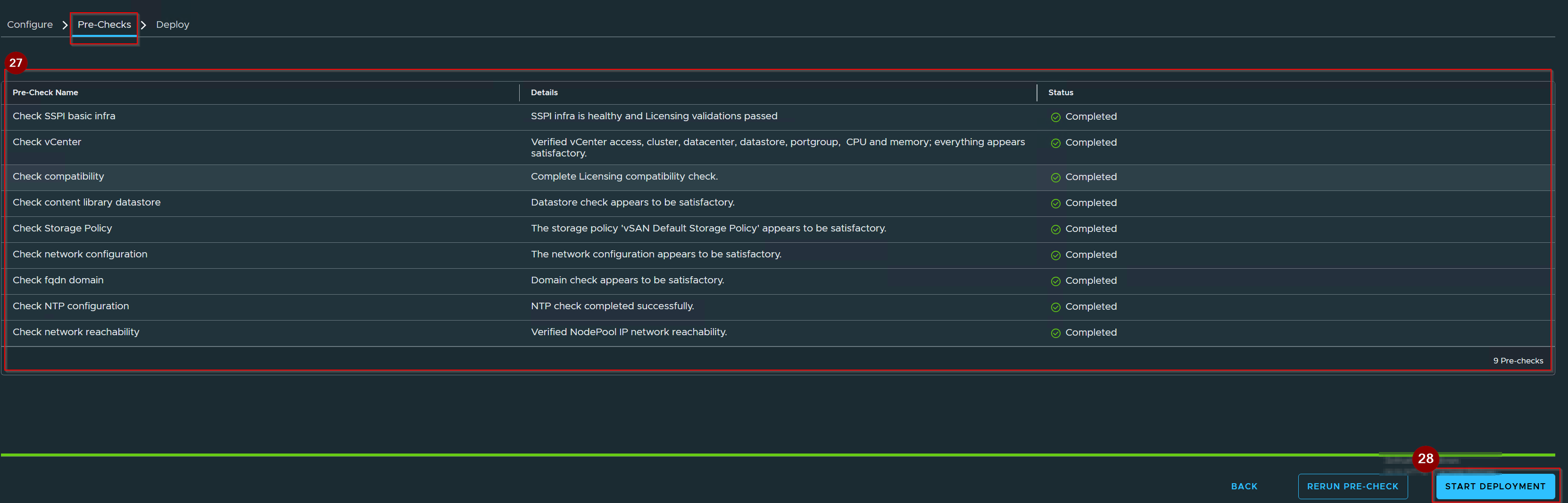
27. Comply with all the Pre-Checks.
28. Click on Start Deployment.
Capture 16: –
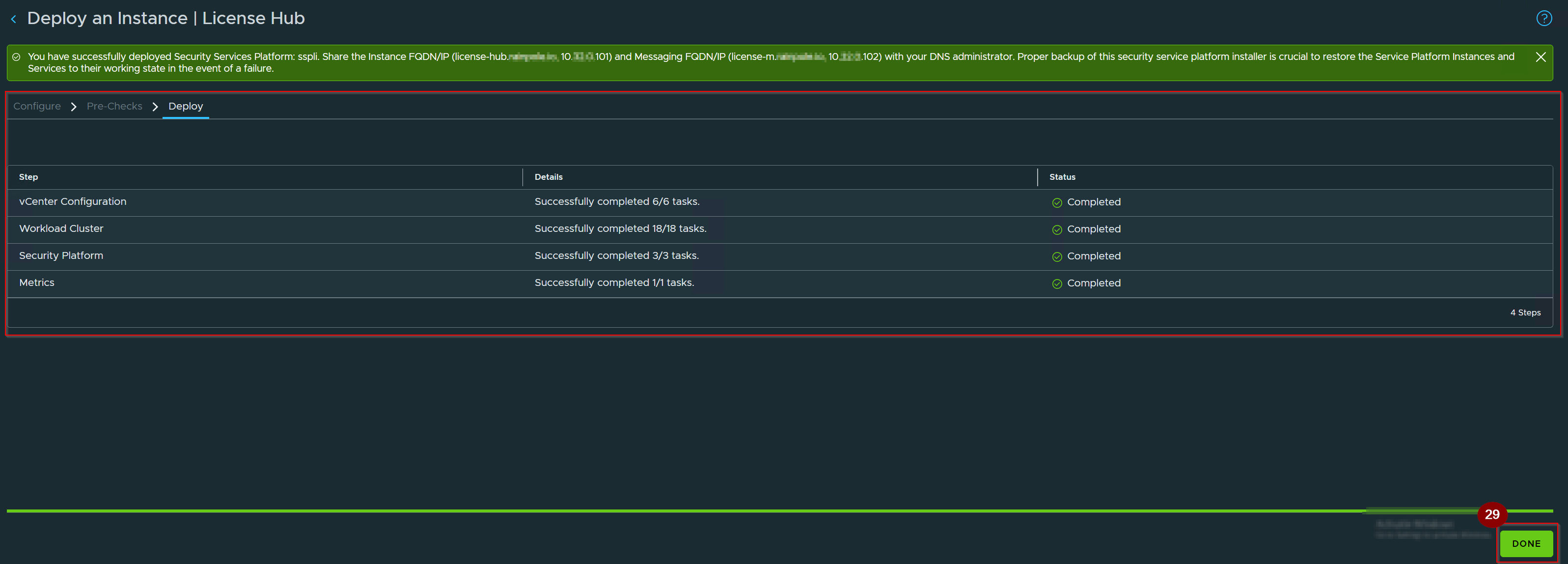
29. Once the Deployment complete Click on Done.
Step 2:- Execute the License Hub Deployment Wizard
Capture 1:-
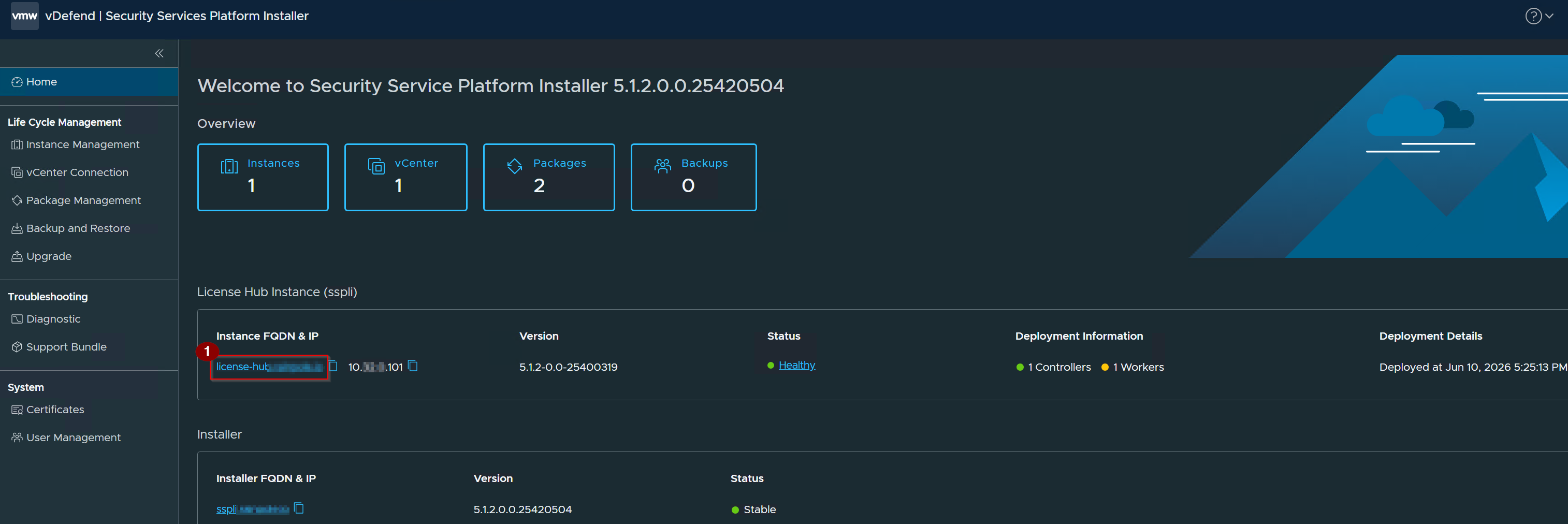
- Click on your SSP instance.
Capture 2: –
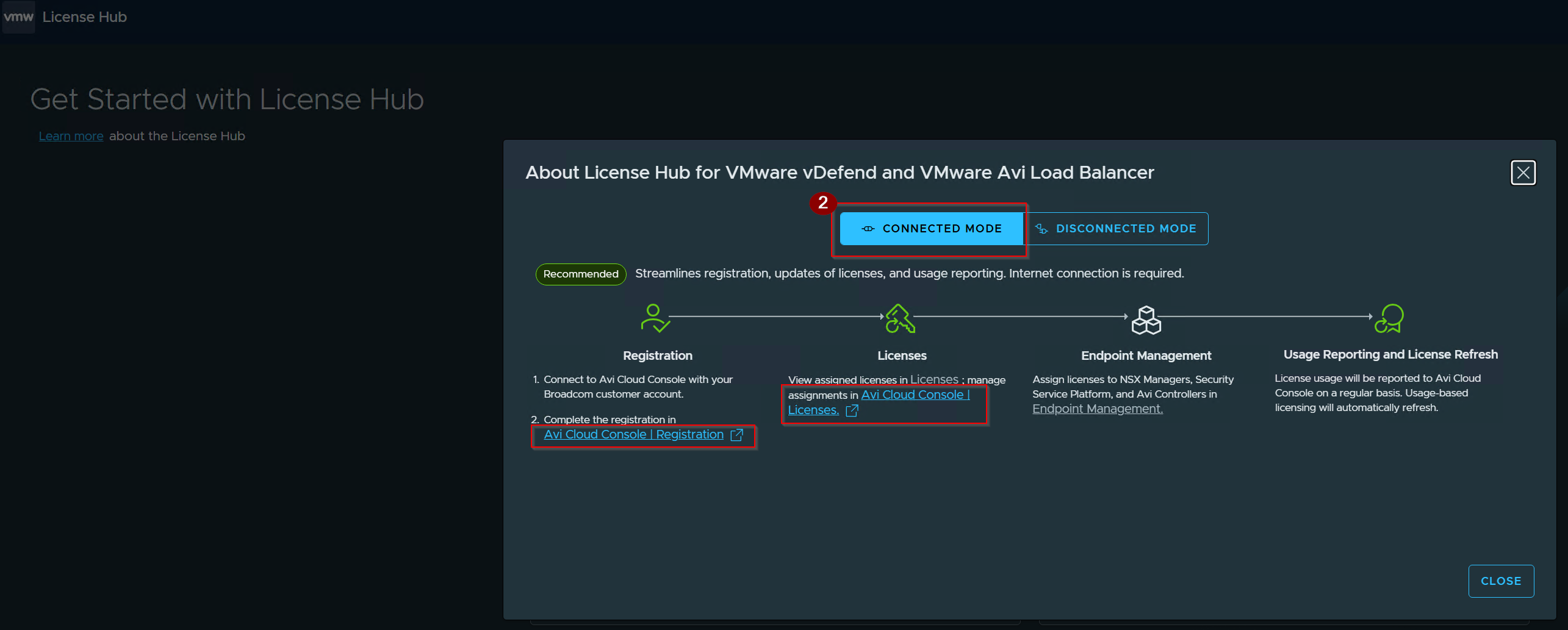
2. Click on Connected mode.
Capture 3: –
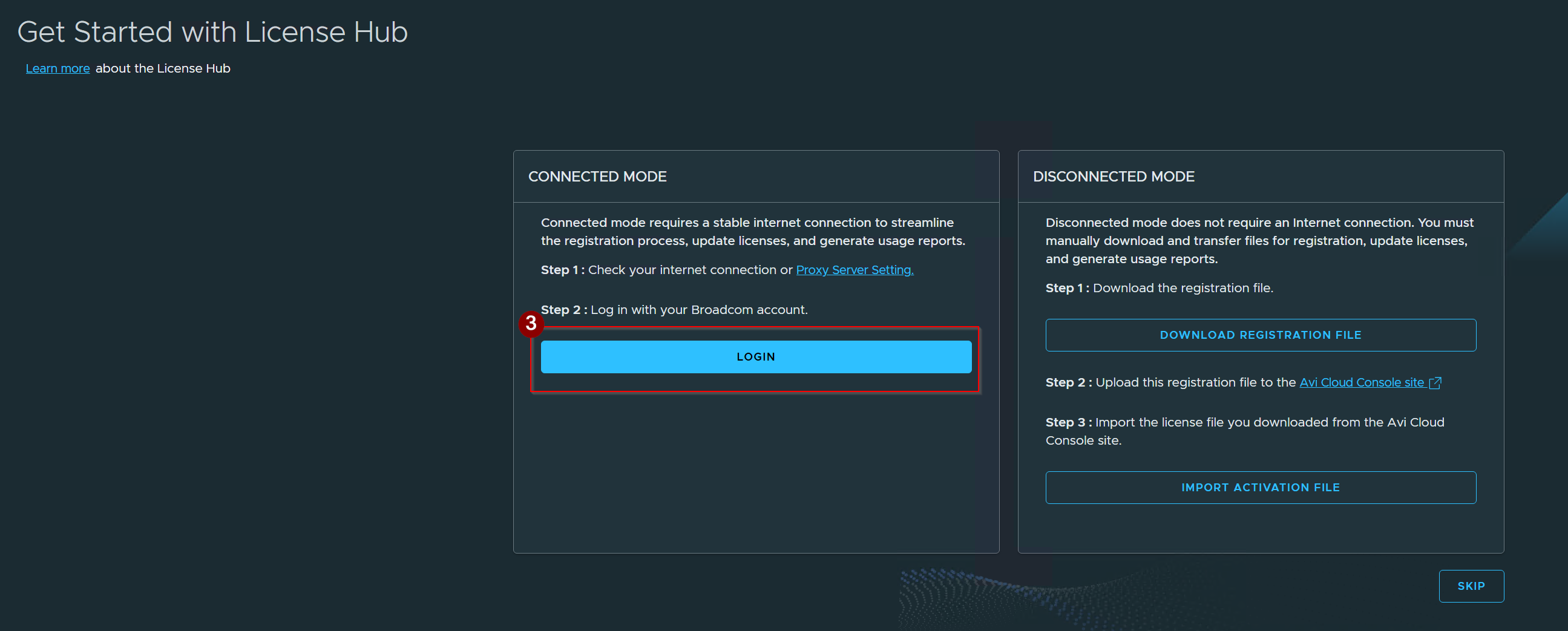
3. Click on login.
Note: There are 2 ways to register for licenses. The Connected mode allows online registration, while the Disconnected mode is for air-gapped environments.
Capture 4: –
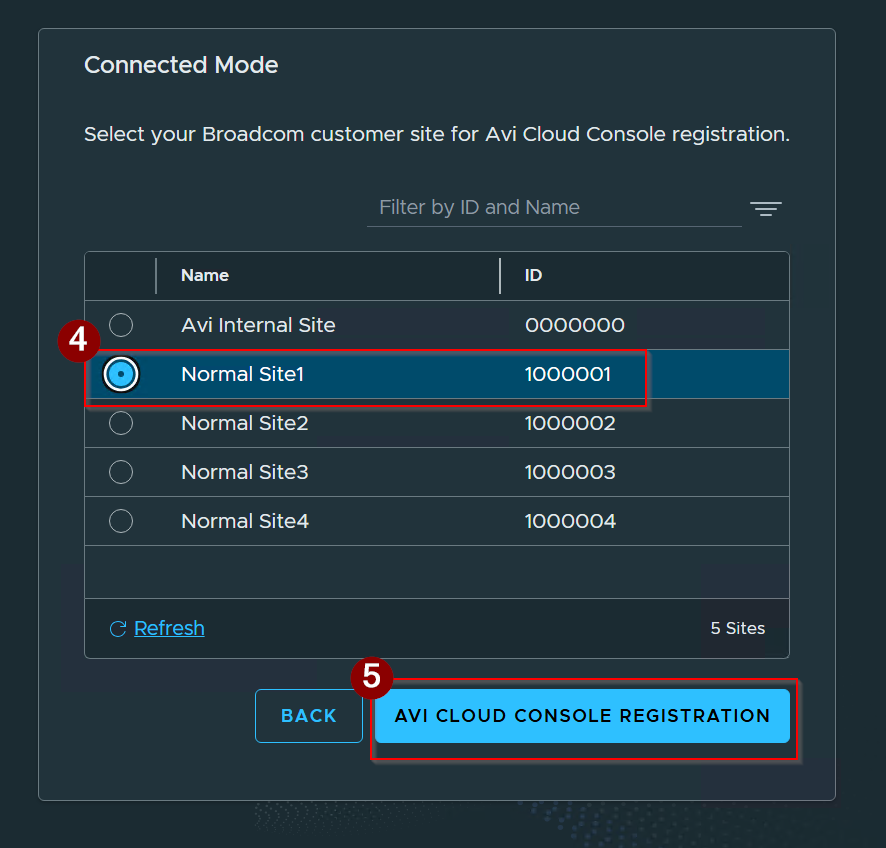
Note:- The Name and ID fields show your verified profiles and accounts from the Broadcom Support Site using your portal credentials. >Choosing the right target site ensures the License Hub connects to the correct corporate tenant that has your vdefend and Avi subscriptions.
4. Select Site id.
5. Click on AVI CLOUD CONSOLE REGISTRATION..
Capture 5: –
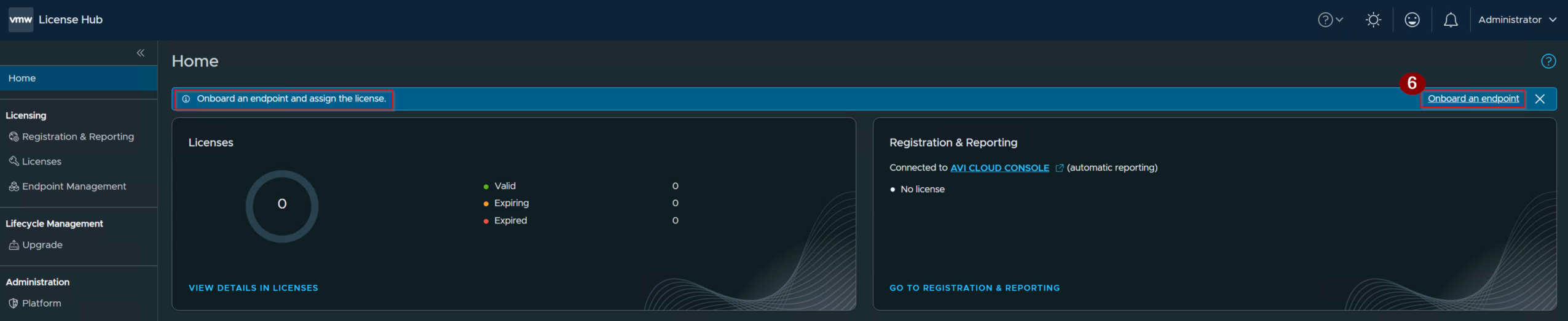
6. Click on Onboard Endpoints.
Capture 6:-
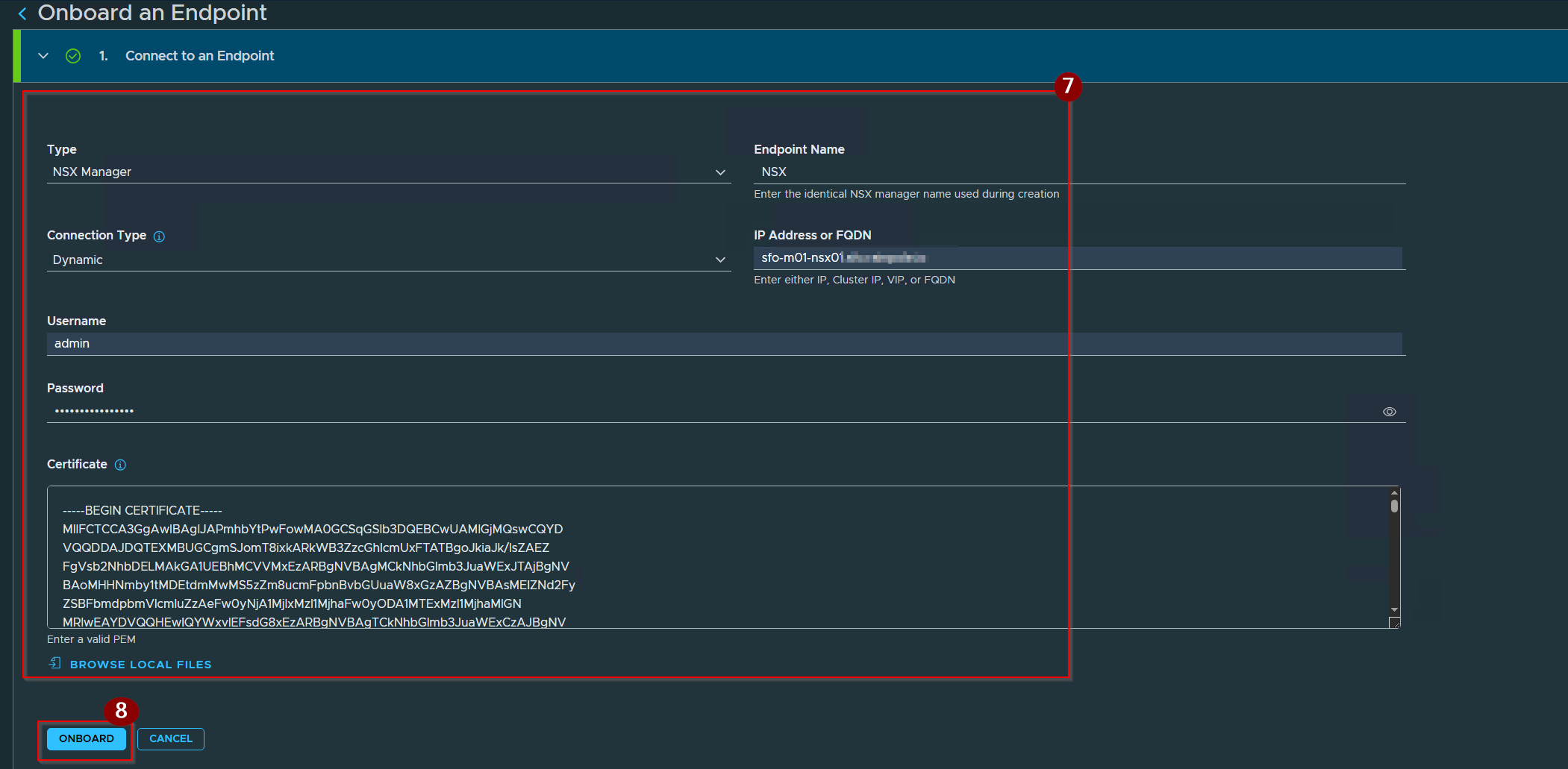
7. Provide the details as per your Endpoint configuration.
8. Click on Onboard.
Capture 7:-
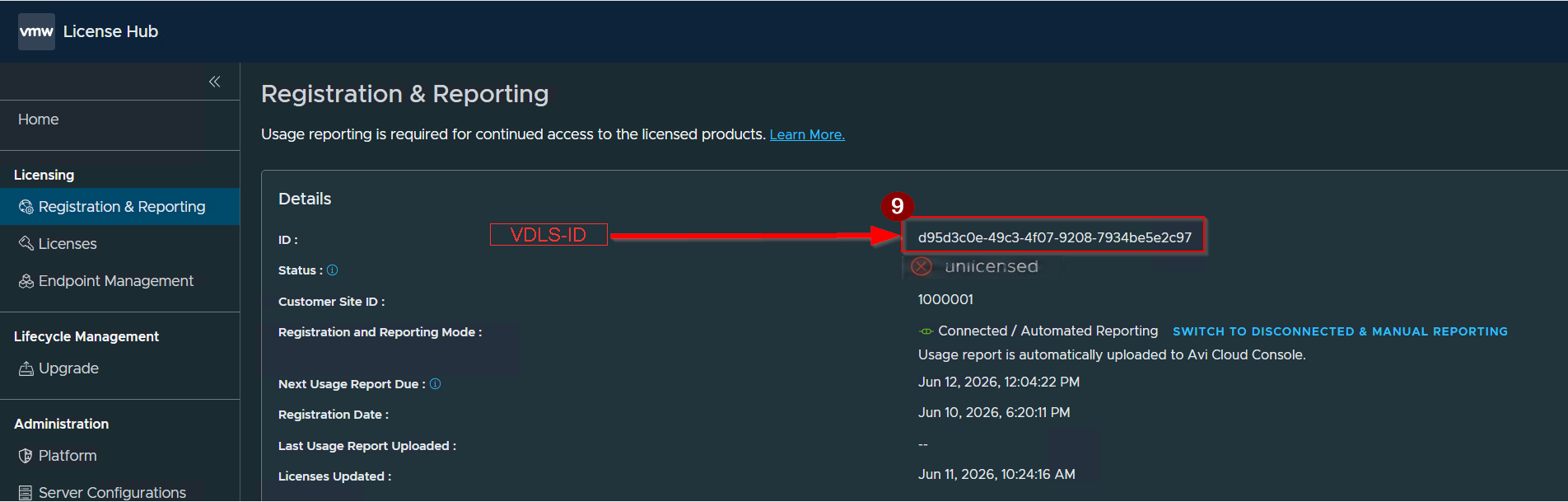
9. Copy this VDLS -ID.
Capture 8:-
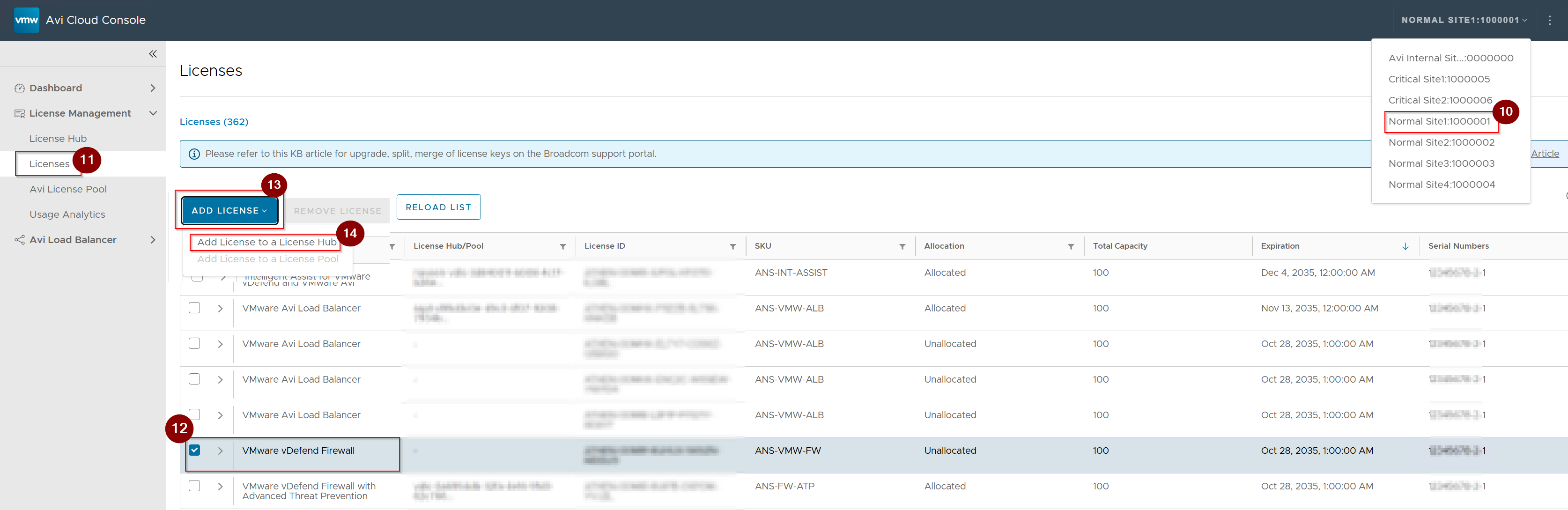
Log in to the AVI Cloud Console. You will find the link on the SSP home page.
10. Select your Site id.
11. Click on Licenses under License Hub.
12.Select the license.
13. Click on Add License.
14. Click on Add license to a License Hub.
Capture 9:-
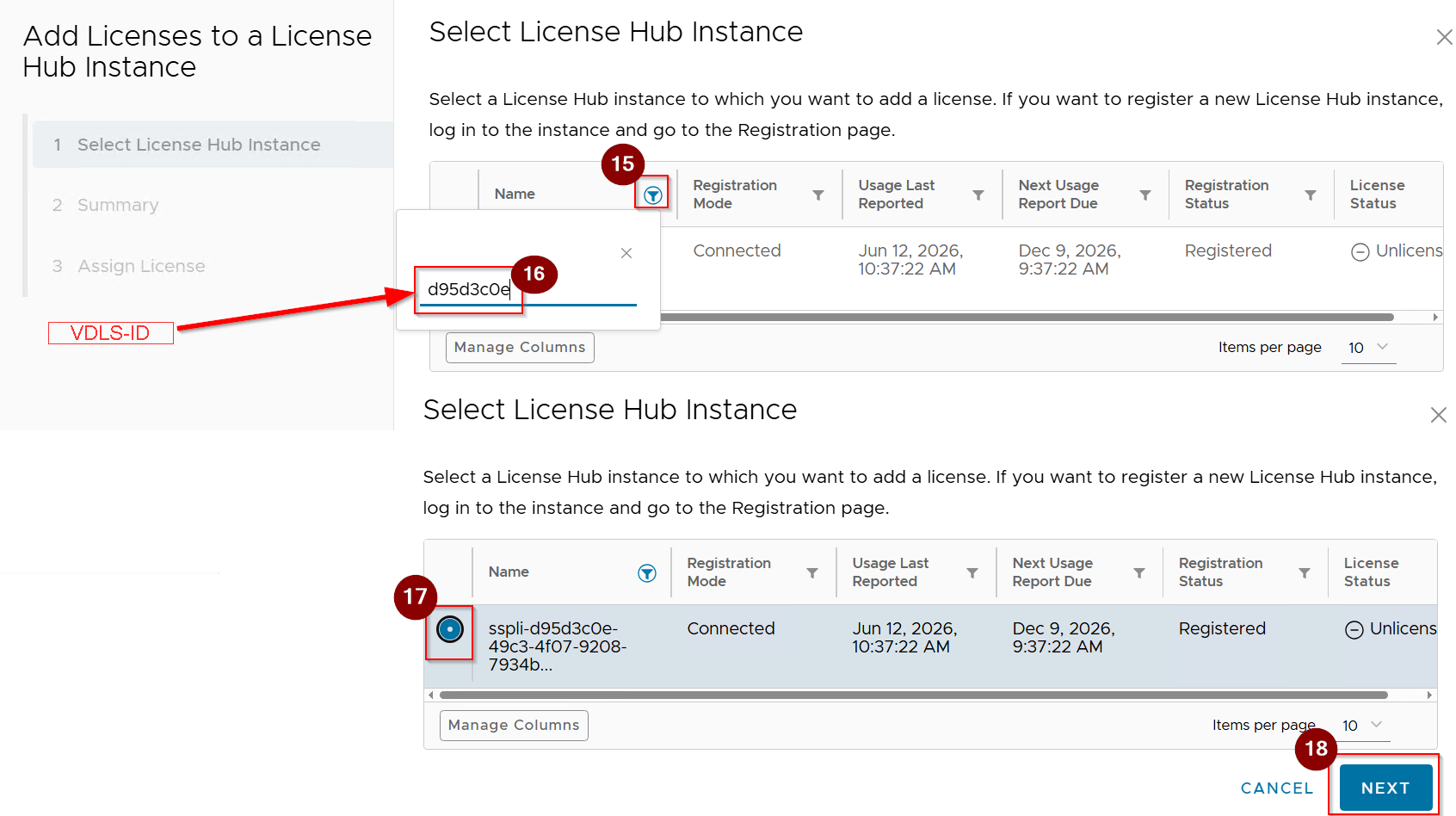
15. Click on Filter.
16. Add the VDLS-ID under the Prefix.
17. Select your VDLS-ID named with SSP mentioned.
18. Click on Next.
Capture 10.
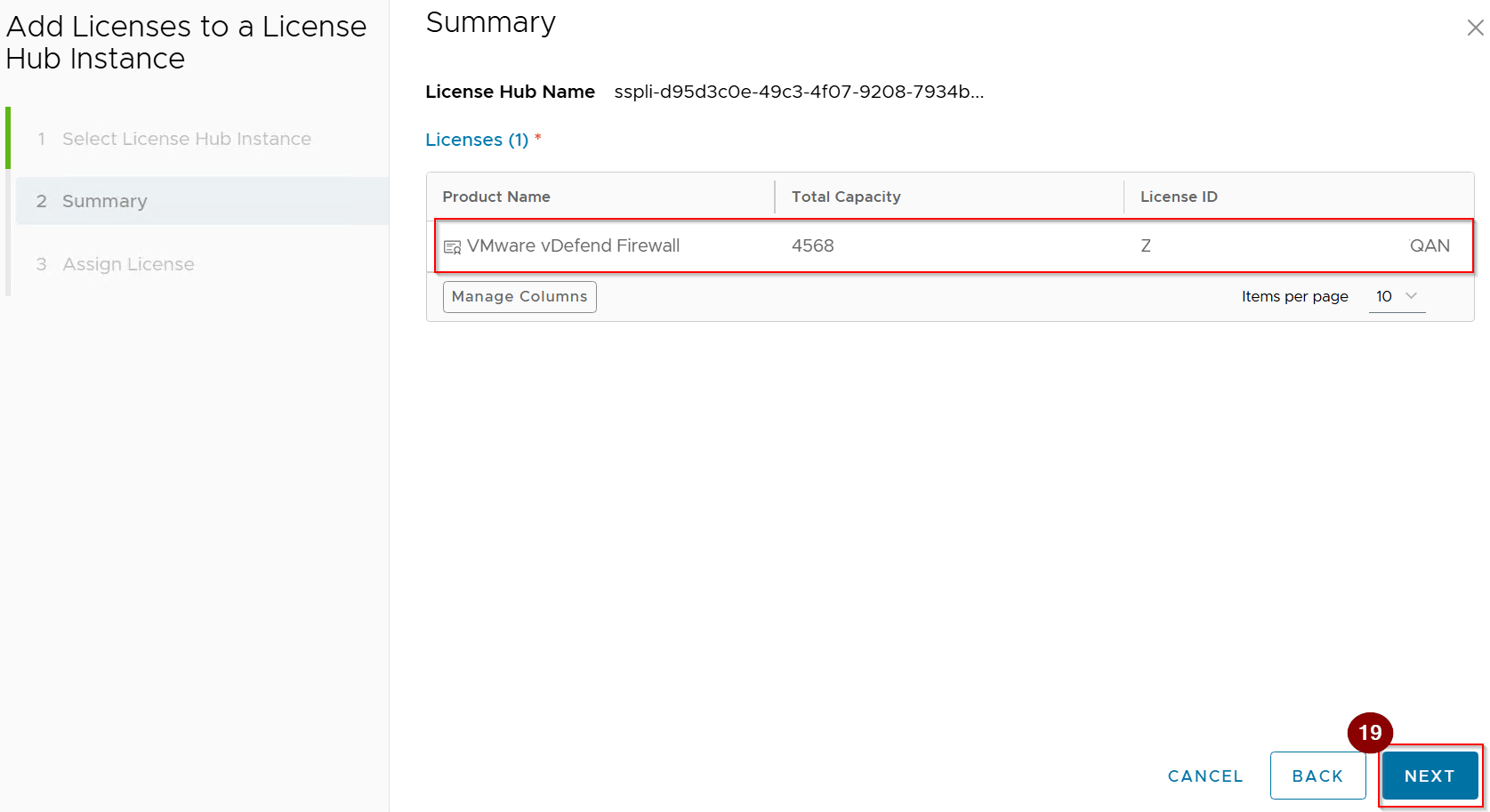
19. Click on Next.
Capture 11: –
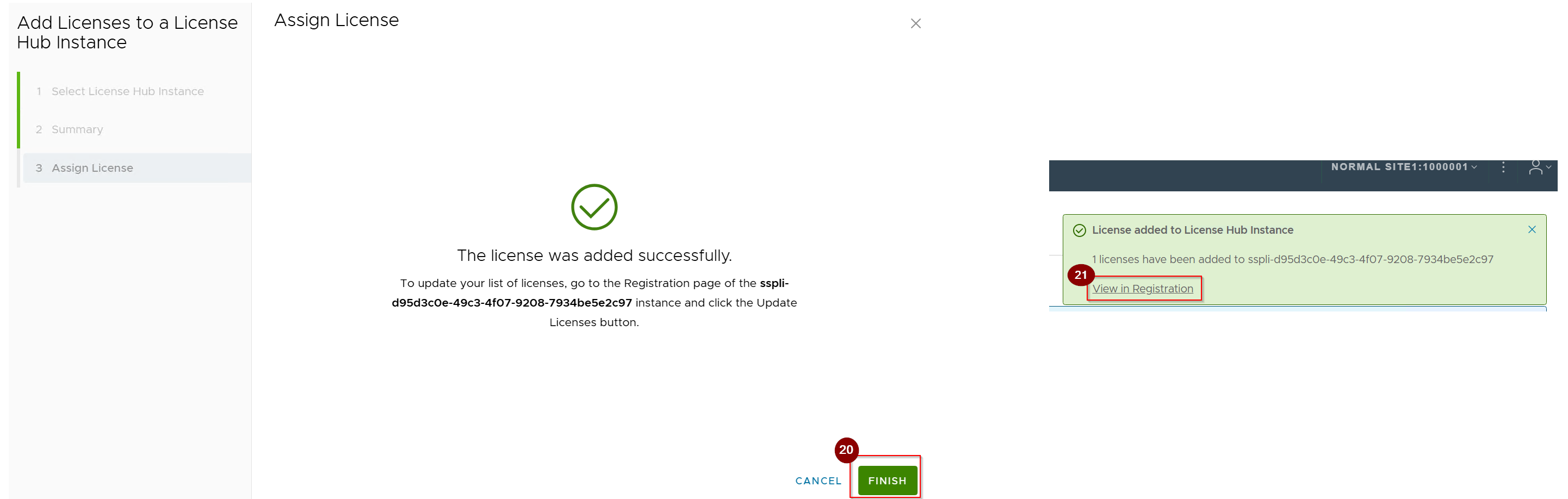
20. Click on Finish.
Note:- License has been successfully added.
21. Click on View in Registration.(This will redirect o SSP page).
Capture 12:-
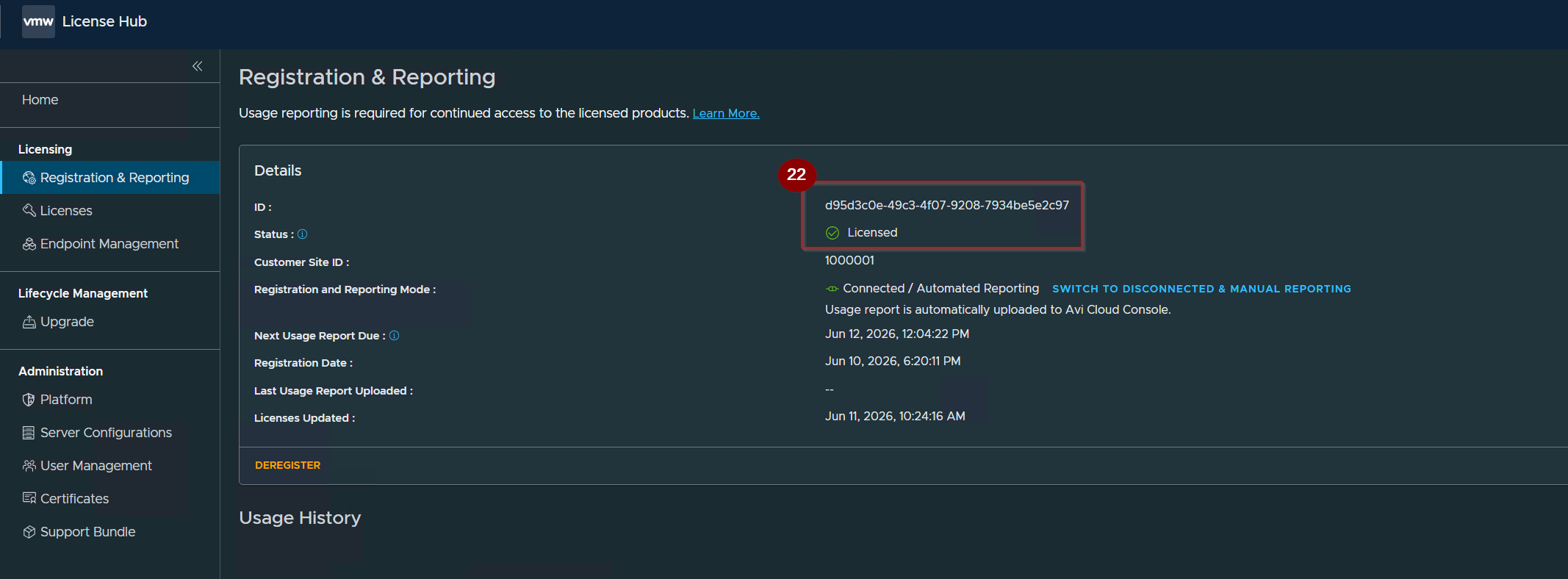
22. Registration completed and status is licensed.
Capture 13:-

22. Click on Licenses.
For complete vdefend i used the below SKUs
ANS-VMW-FW
ANS-FW-ATPAD
ANS-FW-ATP
Step 3: – Configure Target Endpoints
Capture 1: –

- Under Licenses–> Click on 3 dots.
- Click on Edit Assigned Endpoints.
Capture 2:-
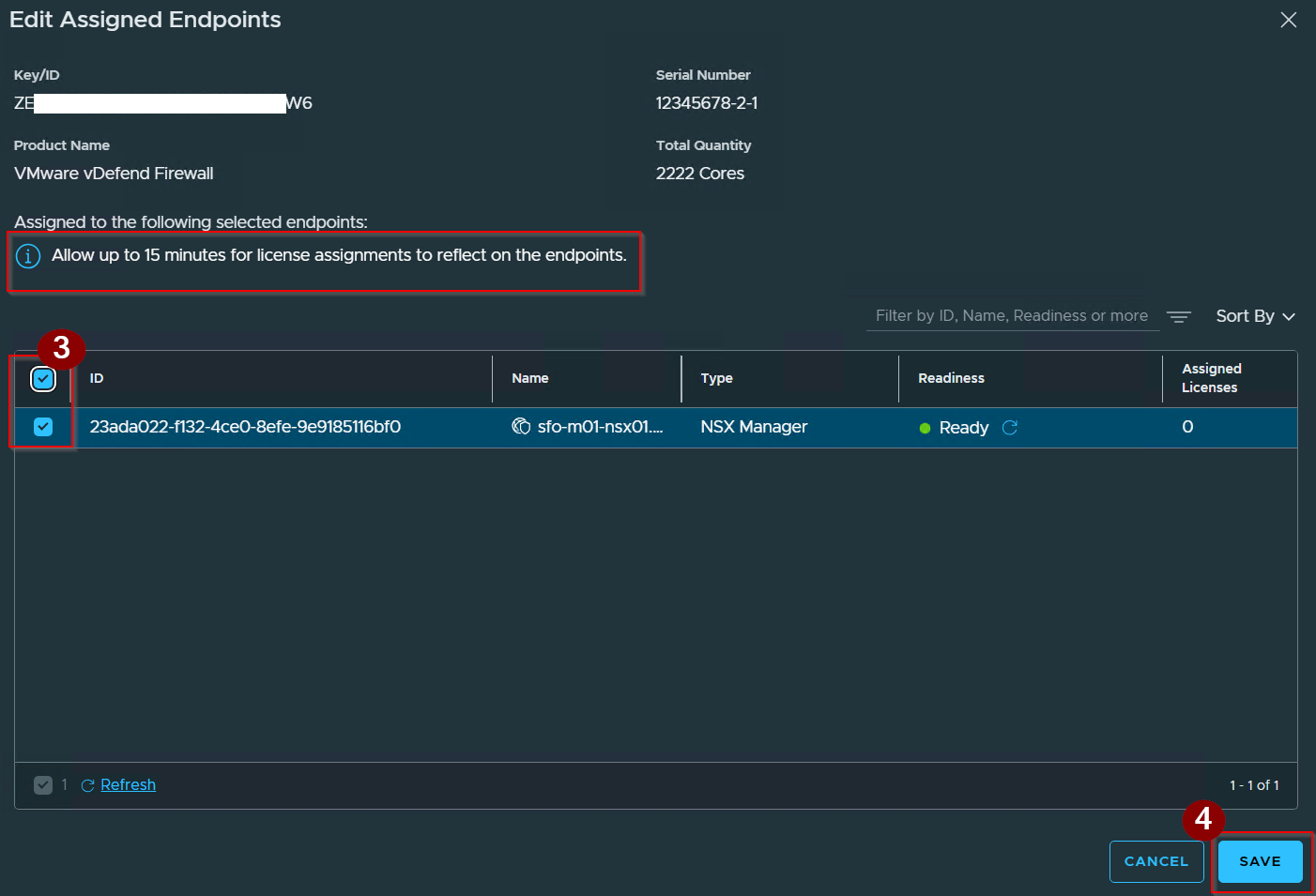
3. Select the endpoint id.
4. Click on Save.
Capture 3: –

5. License has successfully assigned.
Conclusion
Deploying the SSP 5.1.2 License Hub satisfies the mandatory licensing dependency for VCF 9.1, transitioning the platform to centralized subscription files across 120 endpoints. By decoupling entitlement logic from the resource-heavy SSP 5.1.1 engine, Broadcom allows administrators to deploy the License Hub as a standalone component if only core Distributed and Gateway Firewalling are required. Maintaining operational continuity requires strict adherence to the Day 0/Day 1 sequence, provisioning exact contiguous IP pools based on cluster reservation states, and satisfying the 180-day telemetry check-in rule to avoid a 90-day grace period lockout. Ultimately, this isolated deployment approach optimizes infrastructure overhead while providing a validated, compliant foundation ready for native vDefend firewall enforcement. CLICK Here for more information.
 Puneet Sharma
Leave a comment